Anonymous credentials: an illustrated primer

Anonymous credentials: an illustrated primer

This post has been on my back burner for well over a year. This has bothered me, since with every month that goes by, I become more convinced that anonymous authentication the most important topic we could be talking about as cryptographers. This isn’t just because I love neat cryptography: it’s that I don’t trust the world we live in. I’m very worried that we’re headed into a privacy dystopia, driven largely by bad legislation and the proliferation of AI.

But this is a lot to kick off with. Let’s begin at the beginning.

One of the most important problems in computer security is user authentication. Every time you visit a website, log into a server, access a resource, you (and more realistically, your computer) must convince the provider that you’re authorized to access the resource. This authorization can take many forms. Some sites require explicit user logins, which users can realize with traditional username/passwords credentials, or (increasingly) advanced alternatives like MFA and passkeys. Other sites that don’t require explicit user credentials, or else they allow you to register a fully pseudonymous account; however even weakly-authenticating sites still ask user agents to prove something. Typically this is some kind of basic “anti-bot” check, which can be done with a combination of long-lived cookies, CAPTCHAs, or whatever the heck Cloudflare does:
I’m pretty sure they’re just mining Monero.

The Internet I grew up with was very casual about authentication: as long as you were willing to take basic steps to prevent abuse (make an account with a pseudonym, or just refrain from spamming), most sites seemed happy to allow somewhat-anonymous usage. Over the past few years this pattern has begun to change. In part this is because advertising-driven sites love to collect data, and knowing your exact identity makes you more lucrative as an advertising target. A more recent driver of the change is a broad legislative push for age verification. Newly minted laws in 25 U.S. states and at least a dozen countries now demand that site operators verify the age of their users before displaying “inappropriate” content.

Many of these laws were designed to block pornography, but (exactly as many civil liberties folks warned) the practical effect is to implement new identity checks on almost every site that hosts user-supplied content. Age-verification checks are now popping up on social media websites like Facebook, BlueSky, X and Discord, and even the encyclopedia isn’t safe: for example, Wikipedia is slowly losing a fight to keep users identity private in the face of the U.K.’s Online Safety Bill.
Whatever you think about age verification, it’s obvious that routine ID checks will create a huge new privacy concern across the Internet. Users of most sites will need to identify themselves, not by pseudonym but using actual government ID. Implemented poorly, this could create a citizen-level transcript of everything you do online. While some nations’ age-verification laws seem aware of this — and allow privacy-conscious sites to voluntarily discard the information once they’ve processed it — this is not required, and far from uniform. Even when data minimization is permitted, advertising-supported sites will be an enormous financial incentive to retain that real-world identity information, since the value of precise human identity is huge in a world full of non-monetizable AI-bots.

Thus, the question for today is: how do we live in a world with routine age-verification and human identification, without completely abandoning our privacy?

Anonymous credentials: authentication without identification

Back in the 1980s, a cryptographer named David Chaum caught a glimpse of our future, and didn’t much like it. Long before the web or smartphones existed, Chaum recognized that users would need to routinely present (electronic) credentials to live their daily lives. He also saw that this would have enormous negative privacy implications. To address life in that world, he proposed a new idea: the anonymous credential.
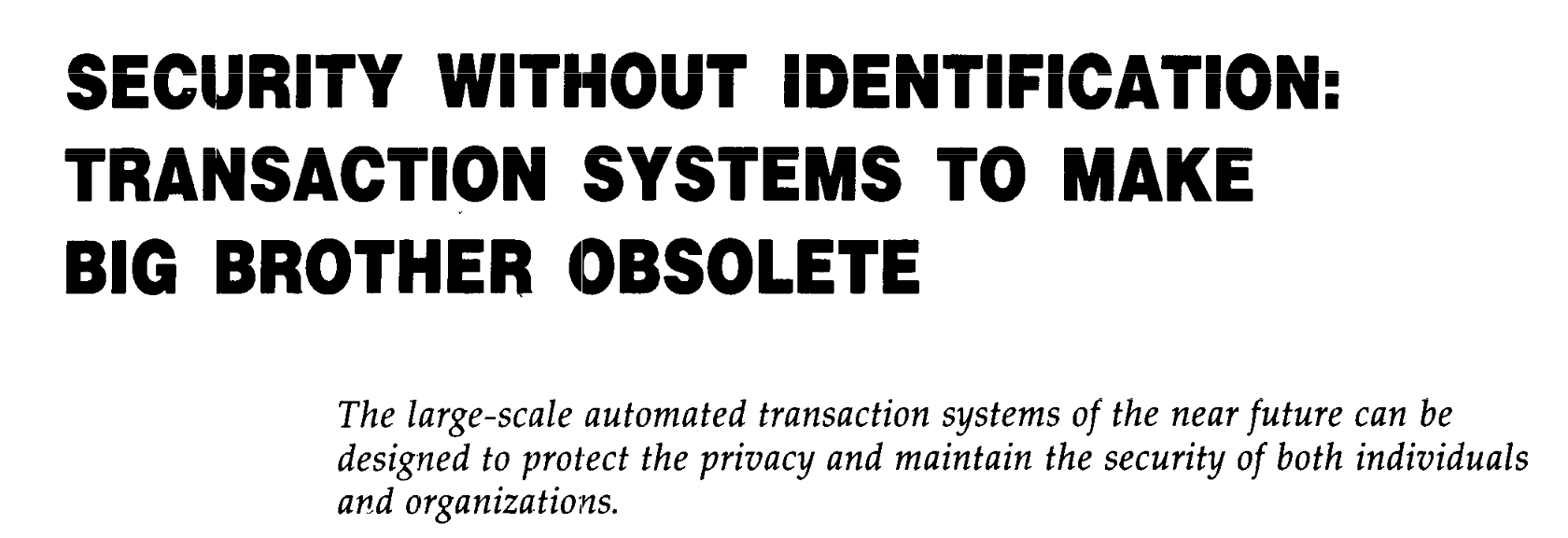
The man could pick a paper title.

Chaum proposed the following model. Imagine a world where Alice needs to access some website or “Resource”. In a standard non-anonymous authentication flow, Alice must first be granted authorization (a “credential”, such as a cookie). This grant can come either from the Resource itself (e.g., the website), or in other cases, from a third party (for example, Google’s SSO service.) For the moment we’ll assume that this part of the process is not private: that is, Alice may need to reveal something about her real-world identity to the person who issues the credential. For example, she might use her credit card to pay for a subscription (e.g., for a news website), or she might hand over her driver’s license to prove that she’s an adult.

From a privacy perspective, the problem is that Alice will need to present her credential every time she wants to access any Resource that requires a credential. Concretely, each time she visits Wikipedia, she’ll need to hand over a credential that is tied to her real-world identity. A curious website (or an advertising network) can use that data to precisely link each visit to the site, tying all of them to her actual identity in the world. This is, to a much more limited extent, a version of the world we live in today: advertising companies probably know a lot about who we are and what we’re browsing. What’s about to change in our future is that these online identities will increasingly be bound to our names and government-issued ID, no more “Anonymous-User-38.”

Chaum’s idea was to break the linkage between the issuance and usage of that credential. When Alice shows her credential to the Resource (website), all it should learn is that some user has appeared with some valid credential. Critically, the Resource does not learn which specific user owns the credential, which means it should not be able to zero in on her exact ID. More importantly, this must hold even if the Resource colludes with (or literally is) the Issuer of the credential. The result is that, to the website, at least, Alice’s browsing is completely unlinked from her identity, and she can “hide” within the anonymity set of all users who obtained credentials.
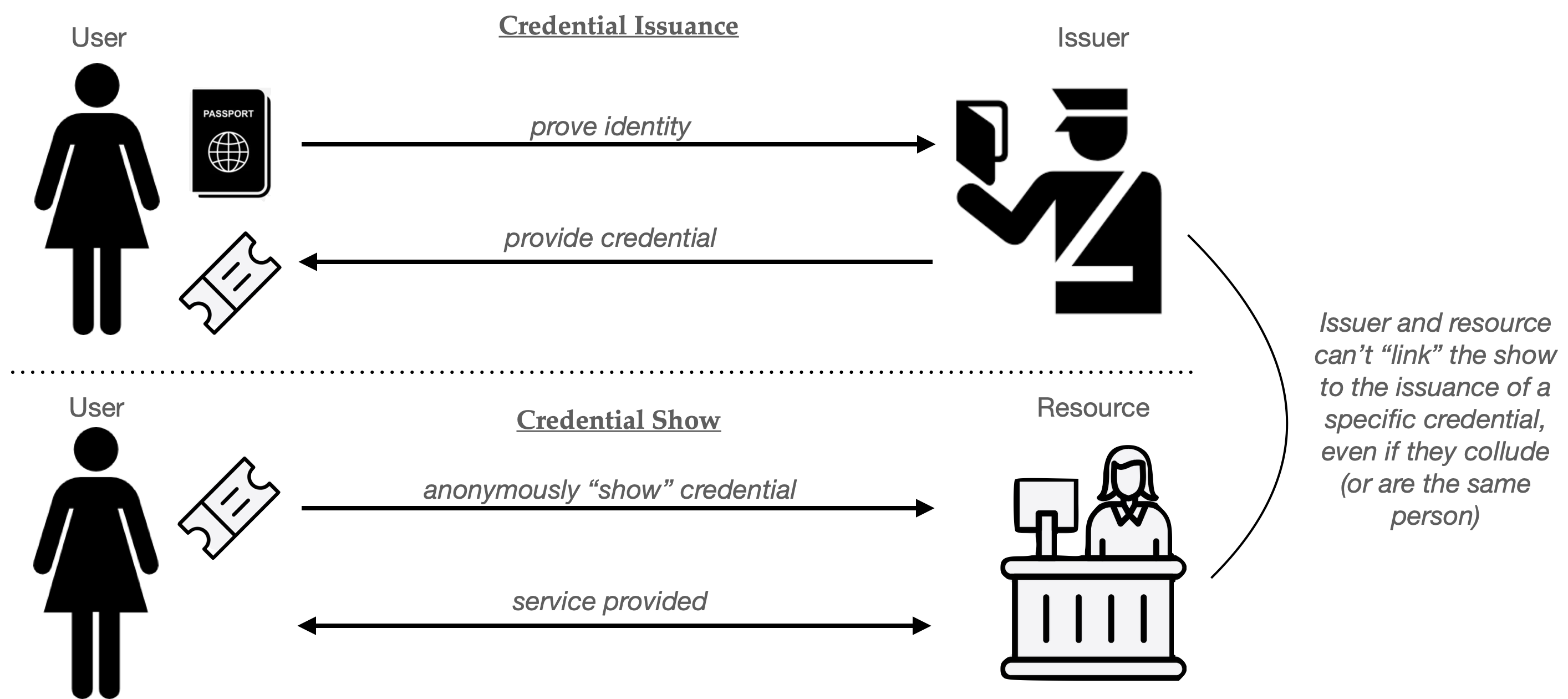
Illustration of a simple anonymous credential system. The “issuance” procedure reveals your identity to the issuer. A later “show” process lets you use the credential, without revealing who you are The goal is that the resource and issuer together can’t link the credential shown to the specific user who it was issued to. (Icons: Larea, Desin.)

One popular analogy for Chaum’s anonymous credentials is to think of them as a digital version of a “wristband”, the kind you might receive at the door of a club. You first show your ID to a person at the door, who then gives you an unlabeled wristband that indicates “this person is old enough to buy alcohol” or something along these lines. When you reach the bar, the bartender knows you only as the owner of a wristband and never needs to see your license. In principle your specific bar orders (for example, your love of spam-based drinks) is not somewhat untied from information like your actual name and address.

You can buy a roll of these for $7, just saying.

Why don’t we just give every user a copy of the same credential?

Before we get into the weeds of building anonymous credentials, it’s worth considering an obvious solution. What we want is simple: every user’s credential should be indistinguishable when “shown” to the Resource. The obvious question is: why doesn’t the the issuer give a copy of the exact same exact credential to every User? In principle this should solve all the privacy problems, since every user’s “show” will literally be identical. (In fact, this is more or less the digital analog of the physical wristband approach.)

The problem here is that digital items are fundamentally different from physical ones. Real-world items like physical credentials (even cheap wristbands) are at least somewhat difficult to copy. A digital credential, on the other hand, can be duplicated effortlessly. Imagine a hacker breaks into your computer and steals a single credential: they can now make an unlimited number of copies and use them to power a basically infinite army of bot accounts, or sell them to underage minors, all of whom will appear identical to the Resource that checks them.

Of course, this exact same problem can occur with non-anonymous credentials, like usernames and session cookies. However, in the non-anonymous setting, credential cloning and other similar abuse can be detected, at least in principle. Websites routinely monitor for patterns that indicate the use of stolen credentials: for example, many will flag when they see a single “user” showing up too frequently, or from different and unlikely parts of the world, a procedure that’s sometimes called continuous authentication. Unfortunately, the anonymity properties of anonymous credentials render those checks ineffective, since every credential “show” looks like every other, and the site will have no idea if they’re all the same cloned credential or a bunch of different ones.
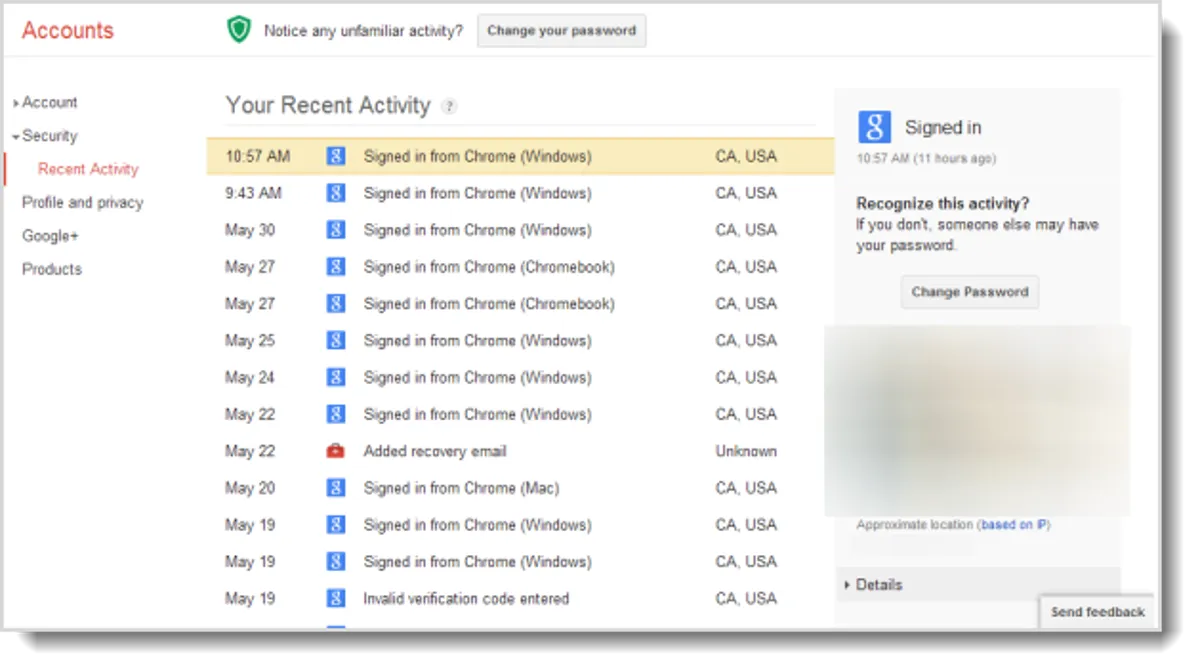
Many sites keep track of where individual account logins come from, and even lets the owner check if they’ve seen logins from weird places. This won’t work easily in anonymous-credential land.

To address cloning, any real-world useful anonymous credential system requires some mechanism to limit credential duplication. The most basic approach is to provide users with credentials that are limited in some fashion. There are a few different approaches to this:

  1. Single-use (or limited-usage) credentials. The most common approach is to issue credentials that allow the user to log in (“Show” the credential) exactly one time. If a user wants to access the Resource fifty times, then she’ll need to obtain fifty separate credentials from the Issuer. A hacker may steal her credentials, but the hacker will then be limited to fifty website accesses. This approach is used by credentials like PrivacyPass, which is used by platforms like CloudFlare.
  2. Revocable credentials. Although this is slightly orthogonal, a different approach is to build credentials that can be revoked in the event of bad behavior. This requires a procedure such that when a particular anonymous user does something bad (posts spam, runs a DOS attack against a website) you can revoke that credential — blocking future usage of it (and all its clones).
  3. Hardware-tied credentials. Some industry proposals like Google’s new anonymous credential library “bind” credentials to a piece of hardware, such as the trusted platform module in your phone. This makes credential theft harder — a hacker will need to “crack” the hardware platform to clone a credentials. But a successful crack still has huge consequences that can undermine the security of the whole system.

The anonymous credential literature is filled with variants of the above approaches, sometimes combinations of the three. In every case, the goal is to put some barriers in the way of credential cloning.

Building a single-use credential

With these warnings in mind, we’re now ready to talk about how anonymous credentials are constructed. We’re going to discuss two different paradigms, which sometimes mix together to produce more interesting combinations.

Chaum’s original proposal produced single-use credentials, and used an underlying primitive known as a blind signature scheme. Blind signatures are a version of digital signatures that feature an additional protocol that allows for “blind signing”. In this flow, a User has a message they want to have signed, while the Server holds the secret half of a public/secret signing keypair. The two parties run an interactive protocol, at the conclusion of which the User obtains a signature on their message. The server knows that it signed exactly one message, but critically, does not learn the value of the message that it signed.
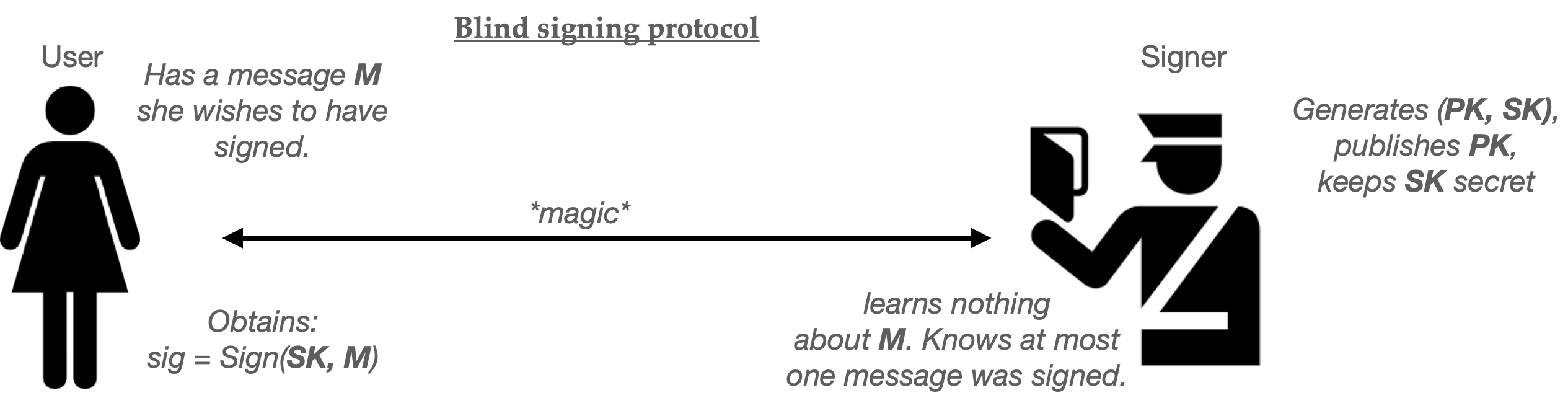
The “magic” part isn’t really magic, but we don’t need to get into the details right now.

For the purposes of this post, we won’t spend much time building blind signatures (though some more details are here, if you’re interested.) Let’s just assume we’ve been handed a working blind signature scheme. Using this scheme as our base ingredient, we can build a basic single-use anonymous credential as follows:

  1. At setup time, the Issuer generates a signing keypair (PK, SK) and gives out the key PK to everyone who might wish to verify its signatures. This keypair can be used to issue many credentials.
  2. When the User wishes to obtain a credential, she randomly selects a new serial number SN. This random string must be long enough that the same number is unlikely to repeat during the usage of the system, assuming numbers are truly chosen at random.
  3. The User and Issuer next run the blind signing protocol described above. In this case, the User sets its message to SN and the Issuer employs its key SK as the signing key. At the completion of this protocol, the user will hold a valid signature under the Issuer’s key computed over the message “SN”. The pair (SN, signature) form the User’s credential.

To “show” the credential to some Resource, the User simply hands over the pair (SN, signature). Provided that the Resource knows the public key (PK) of the issuer, it can verify that (1) the signature is valid on message SN, and (2) nobody has used that specific value SN in some previous credential “show”.

If there is exactly one Resource (website) consuming these credentials, then serial number checking can be conducted locally, using a simple database of all past SN values. Things get a bit messier if there are many Resources (say different websites) that credentials can be used at. One solution is to outsource serial number checks to some centralized service (or “bulletin board”) which can prevent a user from re-using a single credential across many different sites.

Here’s the whole protocol in helpful pictograms:
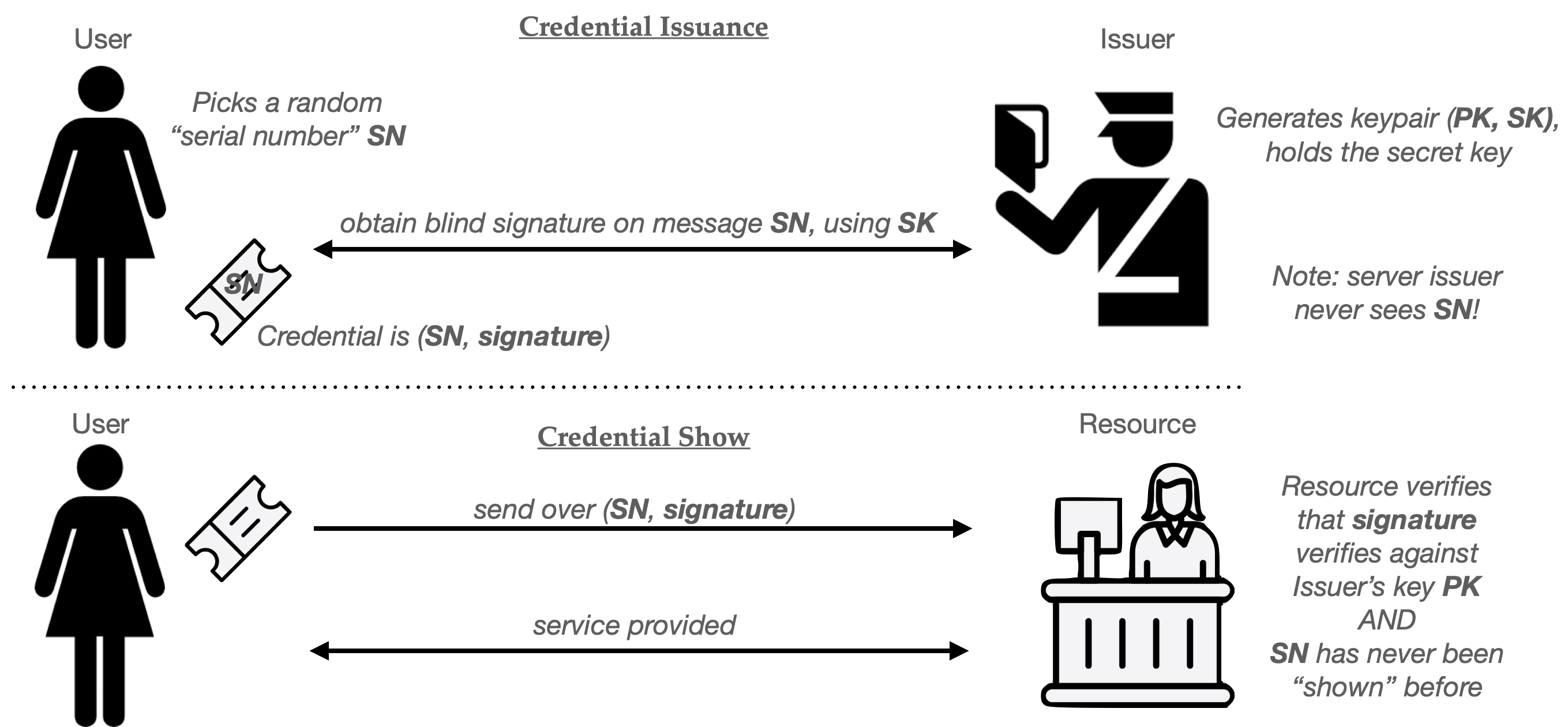
Simple one-time use credentials from a blind signature scheme. Note that this provides privacy because the Issuer never learns SN, and can’t link a Credential Show to the one it issued to a specific user.

Chaumian credentials are forty years old and the basic idea still works well enough, provided your Issuer is willing to bear the cost of running a blind signature protocol for each credential it issues, and that the Resource doesn’t mind verifying a signature every time you use one. Protocols like PrivacyPass actually realize this using ingredients like blind RSA signatures. (PrivacyPass also includes a separate variant called a “blind MAC” for cases where the Issuer and Resource are the same entity, which can make a big difference for performance.1)

Single-use credentials work well, but they aren’t without their drawbacks. The big ones are (1) efficiency, and (2) lack of expressiveness.

The efficiency issue becomes obvious when you consider a User who accesses a website site many times. For example, imagine using an anonymous credential to replace Google’s session cookies. For most users, this require obtaining and delivering thousands of single-use credentials every single day. You could mitigate this problem by using credentials only for the first registration to a specific website, after which you could trade your credential for a pseudonym issued by the site (such as a random username or a normal session cookie) which would reduce the need for credential usage. The downside of this is that all of your subsequent site accesses would be linkable, which is a bit of a tradeoff.

The expressiveness objection is a bit more complicated. Let’s talk about that next.

Let’s be expressive!

Simple Chaumian credentials have a more fundamental limitation: they don’t carry much information.

Consider our bartender in a hypothetical wristband-issuing club. When I show up at the door, I provide my ID and get a wristband that shows I’m over 21. In this scenario, we can say that the wristband carries “one bit” of information: namely, the fact that you’re older than some arbitrary age constant.

Sometimes we want to do prove more complicated things with a digital credential. For example, imagine that I want to join a cryptocurrency exchange that needs more complicated assurances about my identity. For example: it might require that I’m a US resident, but not a resident of New York State (which has its own regulations.) The site might also demand that I’m over the age of 25. (I am literally making these requirements up as I go.) I could satisfy the website on all these fronts using the digitally-signed driver’s license issued by my state’s DMV. This is a real thing! It consists of a signed and structured document full of all sorts of useful information: my home address, state of issue, eye color, birthplace, height, weight, hair color and gender. In this world, the non-anonymous solution is easy: I can just hand over my entire digitally-signed license and the website can check the signature and verify the properties it needs.
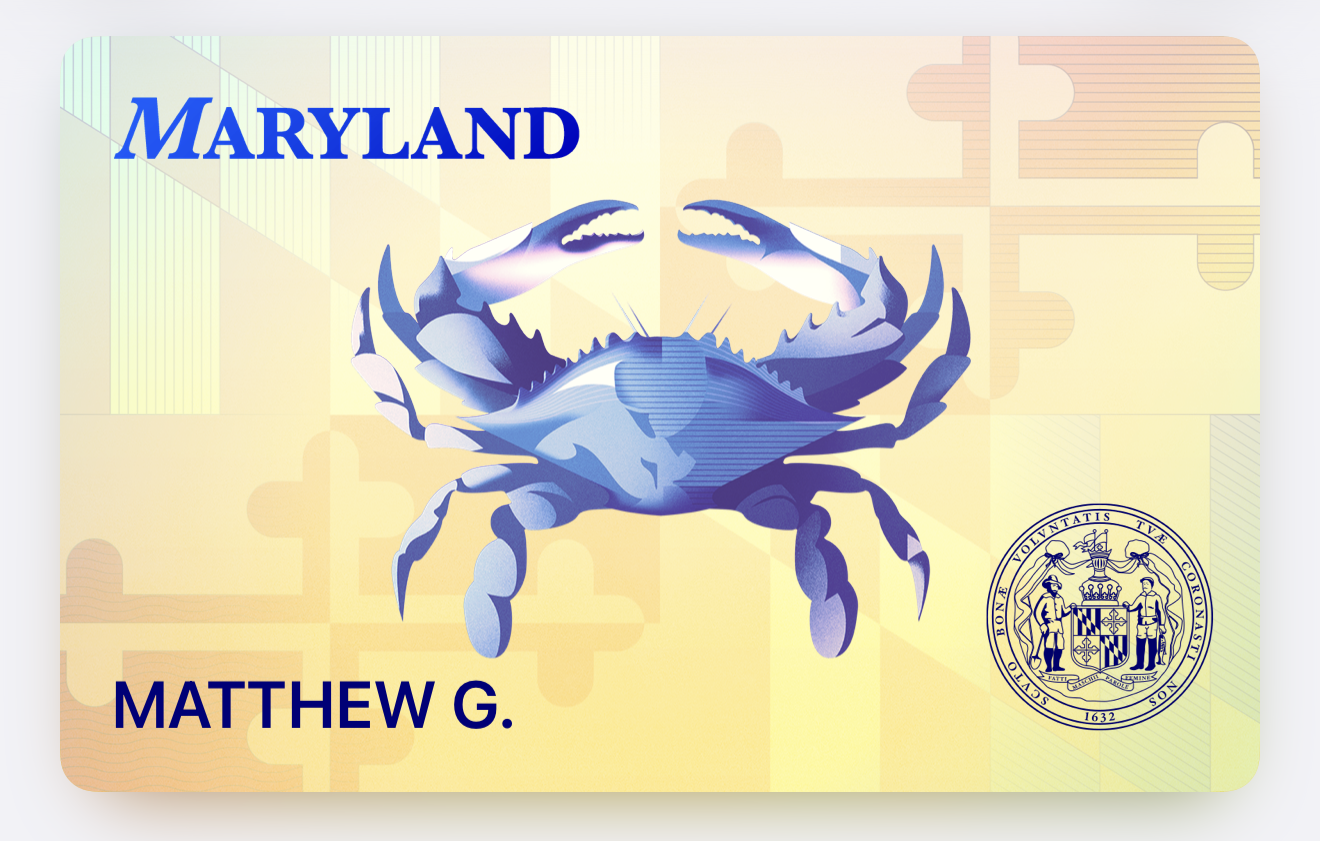
This is a real digital driver’s license that I installed on my iPhone. I can’t really do anything with it, but you have to wonder why Apple and Google are making this available if not to support age verification laws.

The downside to handing over my driver’s license is that doing so also leaks much more information than the site requires. For example, this creepy website will also learn my home address, which it might use it to send me junk mail! It will learn that I’m a specific user, every time I show up with the same license. I’d really prefer it didn’t. A much better solution would allow me to assure the website only that I’ve satisfied the specific requirements that it cares about and nothing else.

In this example, everything I want to prove can be summarized in the following four bullet points:

  1. BIRTHDATE <= (TODAY – 25 years)
  2. ISSUE_STATE != NY
  3. ISSUE_COUNTRY = US
  4. SIGNATURE = (some valid signature that verifies under one of fifty known state DMV public keys.)

One obvious solution is that I could outsource all of these checks to some centralized Issuer (showing it my whole license), and have the Issuer now issue me a single-use “wristband” credential that claims that I satisfy all these requirements. This requires trusting some third-party Issuer with all of the information on my license, and also means that I’ll have to visit the Issuer every time I want to log into the website.

An alternative way to accomplish this is to use a zero-knowledge (ZK) proof. ZK proofs allows a party (called a Prover) to prove that they know some secret value that satisfies various constraints. For example, I could use a ZK proof to convince a Resource that I possess a signed, structured driver’s license credential. I could further use the proof to demonstrate that the value in the specific fields referenced above satisfies the necessary constraints. The lovely thing about using a ZK proofs for this task is that the website should be entirely convinced that I truly possess a valid driver’s license, and yet the zero-knowledge property ensures that I reveal nothing at all beyond the fact that these claims are true.

A variant of the ZK proof, called the non-interactive zero-knowledge proof (NIZK) lets me do this in a single message from User to Issuer. Using this tool, I can build a credential system as follows:
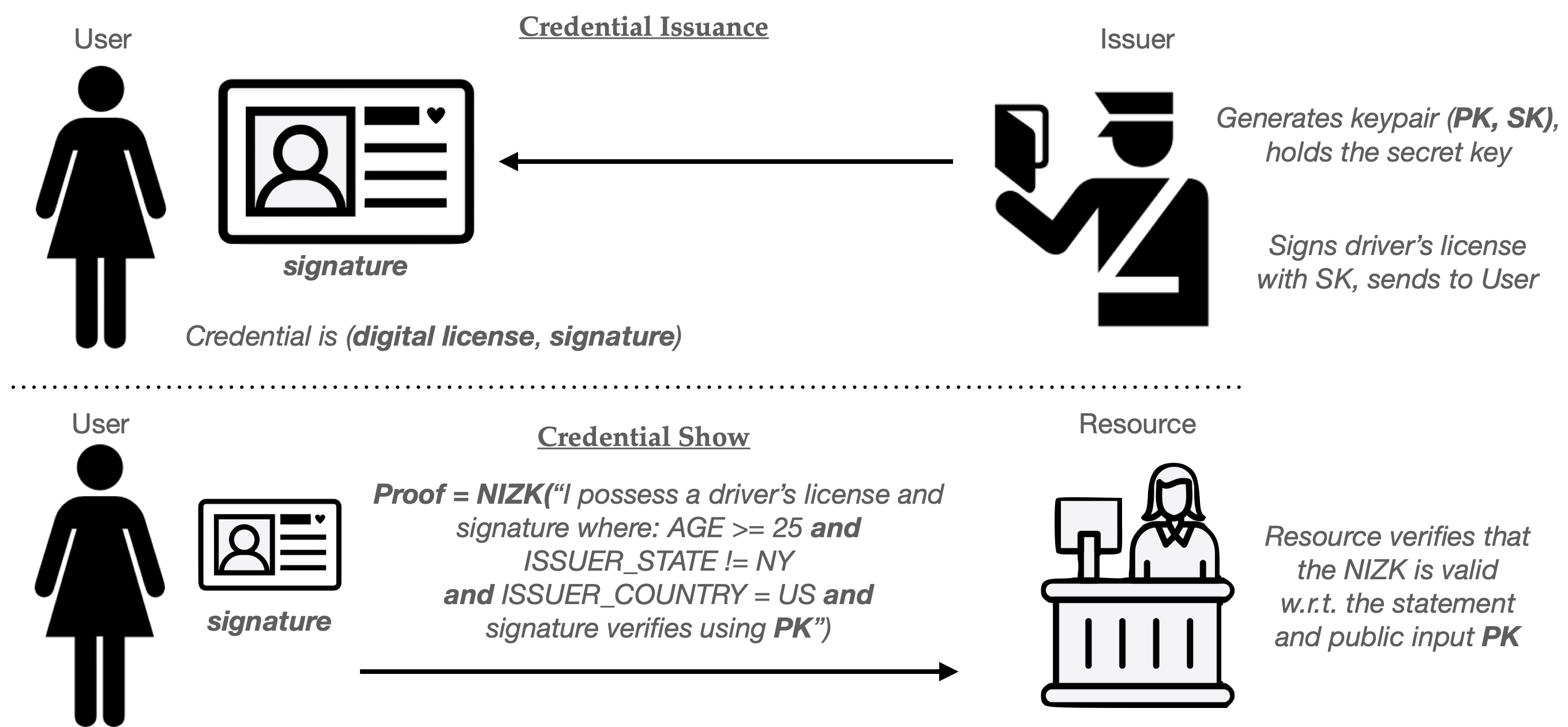
A rough picture of a zero-knowledge-based credential system. Here the driver’s license is a structured document that the Issuer signs and sends over. The “Show” involves creating a non-interactive ZK proof (NIZK) that the User can send to the Resource. Generally this will be structured so that it’s bound to the specific Resource and sometimes a nonce, to prevent it from being replayed. (License icon: Joshua Goupil.)

(These zero-knowledge techniques are ridiculously powerful. Not only can I change the constraints I’m asserting, but I can also perform proofs that reference multiple different credentials at the same time. For example, I might prove that I have a driver’s license, and also that by digitally-signed credit report indicates that I have a credit rating over 700.)

The zero-knowledge approach conveniently also addresses the efficiency limitation of the basic single-use credential. This is because the same credential (driver’s license) can now be re-used to power many “show” protocol runs, without allowing websites to link any credential “show” to the others. This guarantee stems from the fact that ZK proofs are genuinely reveal no information to the user, even the minimal fact that two different shows are the same user.2

Of course, there are downsides to this re-usability as well, as we’ll discuss in the next section.

How to win the clone wars

We’ve argued that the zero-knowledge paradigm has two advantages over simple Chaumian credentials. First, it’s potentially much more expressive. Second, it allows a User to re-use a single credential many times without needing to constantly retrieve more single-use credentials from the Issuer. While that last fact is very convenient, it raises a concern we already mentioned: what happens if a hacker steals one of these re-usable driver’s license credentials?

This is catastrophic for anonymous credential systems, since any single stolen credential can be cloned an unlimited number of times, basically without detection. It’s even worse in the real-world where you have millions of users, because the “hacker” in this case might be one of your legitimate customers!

As I noted above, one possible solution is to make credential theft very, very hard. This is the optimistic approach suggested in Google’s new anonymous credential scheme. Here, credentials will be tied to a secret key stored within the “secure element” in your phone, which theoretically makes the credential hard to duplicate onto a different device. The problem with this approach is that it requires an amazing amount of security across a vast number of phones. There are hundreds of millions of Android phones in the world, and the Secure Element technology in them runs the gamut from “actually very good” (for high-end, flagship phones) to “kinda garbage” (for the cheapest burner Android phone you can buy at Target.) Unfortunately, anonymous credential systems don’t care about the best device in your ecosystem — they collapse when the worst ones are compromised. Putting this differently, basic systems can be highly fragile: a failure in any of those phones potentially compromises the integrity of the whole system.

This necessitates some alternative techniques that will limit the usefulness of a given credential. Once you have ZK proofs in place, there are many ways to do this.

One clever approach is to place a fixed limit on the number of times that a single ZK credential can be “used”. For example, imagine that the Issuer produces a credential can be “shown” at most N times before it expires. This is much the same as requiring the user to extract N single-use credentials, but with much less work.

We can modify our ZK credential to support this limit as follows: First, have the User select a random key K for a pseudorandom function (PRF), and insert it into the credential to be signed. This function is somewhat like a good hash function: it’s a deterministic function that takes in a key and an arbitrary “message”, then blends them to produce a random-looking output that should be unlikely to repeat, provided the same message is not re-evaluated. Once K is embedded into the credential, we’ll have the issuer sign it. (It’s important that the Issuer does not learn K, so this often requires that the credential be signed using a blind, or partially-blind, signing protocol.3) We’ll now use this key and PRF to generate unique serial numbers, one for each time we “show” the credential.

Concretely, the ith time we “Show” the credential, the User will compute a “serial number” as follows:

SN = PRF(K, i)

Once the User has computed SN for a particular show, it sends this serial number to the Resource along with the zero-knowledge proof. The ZK proof will, in turn, be modified to include two additional clauses:

  1. A proof that SN = PRF(K, i), for some counter value i, and that K is the key that’s stored within the signed credential.
  2. A proof that 0 <= i < N.

Notice that these “serial numbers” work very much like the ones from our single-use credentials up above. Every Resource (website) must keep a list of all the SN values that it sees, and it can use this to reject any “show” that repeats a serial number. As long as the User never repeats a counter value i (and the PRF output is long enough to avoid collisions), honest users should not run into repeated serial numbers. However, a user who “cheats” and tries to show the same credential N+1 times will always have to repeat a serial number, and their “show” cheating will be detected.
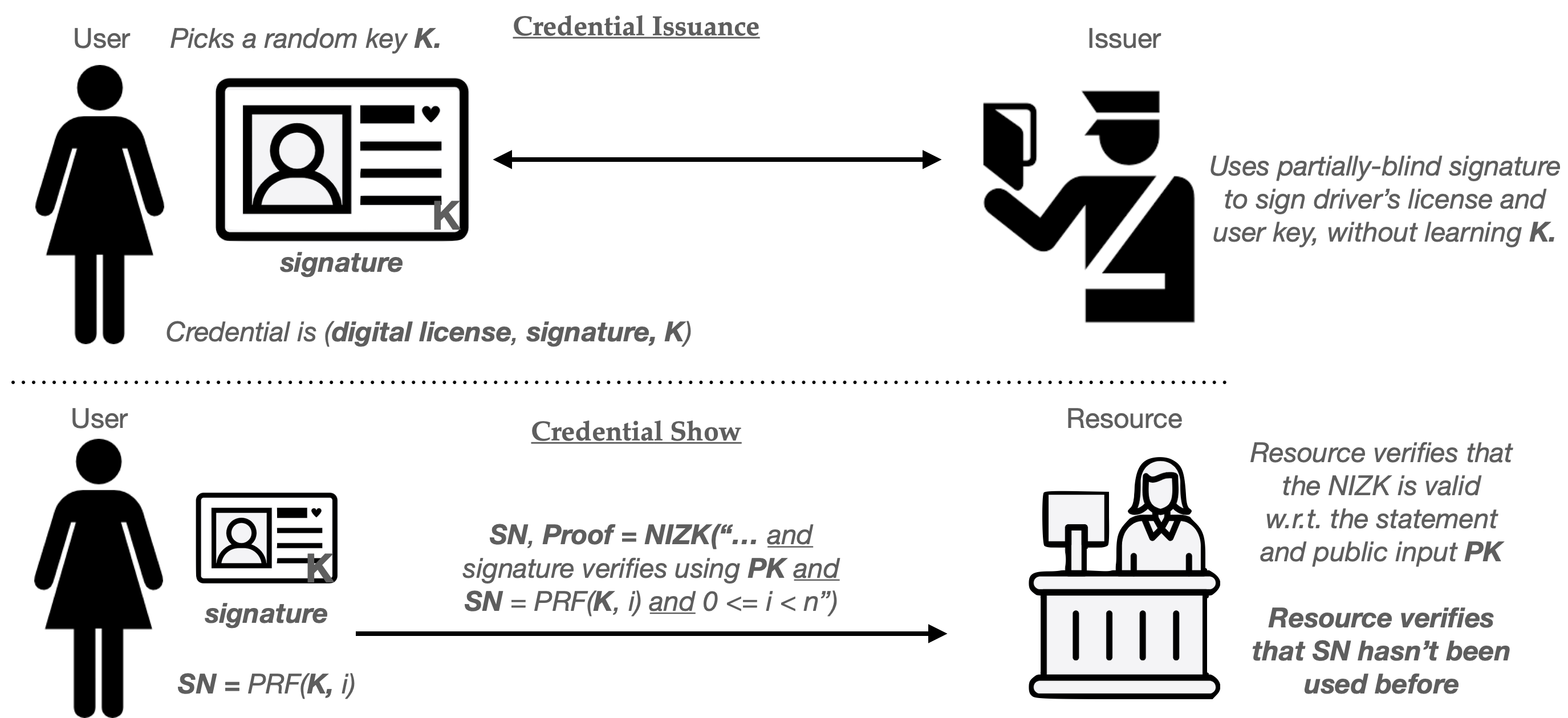
Brief sketch of an “N-time use” digital credential, based on zero-knowledge proofs.

This basic approach has many variants. For example, with only simple tweaks, can build credentials that only permit the User to employ the credential a limited number of times in any given time period: for example, at most 100 times per day.4 This requires us to simply change the inputs to the PRF function, so that the “message” is “(current_date, i)” rather than just i. Because the date changes every day, the same input will only occur if the user repeats i too many times within a single day. These techniques are described in a great paper whose title I’ve stolen for this section.

Expiring and revoking credentials

The power of the zero-knowledge techniques supplies us with many other tools to limit the power of credentials. For example, it’s easy to add expiration dates to credentials. This will implicitly limit their useful lifespan, and hopefully reduce the probability that one gets stolen. To do this, we simply add a new field (e.g., Expiration_Time) to the credential, and embed a timestamp at which the credential should expire.

Whenever a user “shows” the credential, they can first check their system clock for the current time T, and can add one more clause to their ZK proof:

T < Expiration_Time

Revoking credentials is only a bit more complicated.

One of the most important countermeasures against credential abuse is the ability to ban users who behave badly. This sort of revocation happens all the time on real sites: for example, when a user posts spam on a website, or abuses the site’s terms of service. Yet implementing revocation with anonymous credentials seems implicitly difficult. In a non-anonymous credential system we simply identify the user and add them to a banlist. But anonymous credential users are anonymous! How do you ban a user who doesn’t have to identify themselves?

That doesn’t mean that revocation is impossible. In fact, there are several clever tricks for banning credentials in the zero-knowledge credential setting.

Imagine we’re using a basic signed credential like the one we’ve previously discussed. As in the constructions above, we’re going to ensure that the User picks a secret key K to embed within the signed credential.5 As before, the key K will power a pseudorandom function (PRF) that can make pseudorandom “serial numbers” based on some input.

For the moment, let’s assume that the site’s “banlist” is empty. When a user goes to authenticate itself, the User and website interact as follows:

  1. First, the website will generate a unique/random “basename” bsn that it sends to the User. This is different for every credential show, meaning that no two interactions should ever repeat a basename.
  2. The user next computes SN = PRF(K, bsn) and sends SN to the Resource, along with a zero-knowledge proof that SN was computed correctly.

If the user does nothing harmful, the website delivers the requested service and nothing further happens. However, if the User abuses the site, the Resource will now ban this User by adding the pair (bsn, SN) to the banlist.

Now that the banlist is non-empty, we require an additional step occur every time a subsequent User shows their credential: specifically, the User must prove to the website that they aren’t on the banlist. In practice, this requires the User to enumerate every pair (bsni, SNi) on the banlist, and prove that for each one, the following statement holds true:

SNi ≠ PRF(K, bsni) — (using the User’s key K from their credential).

Naturally this approach adds some work on the User’s part: if there are M users on the banned list, then every User must now prove about M extra statements when “showing” their credential, which isn’t ideal — but works as long as the number of banned users stays relatively small.

Up next: what do real-world credential systems look like?

So far we’ve just dipped our toes into the techniques that we can use for building anonymous credentials. This tour has been extremely shallow: we haven’t talked about how to build any of the pieces we need to make them work. We also haven’t addressed tough real-world questions like: where are these digital identity certificates coming from, and what do we actually use them for?

In the next part of the piece I’m going to try to make this all much more concrete, by looking at two real-world examples: PrivacyPass, and a brand-new proposal from Google to tie anonymous credentials to your driver’s license on Android phones.

(To be continued)

Headline image: Islington Education Library Service

Notes:

  1. PrivacyPass has two separate issuance protocols. One uses blind RSA signatures, which are more or less an exact mapping to the protocol we described above. The second one replaces the signature with a special kind of MAC scheme, which is built from an elliptic-curve OPRF scheme. MACs work very similarly to signatures, but require the secret key for verification. Hence, this version of PrivacyPass really only works in cases where the Resource and the Issuer are the same person, or where the Resource is willing to outsource verification of credentials to the Issuer.
  2. This is a normal property of zero-knowledge proofs, namely that any given “proof” should reveal nothing about the information proven on. In most settings this extends to even alowing the ability to link proofs to a specific piece of secret input you’re proving over, which is called a witness.
  3. A blind signature ensures that the server never learns which message it’s signing. A partially-blind signature protocol allows the server to see a part of the message, but hides another part. For example, a partially-blind signature protocol might allow the server to see the driver’s license data that it’s signing, but not learn the value K that’s being embedded within a specific part of the credential. A second way to accomplish this is for the User to simply commit to K (e.g., compute a hash of K), and store this value within the credential. The ZK statement would then be modified to prove: “I know some value K that opens the commitment stored in my credential.” This is pretty deep in the weeds.
  4. In more detail, imagine that the User and Resource both know that the date is “December 4, 2026”. Then we can compute the serial number as follows:

    SN = PRF(K, date || i)

    As long we keep the restriction that 0 <= i < N (and we update the other ZK clauses appropriately, so they ensure the right date is included in this input), this approach allows us to use N different counter values (i) within each day. Once both parties increment the date value, we should get an entirely new set of N counter values. Days can be swapped for hours, or even shorter periods, provided that both parties have good clocks.
  5. In real systems we do need to be a bit careful to ensure that the key K is chosen honestly and at random, to avoid a user duplicating another user’s key or doing something tricky. Often real-world issuance protocols will have K chosen jointly by the Issuer and User, but this is a bit too technically deep for a blog post.

Attack of the week: Airdrop tracing

Attack of the week: Airdrop tracing

It’s been a while since I wrote an “attack of the week” post, and the fault for this is entirely mine. I’ve been much too busy writing boring posts about Schnorr signatures! But this week’s news brings an exciting story with both technical and political dimensions: new reports claim that Chinese security agencies have developed a technique to trace the sender of AirDrop transmissions.

Typically my “attack of the week” posts are intended to highlight recent research. What’s unusual about this one is that the attack is not really new; it was discovered way back in 2019, when a set of TU Darmstadt researchers — Heinrich, Hollick, Schneider, Stute, and Weinert — reverse-engineered the Apple AirDrop protocol and disclosed several privacy flaws to Apple. (The resulting paper, which appeared in Usenix Security 2021 can be found here.)

What makes this an attack of the week is a piece of news that was initially reported by Bloomberg (here’s some other coverage without paywall) claiming that researchers in China’s Beijing Wangshendongjian Judicial Appraisal Institute have used these vulnerabilities to help police to identify the sender of “unauthorized” AirDrop materials, using a technique based on rainbow tables. While this new capability may not (yet) be in widespread deployment, it represents a new tool that could strongly suppress the use of AirDrop in China and Hong Kong.

And this is a big deal, since AirDrop is apparently one of a few channels that can still be used to disseminate unauthorized protest materials — and indeed, that was used in both places in 2019 and 2022, and (allegedly as a result) has already been subject to various curtailments.

In this post I’m going to talk about the Darmstadt research and how it relates to the news out of Beijing. Finally, I’ll talk a little about what Apple can do about it — something that is likely to be as much of a political problem as a technical one.

As always, the rest of this will be in the “fun” question-and-answer format I use for these posts.

What is AirDrop and why should I care?

Image from Apple. Used without permission.

If you own an iPhone, you already know the answer to this question. Otherwise: AirDrop is an Apple-specific protocol that allows Apple devices to send files (and contacts and other stuff) in a peer-to-peer manner over various wireless protocols, including Bluetooth and WiFi.

The key thing to know about AirDrop is that it has two settings, which can be enabled by a potential receiver. In “Contacts Only” mode, AirDrop will accept files only from people who are in your Contacts list (address book.) When set to “Everyone”, AirDrop will receive files from any random person within transmit range. This latter mode has been extensively used to distribute protest materials in China and Hong Kong, as well as to distribute indecent photos to strangers all over the world.

The former usage of AirDrop became such a big deal in protests that in 2022, Apple pushed a software update exclusively to Chinese users that limited the “Everyone” receive-from mode — ensuring that phones would automatically switch back to “Contacts only” after 10 minutes. The company later extended this software update to all users worldwide, but only after they were extensively criticized for the original move.

Is AirDrop supposed to be private? And how does AirDrop know if a user is in their Contacts list?

While AirDrop is not explicitly advertised as an “anonymous” communication protocol, any system that has your phone talking to strangers has implicit privacy concerns baked into it. This drives many choices around how AirDrop works.

Let’s start with the most important one: do AirDrop senders provide their ID to potential recipients? The answer, at some level, must be “yes.”

The reason for this is straightforward. In order for AirDrop recipients in “Contacts only” mode to check that a sender is in their Contacts list, there must be a way for them to check the sender’s ID. This implies that the sender must somehow reveal their identity to the recipient. And since AirDrop presents a list of possible recipients any time a sending user pops up the AirDrop window, this will happen at “discovery” time — typically before you’ve even decided if you really want to send a file.

But this poses a conundrum: the sender’s phone doesn’t actually know which nearby AirDrop users are willing to receive files from it — i.e., which AirDrop users have the sender in their Contacts — and it won’t know this until it actually talks to them. But talking to them means your phone is potentially shouting at everyone around it all the time, saying something like:

Hi there! My Apple ID is john.doe.28@icloud.com. Will you accept files from me!??

Now forget that this is being done by phones. Instead imagine yourself, as a human being, doing this to every random stranger you encounter on the subway. It should be obvious that this will quickly become a privacy concern, one that would scare even a company that doesn’t care about privacy. But Apple generally does care quite a bit about privacy!

Thus, just solving this basic problem requires a clever way by which phones can figure out whether they should talk to each other — i.e., whether the receiver has the sender in its Contacts — without either side leaking any useful information to random strangers. Fortunately cryptographic researchers have thought a lot about this problem! We’ve even given it a cool name: it’s called Private Set Intersection, or PSI.

To make a long story short: a Private Set Intersection protocol takes a set of strings from the Sender and a set from the Receiver. It gives one (or both) parties the intersection of both sets: that is, the set of entries that appear on both lists. Most critically, a good PSI protocol doesn’t reveal any other information about either of the sets.

In Apple’s case, the Sender would have just a few entries, since you can have a few different email addresses and phone numbers. The Receiver would have a big set containing its entire Contacts list. The output of the protocol would contain either (1) one or more of the Sender’s addresses, or (2) nothing. A PSI protocol would therefore solve Apple’s problem nicely.

Great, so which PSI protocol does Apple use?

The best possible answer to this is: 😔.

For a variety of mildly defensible reasons — which I will come back to in a moment — Apple does not use a secure PSI protocol to solve their AirDrop problem. Instead they did the thing that every software developer does when faced with the choice of doing complicated cryptography or “hacking something together in time for the next ship date”: they threw together their own solution using hash functions.

The TU Darmstadt researchers did a nice job of reverse-engineering Apple’s protocol in their paper. Read it! The important bit happens during the “Discovery” portion of the protocol, which is marked by an HTTPS POST request as shown in the excerpt below:

The very short TL;DR is this:

  1. In the POST request, a sender attaches a truncated SHA-256 hash of its own Apple ID, which is contained within a signed certificate that it gets from Apple. (If the sender has more than one identifier, e.g., a phone number and an email address, this will contain hashes of each one.)
  2. The recipient then hashes every entry in its Contacts list, and compares the results to see if it finds a match.
  3. If the recipient is in Contacts Only mode and finds a match, it indicates this and accepts later file transfers. Otherwise it aborts the connection.

(As a secondary issue, AirDrop also includes a very short [two byte] portion of the same hashes in its BLE advertisements. Two bytes is pretty tiny, which means this shouldn’t leak much information, since many different addresses will collide on a two-byte hash. However, some other researchers have determined that it generally does work well enough to guess identities. Or they may have, the source isn’t translating well for me.)

A second important issue here is that the hash identifiers are apparently stored in logs within the recipient’s phone, which means that to obtain them you don’t have to be physically present when the transfer happens. You can potentially scoop them out of someone else’s phone after the fact.

So what’s the problem?

Many folks who have some experience with cryptography will see the problem immediately. But let’s be explicit.

Hash functions are designed to be one-way. In theory, this means that there is should be no efficient algorithm for “directly” taking the output of a hash function and turning it back into its input. But that guarantee has a huge asterisk: if I can guess a set of possible inputs that could have produced the hash, I can simply hash each one of my guesses and compare it to the target. If one input matches, then chances are overwhelming that I’ve found the right input (also called a pre-image.)

In its most basic form, this naive approach is called a “dictionary attack” based on the idea that one can assemble a dictionary of likely candidates, then test every one. Since these hashes apparently don’t contain any session-dependent information (such as salt), you can even do the hashing in advance to assemble a dictionary of candidate hashes, making the attack even faster.

This approach won’t work if your Apple ID (or phone number) is not guessable. The big question in exploiting this vulnerability is whether it’s possible to assemble a complete list of candidate Apple ID emails and phone numbers. The answer for phone numbers, as the Darmstadt researchers point out, is absolutely yes. Since there are only a few billion phone numbers, it is entirely possible to make a list of every phone number and have a computer grind through them — given a not-unreasonable amount of time. For email addresses this is more complicated, but there are many lists of email addresses in the world, and the Chinese state authorities almost certainly have some good approaches to collecting and/or generating those lists.

As an aside, exploiting these dictionaries can be done in three different ways:

  1. You can make a list of candidate identifiers (or generate them programmatically) and then, given a new target hash, you can hash each identifier and check for a match. This requires you to compute a whole lot of SHA256 hashes for each target you crack, which is pretty fast on a GPU or FPGA (or ASIC) but not optimal.
  2. You can pre-hash the list and make a database of hashes and identifiers. Then when you see a target hash, you just need to do a fast lookup. This means all computation is done once, and lookups are fast. But it requires a ton of storage.
  3. Alternatively, you can use an intermediate approach called a time-memory tradeoff in which you exchange some storage for some computation once the target is found. The most popular technique is called a rainbow table, and it really deserves its own separate blog post, though I will not elaborate today.

The Chinese announcement explicitly mentions a rainbow table, so that’s a good indicator that they’re exploiting this vulnerability.

Well that sucks. What can we, or rather Apple, do about it?

If you’re worried about leaking your identifier, an immediate solution is to turn off AirDrop, assuming such a thing is possible. (I haven’t tried it, so I don’t know if turning this off will really stop your phone from talking to other people!) Alternatively you can unregister your Apple ID, or use a bizarre high-entropy Apple ID that nobody will possibly guess. Apple could also reduce their use of logging.

But those solutions are all terrible.

The proper technical solution is for Apple to replace their hashing-based protocol with a proper PSI protocol, which will — as previously discussed — reveal only one bit of information: whether the receiver has the sender’s address(es) in their Contacts list. Indeed, that’s the solution that the Darmstadt researchers propose. They even devised a Diffie-Hellman-based PSI protocol called “PrivateDrop” and showed that it can be used to solve this problem.

But this is not necessarily an easy solution, for reasons that are both technical and political. It’s worth noting that Apple almost certainly knew from the get-go that their protocol was vulnerable to these attacks — but even if they didn’t, they were told about these issues back in May 2019 by the Darmstadt folks. It’s now 2024, and Chinese authorities are exploiting it. So clearly it was not an easy fix.

Some of this stems from the fact that PSI protocols are more computationally heavy that the hashing-based protocol, and some of it (may) stem from the need for more interaction between each pair of devices. Although these costs are not particularly unbearable, it’s important to remember that phone battery life and BLE/WiFi bandwidth is precious to Apple, so even minor costs are hard to bear. Finally, Apple may not view this as really being an issue.

However in this case there is an even tougher political dimension.

Will Apple even fix this, given that Chinese authorities are now exploiting it?

And here we find the hundred billion dollar question: if Apple actually replaced their existing protocol with PrivateDrop, would that be viewed negatively by the Chinese government?

Those of us on the outside can only speculate about this. However, the facts are pretty worrying: Apple has enormous manufacturing and sales resources located inside of China, which makes them extremely vulnerable to an irritated Chinese government. They have, in the past, taken actions that appeared to be targeted at restricting AirDrop use within China — and although there’s no definitive proof of their motivations, it certainly looked bad.

Finally, Apple has recently been the subject of pressure by the Indian government over its decision to alert journalists about a set of allegedly state-sponsored attacks. Apple’s response to this pressure was to substantially tone down its warnings. And Apple has many fewer resources at stake in India than in China, although that’s slowly changing.

Hence there is a legitimate question about whether it’s politically wise for Apple to make a big technical improvement to their AirDrop privacy, right at the moment that the lack of privacy is being viewed as an asset by authorities in China. Even if this attack isn’t really that critical to law enforcement within China, the decision to “fix” it could very well be seen as a slap in the face.

One hopes that despite all these concerns, we’ll soon see a substantial push to improve the privacy of AirDrop. But I’m not going to hold my breath.

How safe is Apple’s Safe Browsing?

How safe is Apple’s Safe Browsing?

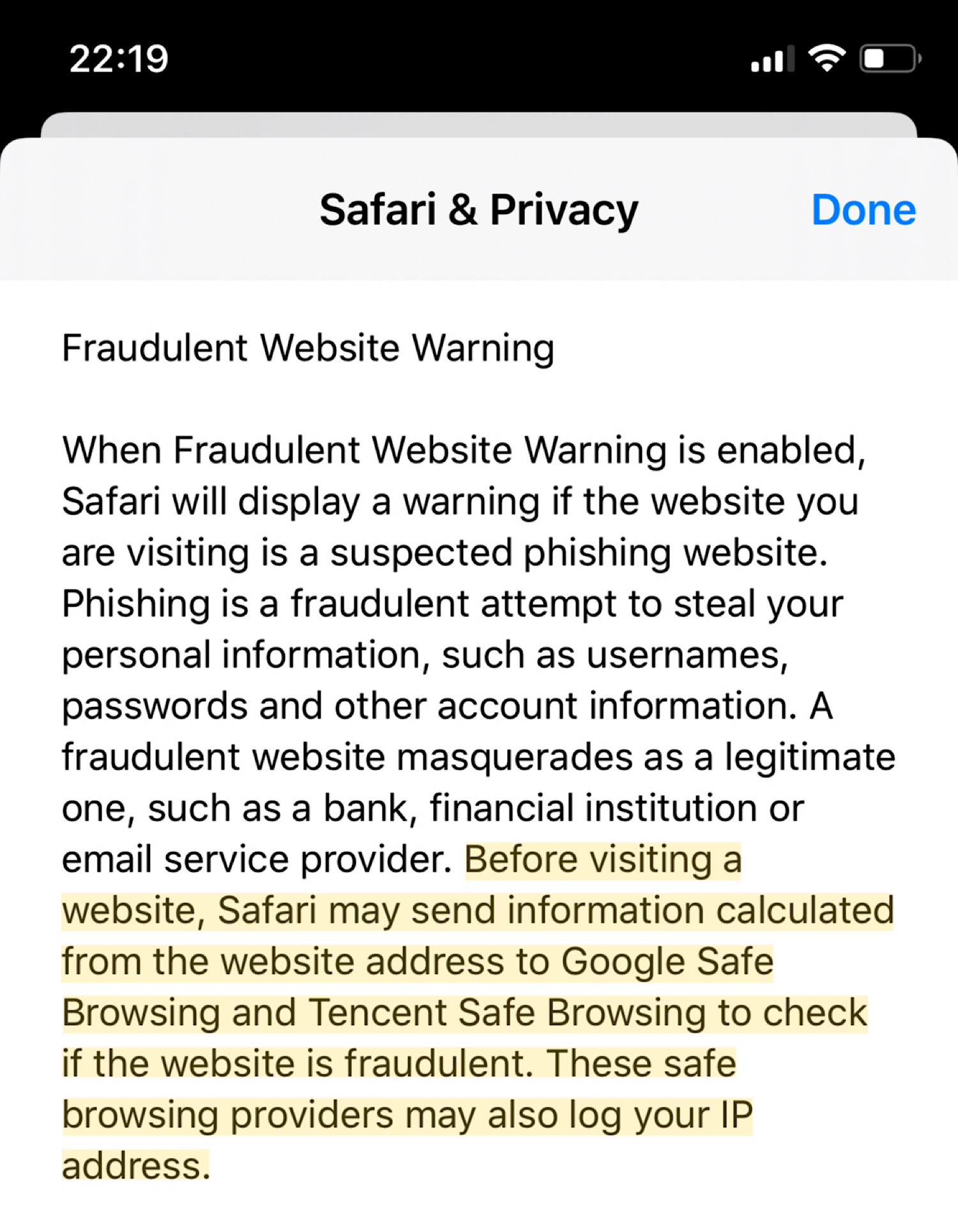
This morning brings new and exciting news from the land of Apple. It appears that, at least on iOS 13, Apple is sharing some portion of your web browsing history with the Chinese conglomerate Tencent. This is being done as part of Apple’s “Fraudulent Website Warning”, which uses the Google-developed Safe Browsing technology as the back end. This feature appears to be “on” by default in iOS Safari, meaning that millions of users could potentially be affected.

apple-safari-ip-addresses-tencent-2
(image source)

As is the standard for this sort of news, Apple hasn’t provided much — well, any — detail on whose browsing history this will affect, or what sort of privacy mechanisms are in place to protect its users. The changes probably affect only Chinese-localized users (see Github commits, courtesy Eric Romang), although it’s difficult to know for certain. However, it’s notable that Apple’s warning appears on U.S.-registered iPhones.

Regardless of which users are affected, Apple hasn’t said much about the privacy implications of shifting Safe Browsing to use Tencent’s servers. Since we lack concrete information, the best we can do is talk a bit about the technology and its implications. That’s what I’m going to do below.

What is “Safe Browsing”, and is it actually safe?

Several years ago Google noticed that web users tended to blunder into malicious sites as they browsed the web. This included phishing pages, as well as sites that attempted to push malware at users. Google also realized that, due to its unique vantage point, it had the most comprehensive list of those sites. Surely this could be deployed to protect users.

The result was Google’s “safe browsing”. In the earliest version, this was simply an API at Google that would allow your browser to ask Google about the safety of any URL you visited. Since Google’s servers received the full URL, as well as your IP address (and possibly a tracking cookie to prevent denial of service), this first API was kind of a privacy nightmare. (This API still exists, and is supported today as the “Lookup API“.)

To address these concerns, Google quickly came up with a safer approach to, um, “safe browsing”. The new approach was called the “Update API”, and it works like this:

  1. Google first computes the SHA256 hash of each unsafe URL in its database, and truncates each hash down to a 32-bit prefix to save space.
  2. Google sends the database of truncated hashes down to your browser.
  3. Each time you visit a URL, your browser hashes it and checks if its 32-bit prefix is contained in your local database.
  4. If the prefix is found in the browser’s local copy, your browser now sends the prefix to Google’s servers, which ship back a list of all full 256-bit hashes of the matching  URLs, so your browser can check for an exact match.

At each of these requests, Google’s servers see your IP address, as well as other identifying information such as database state. It’s also possible that Google may drop a cookie into your browser during some of these requests. The Safe Browsing API doesn’t say much about this today, but Ashkan Soltani noted this was happening back in 2012.

It goes without saying that Lookup API is a privacy disaster. The “Update API” is much more private: in principle, Google should only learn the 32-bit hashes of some browsing requests. Moreover, those truncated 32-bit hashes won’t precisely reveal the identity of the URL you’re accessing, since there are likely to be many collisions in such a short identifier. This provides a form of k-anonymity.

The weakness in this approach is that it only provides some privacy. The typical user won’t just visit a single URL, they’ll browse thousands of URLs over time. This means a malicious provider will have many “bites at the apple” (no pun intended) in order to de-anonymize that user. A user who browses many related websites — say, these websites — will gradually leak details about their browsing history to the provider, assuming the provider is malicious and can link the requests. (Updated to add: There has been some academic research on such threats.)

And this is why it’s so important to know who your provider actually is.

What does this mean for Apple and Tencent?

That’s ultimately the question we should all be asking.

The problem is that Safe Browsing “update API” has never been exactly “safe”. Its purpose was never to provide total privacy to users, but rather to degrade the quality of browsing data that providers collect. Within the threat model of Google, we (as a privacy-focused community) largely concluded that protecting users from malicious sites was worth the risk. That’s because, while Google certainly has the brainpower to extract a signal from the noisy Safe Browsing results, it seemed unlikely that they would bother. (Or at least, we hoped that someone would blow the whistle if they tried.)

But Tencent isn’t Google. While they may be just as trustworthy, we deserve to be informed about this kind of change and to make choices about it. At very least, users should learn about these changes before Apple pushes the feature into production, and thus asks millions of their customers to trust them.

We shouldn’t have to read the fine print

When Apple wants to advertise a major privacy feature, they’re damned good at it. As an example:  this past summer the company announced the release of the privacy-preserving “Find My” feature at WWDC, to widespread acclaim. They’ve also been happy to claim credit for their work on encryption, including technology such as iCloud Keychain.

But lately there’s been a troubling silence out of Cupertino, mostly related to the company’s interactions with China. Two years ago, the company moved much of iCloud server infrastructure into mainland China, for default use by Chinese users. It seems that Apple had no choice in this, since the move was mandated by Chinese law. But their silence was deafening. Did the move involve transferring key servers for end-to-end encryption? Would non-Chinese users be affected? Reporters had to drag the answers out of the company, and we still don’t know many of them.

In the Safe Browsing change we have another example of Apple making significant modifications to its privacy infrastructure, largely without publicity or announcement. We have learn about this stuff from the fine print. This approach to privacy issues does users around the world a disservice.

It increasingly feels like Apple is two different companies: one that puts the freedom of its users first, and another that treats its users very differently. Maybe Apple feels it can navigate this split personality disorder and still maintain its integrity.

I very much doubt it will work.


How does Apple (privately) find your offline devices?

How does Apple (privately) find your offline devices?

At Monday’s WWDC conference, Apple announced a cool new feature called “Find My”. Unlike Apple’s “Find my iPhone“, which uses cellular communication and the lost device’s own GPS to identify the location of a missing phone, “Find My” also lets you find devices that don’t have cellular support or internal GPS — things like laptops, or (and Apple has hinted at this only broadly) even “dumb” location tags that you can attach to your non-electronic physical belongings.

The idea of the new system is to turn Apple’s existing network of iPhones into a massive crowdsourced location tracking system. Every active iPhone will continuously monitor for BLE beacon messages that might be coming from a lost device. When it picks up one of these signals, the participating phone tags the data with its own current GPS location; then it sends the whole package up to Apple’s servers. This will be great for people like me, who are constantly losing their stuff: if I leave my backpack on a tour bus in China in my office, sooner or later someone else will stumble on its signal and I’ll instantly know where to find it.

(It’s worth mentioning that Apple didn’t invent this idea. In fact, companies like Tile have been doing this for quite a while. And yes, they should probably be worried.)

If you haven’t already been inspired by the description above, let me phrase the question you ought to be asking: how is this system going to avoid being a massive privacy nightmare?

Let me count the concerns:

  • If your device is constantly emitting a BLE signal that uniquely identifies it, the whole world is going to have (yet another) way to track you. Marketers already use WiFi and Bluetooth MAC addresses to do this: Find My could create yet another tracking channel.
  • It also exposes the phones who are doing the tracking. These people are now going to be sending their current location to Apple (which they may or may not already be doing). Now they’ll also be potentially sharing this information with strangers who “lose” their devices. That could go badly.
  • Scammers might also run active attacks in which they fake the location of your device. While this seems unlikely, people will always surprise you.

The good news is that Apple claims that their system actually does provide strong privacy, and that it accomplishes this using clever cryptography. But as is typical, they’ve declined to give out the details how they’re going to do it. Andy Greenberg talked me through an incomplete technical description that Apple provided to Wired, so that provides many hints. Unfortunately, what Apple provided still leaves huge gaps. It’s into those gaps that I’m going to fill in my best guess for what Apple is actually doing.

A big caveat: much of this could be totally wrong. I’ll update it relentlessly when Apple tells us more.

Some quick problem-setting

To lay out our scenario, we need to bring several devices into the picture. For inspiration, we’ll draw from the 1950s television series “Lassie”.

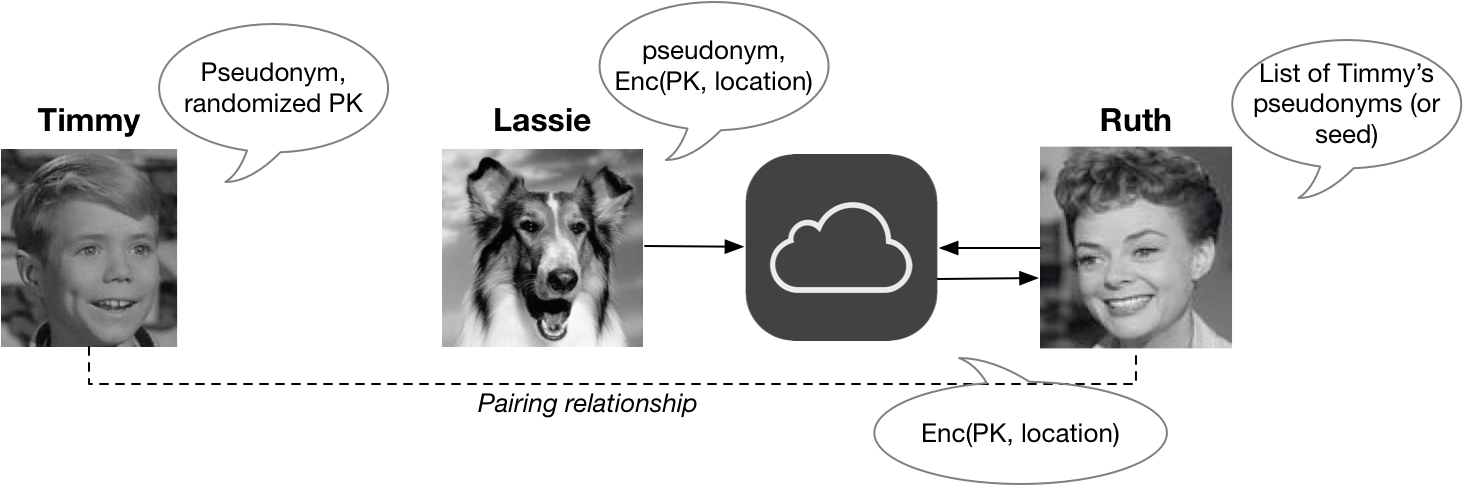
A first device, which we’ll call Timmy, is “lost”. Timmy has a BLE radio but no GPS or connection to the Internet. Fortunately, he’s been previously paired with a second device called Ruth, who wants to find him. Our protagonist is Lassie: she’s a random (and unknowing) stranger’s iPhone, and we’ll  assume that she has at least an occasional Internet connection and solid GPS. She is also a very good girl. The networked devices communicate via Apple’s iCloud servers, as shown below:

Lassie(Since Timmy and Ruth have to be paired ahead of time, it’s likely they’ll both be devices owned by the same person. Did I mention that you’ll need to buy two Apple devices to make this system work? That’s also just fine for Apple.)
Since this is a security system, the first question you should ask is: who’s the bad guy? The answer in this setting is unfortunate: everyone is potentially a bad guy. That’s what makes this  problem so exciting.

Keeping Timmy anonymous

The most critical aspect of this system is that we need to keep unauthorized third parties from tracking Timmy, especially when he’s not lost. This precludes some pretty obvious solutions, like having the Timmy device simply shout “Hi my name is Timmy, please call my mom Ruth and let her know I’m lost.” It also precludes just about any unchanging static identifier, even an opaque and random-looking one.

This last requirement is inspired by the development of services that abuse static identifiers broadcast by your devices (e.g., your WiFi MAC address) to track devices as you walk around. Apple has been fighting this — with mixed success — by randomizing things like MAC addresses. If Apple added a static tracking identifier to support the “Find My” system, all of these problems could get much worse.

This requirement means that any messages broadcast by Timmy have to be opaque — and moreover, the contents of these messages must change, relatively frequently, to new values that can’t be linked to the old ones. One obvious way to realize this is to have Timmy and Ruth agree on a long list of random “pseudonyms” for Timmy, and have Timmy pick a different one each time.

This helps a lot. Each time Lassie sees some (unknown) device broadcasting an identifier, she won’t know if it belongs to Timmy: but she can send it up to Apple’s servers along with her own GPS location. In the event that Timmy ever gets lost, Ruth can ask Apple to search for every single one of Timmy‘s possible pseudonyms. Since neither nobody outside of Apple ever learns this list, and even Apple only learns it after someone gets lost, this approach prevents most tracking.

A slightly more efficient way to implement this idea is to use a cryptographic function (like a MAC or hash function) in order to generate the list of pseudonyms from a single short “seed” that both Timmy and Ruth will keep a copy of. This is nice because the data stored by each party will be very small. However, to find Timmy, Ruth must still send all of the pseudonyms — or her “seed” — up to Apple, who will have to search its database for each one.

Hiding Lassie’s location

The pseudonym approach described above should work well to keep Timmy‘s identity hidden from Lassie, and even from Apple (up until the point that Ruth searches for it.) However, it’s got a big drawback: it doesn’t hide Lassie‘s GPS coordinates.

This is bad for at least a couple of reasons. Each time Lassie detects some device broadcasting a message, she needs to transmit her current position (along with the pseudonym she sees) to Apple’s servers. This means Lassie is constantly telling Apple where she is. And moreover, even if Apple promises not to store Lassie‘s identity, the result of all these messages is a huge centralized database that shows every GPS location where some Apple device has been detected.

Note that this data, in the aggregate, can be pretty revealing. Yes, the identifiers of the devices might be pseudonyms — but that doesn’t make the information useless. For example: a record showing that some Apple device is broadcasting from my home address at certain hours of the day would probably reveal when I’m in my house.

An obvious way to prevent this data from being revealed to Apple is to encrypt it — so that only parties who actually need to know the location of a device can see this information. If Lassie picks up a broadcast from Timmy, then the only person who actually needs to know Lassie‘s GPS location is Ruth. To keep this information private, Lassie should encrypt her coordinates under Ruth’s encryption key.

This, of course, raises a problem: how does Lassie get Ruth‘s key? An obvious solution is for Timmy to shout out Ruth’s public key as part of every broadcast he makes. Of course, this would produce a static identifier that would make Timmy‘s broadcasts linkable again.

To solve that problem, we need Ruth to have many unlinkable public keys, so that Timmy can give out a different one with each broadcast. One way to do this is have Ruth and Timmy generate many different shared keypairs (or generate many from some shared seed). But this is annoying and involves Ruth storing many secret keys. And in fact, the identifiers we mentioned in the previous section can be derived by hashing each public key.

A slightly better approach (that Apple may not employ) makes use of  key randomization. This is a feature provided by cryptosystems like Elgamal: it allows any party to randomize a public key, so that the randomized key is completely unlinkable to the original. The best part of this feature is that Ruth can use a single secret key regardless of which randomized version of her public key was used to encrypt.

FilledInLassie

All of this  leads to a final protocol idea. Each time Timmy broadcasts, he uses a fresh pseudonym and a randomized copy of Ruth‘s public key. When Lassie receives a broadcast, she encrypts her GPS coordinates under the public key, and sends the encrypted message to Apple. Ruth can send in Timmy‘s pseudonyms to Apple’s servers, and if Apple finds a match, she can obtain and decrypt the GPS coordinates.

Does this solve all the problems?

The nasty thing about this problem setting is that, with many weird edge cases, there just isn’t a perfect solution. For example, what if Timmy is evil and wants to make Lassie reveal her location to Apple? What if Old Man Smithers tries to kidnap Lassie?

At a certain point, the answer to these question is just to say that we’ve done our best: any remaining problems will have to be outside the threat model. Sometimes even Lassie knows when to quit.

Is Apple’s Cloud Key Vault a crypto backdoor?

TL;DR: No, it isn’t. If that’s all you wanted to know, you can stop reading.

Still, as you can see there’s been some talk on Twitter about the subject, and I’m afraid it could lead to a misunderstanding. That would be too bad, since Apple’s new technology is kind of a neat experiment.

So while I promise that this blog is not going to become all-Apple-all-the-time, I figured I’d take a minute to explain what I’m talking about. This post is loosely based on an explanation of Apple’s new escrow technology that Ivan Krstic gave at BlackHat. You should read the original for the fascinating details.

What is Cloud Key Vault (and what is iCloud Keychain)?

A few years ago Apple quietly introduced a new service called iCloud Keychain. This service is designed to allow you to back up your passwords and secret keys to the cloud. Now, if backing up your sensitive passwords gives you the willies, you aren’t crazy. Since these probably include things like bank and email passwords, you really want these to be kept extremely secure.

And — at least going by past experience — security is not where iCloud shines:

The problem here is that passwords need to be secured at a much higher assurance level than most types of data backup. But how can Apple ensure this? We can’t simply upload our secret passwords the way we upload photos of our kids. That would create a number of risks, including:

  1. The risk that someone will guess, reset or brute-force your iCloud password. Password resets are a particular problem. Unfortunately these seem necessary for normal iCloud usage, since people do forget their passwords. But that’s a huge risk when you’re talking about someone’s entire password collection.
  2. The risk that someone will break into Apple’s infrastructure. Even if Apple gets their front-end brute-forcing protections right (and removes password resets), the password vaults themselves are a huge target. You want to make sure that even someone who hacks Apple can’t get them out of the system.
  3. The risk that a government will compel Apple to produce data. Maybe you’re thinking of the U.S. government here. But that’s myopic: Apple stores iCloud data all over the world.

So clearly Apple needs a better way to protect these passwords. How do to it?

Why not just encrypt the passwords?

It is certainly possible for an Apple device to encrypt your password vault before sending it to iCloud. The problem here is that Apple doesn’t necessarily have a strong encryption key to do this with. Remember that the point of a backup is to survive the loss of your device, and thus we can’t assume the existence of a strong recovery key stored on your phone.

This leaves us with basically one option: a user password. This could be either the user’s iCloud password or their device passcode. Unfortunately for the typical user, these tend to be lousy. They may be strong enough to use as a login password — in a system that allows only a very limited number of login attempts. But the kinds of passwords typical users choose to enter on mobile devices are rarely strong enough to stand up to an offline dictionary attack, which is the real threat when using passwords as encryption keys.

(Even using a strong memory-hard password hash like scrypt — with crazy huge parameters — probably won’t save a user who chooses a crappy password. Blame phone manufacturers for making it painful to type in complicated passwords by forcing you to type them so often.)

So what’s Apple to do?

So Apple finds itself in a situation where they can’t trust the user to pick a strong password. They can’t trust their own infrastructure. And they can’t trust themselves. That’s a problem. Fundamentally, computer security requires some degree of trust — someone has to be reliable somewhere.

Apple’s solution is clever: they decided to make something more trustworthy than themselves. To create a new trust anchor, Apple purchased a bunch of fancy devices called Hardware Security Modules, or HSMs. These are sophisticated, tamper-resistant specialized computers that store and operate with cryptographic keys, while preventing even malicious users from extracting them. The high-end HSMs Apple uses also allow the owner to include custom programming.

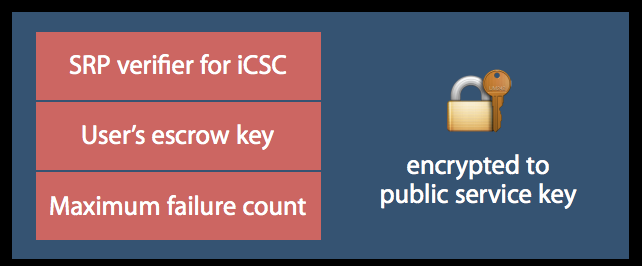
Rather than trusting Apple, your phone encrypts its secrets under a hardcoded 2048-bit RSA public key that belongs to Apple’s HSM. It also encrypts a function of your device passcode, and sends the resulting encrypted blob to iCloud. Critically, only the HSM has a copy of the corresponding RSA decryption key, thus only the HSM can actually view any of this information. Apple’s network sees only an encrypted blob of data, which is essentially useless.

When a user wishes to recover their secrets, they authenticate themselves directly to the HSM. This is done using a user’s “iCloud Security Code” (iCSC), which is almost always your device passcode — something most people remember after typing it every day. This authentication is done using the Secure Remote Password protocol, ensuring that Apple (outside of the HSM) never sees any function of your password.

Now, I said that device passcodes are lousy secrets. That’s true when we’re talking about using them as encryption keys — since offline decryption attacks allow the attacker to make an unlimited number of attempts. However, with the assistance of an HSM, Apple can implement a common-sense countermeasure to such attacks: they limit you to a fixed number of login attempts. This is roughly the same protection that Apple implements on the devices themselves.

The encrypted contents of the data sent to the HSM (source).

The upshot of all these ideas is that — provided that the HSM works as designed, and that it can’t be reprogrammed — even Apple can’t access your stored data except by logging in with a correct passcode. And they only get a limited number of attempts to guess correctly, after which the account locks.

This rules out both malicious insiders and government access, with one big caveat.

What stops Apple from just reprogramming its HSM?

This is probably the biggest weakness of the system, and the part that’s driving the “backdoor’ concerns above. You see, the HSMs Apple uses are programmable. This means that — as long as Apple still has the code signing keys — the company can potentially update the custom code it includes onto the HSM to do all sort sorts of things.

These things might include: programming the HSM to output decrypted escrow keys. Or disabling the maximum login attempt counting mechanism. Or even inserting a program that runs a brute-force dictionary attack on the HSM itself. This would allow Apple to brute-force your passcode and/or recover your passwords.

Fortunately Apple has thought about this problem and taken steps to deal with it. Note that on HSMs like the one Apple is using, the code signing keys live on a special set of admin smartcards. To remove these keys as a concern, once Apple is done programming the HSM, they run these cards through a process that they call a “physical one-way hash function”.

If that sounds complicated, here’s Ivan’s slightly simpler explanation.

So, with the code signing keys destroyed, updating the HSM to allow nefarious actions should not be possible. Pretty much the only action Apple can take is to  wipe the HSM, which would destroy the HSM’s RSA secret keys and thus all of the encrypted records it’s responsible for. To make sure all admin cards are destroyed, the company has developed a complex ceremony for controlling the cards prior to their destruction. This mostly involves people making assertions that they haven’t made copies of the code signing key — which isn’t quite foolproof. But overall it’s pretty impressive.

The downside for Apple, of course, is that there had better not be a bug in any of their programming. Because right now there’s nothing they can do to fix it — except to wipe all of their HSMs and start over.

Couldn’t we use this idea to implement real crypto backdoors?

A key assertion I’ve heard is that if Apple can do this, then surely they can do something similar to escrow your keys for law enforcement. But looking at the system shows isn’t true at all.

To be sure, Apple’s reliance on a Hardware Security Module indicates a great deal of faith in a single hardware/software solution for storing many keys. Only time will tell if that faith is really justified. To be honest, I think it’s an overly-strong assumption. But iCloud Keychain is opt-in, so individuals can decide for themselves whether or not to take the risk. That wouldn’t be true of a mandatory law enforcement backdoor.

But the argument that Apple has enabled a law enforcement backdoor seems to miss what Apple has actually done. Instead of building a system that allows the company to recover your secret information, Apple has devoted enormous resources to locking themselves out. Only customers can access their own information. In other words, Apple has decided that the only way they can hold this information is if they don’t even trust themselves with it.

That’s radically different from what would be required to build a mandatory key escrow system for law enforcement. In fact, one of the big objections to such a backdoor — which my co-authors and I recently outlined in a report — is the danger that any of the numerous actors in such a system could misuse it. By eliminating themselves from the equation, Apple has effectively neutralized that concern.

If Apple can secure your passwords this way, then why don’t they do the same for your backed up photos, videos, and documents?

That’s a good question. Maybe you should ask them?

What is Differential Privacy?

Yesterday at the WWDC keynote, Apple announced a series of new security and privacy features, including one feature that’s drawn a bit of attention — and confusion. Specifically, Apple announced that they will be using a technique called “Differential Privacy” (henceforth: DP) to improve the privacy of their data collection practices.

The reaction to this by most people has been a big “???”, since few people have even heard of Differential Privacy, let alone understand what it means. Unfortunately Apple isn’t known for being terribly open when it comes to sharing the secret sauce that drives their platform, so we’ll just have to hope that at some point they decide to publish more. What we know so far comes from Apple’s iOS 10 Preview guide:

Starting with iOS 10, Apple is using Differential Privacy technology to help discover the usage patterns of a large number of users without compromising individual privacy. To obscure an individual’s identity, Differential Privacy adds mathematical noise to a small sample of the individual’s usage pattern. As more people share the same pattern, general patterns begin to emerge, which can inform and enhance the user experience. In iOS 10, this technology will help improve QuickType and emoji suggestions, Spotlight deep link suggestions and Lookup Hints in Notes.

To make a long story short, it sounds like Apple is going to be collecting a lot more data from your phone. They’re mainly doing this to make their services better, not to collect individual users’ usage habits. To guarantee this, Apple intends to apply sophisticated statistical techniques to ensure that this aggregate data — the statistical functions it computes over all your information — don’t leak your individual contributions. In principle this sounds pretty good. But of course, the devil is always in the details.

While we don’t have those details, this seems like a good time to at least talk a bit about what Differential Privacy is, how it can be achieved, and what it could mean for Apple — and for your iPhone.

The motivation

In the past several years, “average people” have gotten used to the idea that they’re sending a hell of a lot of personal information to the various services they use. Surveys also tell us they’re starting to feel uncomfortable about it.

This discomfort makes sense when you think about companies using our personal data to market (to) us. But sometimes there are decent motivations for collecting usage information. For example, Microsoft recently announced a tool that can diagnose pancreatic cancer by monitoring your Bing queries. Google famously runs Google Flu Trends. And of course, we all benefit from crowdsourced data that improves the quality of the services we use — from mapping applications to restaurant reviews.

Unfortunately, even well-meaning data collection can go bad. For example, in the late 2000s, Netflix ran a competition to develop a better film recommendation algorithm. To drive the competition, they released an “anonymized” viewing dataset that had been stripped of identifying information. Unfortunately, this de-identification turned out to be insufficient. In a well-known piece of work, Narayanan and Shmatikov showed that such datasets could be used to re-identify specific users — and even predict their political affiliation! — if you simply knew a little bit of additional information about a given user.

This sort of thing should be worrying to us. Not just because companies routinely share data (though they do) but because breaches happen, and because even statistics about a dataset can sometimes leak information about the individual records used to compute it. Differential Privacy is a set of tools that was designed to address this problem.

What is Differential Privacy?

Differential Privacy is a privacy definition that was originally developed by Dwork, Nissim, McSherry and Smith, with major contributions by many others over the years. Roughly speaking, what it states can summed up intuitively as follows:

Imagine you have two otherwise identical databases, one with your information in it, and one without it. Differential Privacy ensures that the probability that a statistical query will produce a given result is (nearly) the same whether it’s conducted on the first or second database.

One way to look at this is that DP provides a way to know if your data has a significant effect on the outcome of a query. If it doesn’t, then you might as well contribute to the database — since there’s almost no harm that can come of it. Consider a silly example:

Imagine that you choose to enable a reporting feature on your iPhone that tells Apple if you like to use the 💩  emoji routinely in your iMessage conversations. This report consists of a single bit of information: 1 indicates you like 💩 , and 0 doesn’t. Apple might receive these reports and fill them into a huge database. At the end of the day, it wants to be able to derive a count of the users who like this particular emoji.

It goes without saying that the simple process of “tallying up the results” and releasing them does not satisfy the DP definition, since computing a sum on the database that contains your information will potentially produce a different result from computing the sum on a database without it. Thus, even though these sums may not seem to leak much information, they reveal at least a little bit about you. A key observation of the Differential Privacy research is that in many cases, DP can be achieved if the tallying party is willing to add random noise to the result. For example, rather than simply reporting the sum, the tallying party can inject noise from a Laplace or gaussian distribution, producing a result that’s not quite exact — but that masks the contents of any given row. (For other interesting functions, there are many other techniques as well.)

Even more usefully, the calculation of “how much” noise to inject can be made without knowing the contents of the database itself (or even its size). That is, the noise calculation can be performed based only on knowledge of the function to be computed, and the acceptable amount of data leakage.

A tradeoff between privacy and accuracy

Now obviously calculating the total number of 💩 -loving users on a system is a pretty silly example. The neat thing about DP is that the same overall approach can be applied to much more interesting functions, including complex statistical calculations like the ones used by Machine Learning algorithms. It can even be applied when many different functions are all computed over the same database.

But there’s a big caveat here. Namely, while the amount of “information leakage” from a single query can be bounded by a small value, this value is not zero. Each time you query the database on some function, the total “leakage” increases — and can never go down. Over time, as you make more queries, this leakage can start to add up.

This is one of the more challenging aspects of DP. It manifests in two basic ways:

  1. The more information you intend to “ask” of your database, the more noise has to be injected in order to minimize the privacy leakage. This means that in DP there is generally a fundamental tradeoff between accuracy and privacy, which can be a big problem when training complex ML models.
  2. Once data has been leaked, it’s gone. Once you’ve leaked as much data as your calculations tell you is safe, you can’t keep going — at least not without risking your users’ privacy. At this point, the best solution may be to just to destroy the database and start over. If such a thing is possible.

The total allowed leakage is often referred to as a “privacy budget”, and it determines how many queries will be allowed (and how accurate the results will be). The basic lesson of DP is that the devil is in the budget. Set it too high, and you leak your sensitive data. Set it too low, and the answers you get might not be particularly useful.

Now in some applications, like many of the ones on our iPhones, the lack of accuracy isn’t a big deal. We’re used to our phones making mistakes. But sometimes when DP is applied in complex applications, such as training Machine Learning models, this really does matter.

Mortality vs. info disclosure, from Frederikson et al.
The red line is partient mortality.

To give an absolutely crazy example of how big the tradeoffs can be, consider this paper by Frederikson et al. from 2014. The authors began with a public database linking Warfarin dosage outcomes to specific genetic markers. They then used ML techniques to develop a dosing model based on their database — but applied DP at various privacy budgets while training the model. Then they evaluated both the information leakage and the model’s success at treating simulated “patients”.

The results showed that the model’s accuracy depends a lot on the privacy budget on which it was trained. If the budget is set too high, the database leaks a great deal of sensitive patient information — but the resulting model makes dosing decisions that are about as safe as standard clinical practice. On the other hand, when the budget was reduced to a level that achieved meaningful privacy, the “noise-ridden” model had a tendency to kill its “patients”.

Now before you freak out, let me be clear: your iPhone is not going to kill you. Nobody is saying that this example even vaguely resembles what Apple is going to do on the phone. The lesson of this research is simply that there are interesting tradeoffs between effectiveness and the privacy protection given by any DP-based system — these tradeoffs depend to a great degree on specific decisions made by the system designers, the parameters chosen by the deploying parties, and so on. Hopefully Apple will soon tell us what those choices are.

How do you collect the data, anyway?

You’ll notice that in each of the examples above, I’ve assumed that queries are executed by a trusted database operator who has access to all of the “raw” underlying data. I chose this model because it’s the traditional model used in most of the literature, not because it’s a particularly great idea.

In fact, it would be worrisome if Apple was actually implementing their system this way. That would require Apple to collect all of your raw usage information into a massive centralized database, and then (“trust us!”) calculate privacy-preserving statistics on it. At a minimum this would make your data vulnerable to subpoenas, Russian hackers, nosy Apple executives and so on.

Fortunately this is not the only way to implement a Differentially Private system. On the theoretical side, statistics can be computed using fancy cryptographic techniques (such as secure multi-party computation or fully-homomorphic encryption.) Unfortunately these techniques are probably too inefficient to operate at the kind of scale Apple needs.

A much more promising approach is not to collect the raw data at all. This approach was recently pioneered by Google to collect usage statistics in their Chrome browser. The system, called RAPPOR, is based on an implementation of the 50-year old randomized response technique. Randomized response works as follows:

  1. When a user wants to report a piece of potentially embarrassing information (made up example: “Do you use Bing?”), they first flip a coin, and if the coin comes up “heads”, they return a random answer — calculated by flipping a second coin. Otherwise they answer honestly.
  2. The server then collects answers from the entire population, and (knowing the probability that the coins will come up “heads”), adjusts for the included “noise” to compute an approximate answer for the true response rate.

Intuitively, randomized response protects the privacy of individual user responses, because a “yes” result could mean that you use Bing, or it could just be the effect of the first mechanism (the random coin flip). More formally, randomized response has been shown to achieve Differential Privacy, with specific guarantees that can adjusted by fiddling with the coin bias.

 I’ve met Craig Federighi. He actually
looks like this in person.
RAPPOR takes this relatively old technique and turns it into something much more powerful. Instead of simply responding to a single question, it can report on complex vectors of questions, and may even return complicated answers, such as strings — e.g., which default homepage you use. The latter is accomplished by first encoding the string into a Bloom filter — a bitstring constructed using hash functions in a very specific way. The resulting bits are then injected with noise, and summed, and the answers recovered using a (fairly complex) decoding process.

While there’s no hard evidence that Apple is using a system like RAPPOR, there are some small hints. For example, Apple’s Craig Federighi describes Differential Privacy as using hashing, subsampling and noise injection to enable…crowdsourced learning while keeping the data of individual users completely private.” That’s pretty weak evidence for anything, admittedly, but presence of the “hashing” in that quote at least hints towards the use of RAPPOR-like filters.

The main challenge with randomized response systems is that they can leak data if a user answers the same question multiple times. RAPPOR tries to deal with this in a variety of ways, one of which is to identify static information and thus calculate “permanent answers” rather than re-randomizing each time. But it’s possible to imagine situations where such protections could go wrong. Once again, the devil is very much in the details — we’ll just have to see. I’m sure many fun papers will be written either way.

So is Apple’s use of DP a good thing or a bad thing?

As an academic researcher and a security professional, I have mixed feelings about Apple’s announcement. On the one hand, as a researcher I understand how exciting it is to see research technology actually deployed in the field. And Apple has a very big field.

On the flipside, as security professionals it’s our job to be skeptical — to at a minimum demand people release their security-critical code (as Google did with RAPPOR), or at least to be straightforward about what it is they’re deploying. If Apple is going to collect significant amounts of new data from the devices that we depend on so much, we should really make sure they’re doing it right — rather than cheering them for Using Such Cool Ideas. (I made this mistake already once, and I still feel dumb about it.)

But maybe this is all too “inside baseball”. At the end of the day, it sure looks like Apple is honestly trying to do something to improve user privacy, and given the alternatives, maybe that’s more important than anything else.

How do we pay for privacy?


If you haven’t read Julia Angwin’s excellent profile of GnuPG’s lead developer Werner Koch, now would be a great time to check it out. Koch, who single-handedly wrote GnuPG in 1997, has been doggedly maintaining the codebase ever since — and not getting paid very well for it. Despite good intentions on all sides, Koch has been essentially going broke.

The news is not all bad. In response to Angwin’s piece, ‘the Internet’ rallied to GnuPG’s aid. So far individual and corporate donors have coughed up over EU 200,000 to pay Koch and even hire him some help. It looks like GnuPG is saved, and so are its users — for the moment.

But is this model really sustainable? I’m pretty skeptical.

Sooner or later this money will run out. And next time this happens, the Internet might not have a quarter million in spare change to fork over. In fact, that’s already the normal state of affairs for most privacy tools — software ranging from GPGTools to OTR — most of which subsist on meager donations and volunteer time. The scary part is that thousands of people depend on these tools for their privacy and even their physical safety.

This raises a question: how can we support the long-term development and maintenance of privacy tools? It turns out that nobody really knows the answer to this — but a few people are groping towards a solution. In this (entirely non-technical) post I’m going to talk a bit about what people are doing today — and how we might do better in the future.NB: I should mention that most of the smart ideas in this post come from Meredith Whittaker, who leads Google’s Open Source Research Group, and helped found Simply Secure. The dumb ideas are all mine.

How we support privacy tools today

If you’re developing, or are interested in developing privacy tools in 2015, there are a handful of funding sources for you to choose from. They include:

  1. Self-funding. The vast majority of privacy tools come from engineers working in their spare time. This is a great way to develop prototypes and simple tools, but it tends not to be very sustainable — particularly when developers have to choose between family and code maintenance.
  2. Donations, charges and crowd-funding. A few major projects pull in some cash through donations, but this seems to work well only during a catastrophe or when the spotlight is on a particular project. GnuPG, for example, made a ton of money following their recent publicity, but before that they averaged a minuscule $20k per year — and this is for one of the most widely used privacy tools on the Internet! Projects like GPG Tools recently began charging for their software, which may work a bit better. Unfortunately this is anathema for young projects that rely on network effect for their success.
  3. Industry grants. From time to time major corporations give out modest chunks of money to tool developers, particularly when those companies use tools internally. Case in point: Google Stripe and Facebook just gave $50k each to GnuPG, and the Linux Foundation Core Infrastructure Initiative (essentially an industry funding group*) kicked in an additional $60k. Unfortunately this money is tragically difficult to come by — for the average developer it might as well not exist.
  4. Government and NGOs. Perhaps the most promising source of money comes from the U.S. government, and a set of NGOs that have sprung up to disburse it. The State Dept. directly funds the Tor Project, and the government also provides block grants to groups such as the Open Technology Fund (via Radio Free Asia) and the — confusingly similar — Open Technology Institute (at New America Foundation). OTF in particular has done a phenomenal job at funding both development and audit of privacy tools.
  5. Internal industry funding. Once in a blue moon a company proposes to internally develop a privacy tool like Google/Yahoo End-to-End. I’ll believe this works when I see it.
  6. Academic research funding. A few academic tools have managed to slip into this space, most notably OTR and Tor. But this model is awfully hard to sustain, mostly because academics don’t get paid to do things. We get paid to teach and write papers. It’s hard to sustain software development this way.
  7. Bitcoin wallet theft. This is mostly a joke.
Of these funding sources, the U.S. government is by far the heaviest hitter — responsible for funding many well-known projects such as Tor and TextSecure. While I tend to think any money is good money in the hands of right people, I should point out that this view is not universally shared. In part this is because we, admittedly, don’t have much of a process to validate code and convince non-experts that this process isn’t producing compromised code.

As Jillian York points out, US government funding also comes with some political baggage, and sadly, tends to attract more than its fair share of paranoia.

Developers need more than just money!

If you give a starving privacy tool a million bucks, you get a well-fed privacy tool. Unfortunately it may not actually be a better privacy tool. That’s not because people are trying to waste your cash. It turns out that software development, crypto, and security are just plain hard.

So yes, people need to eat — that’s a baseline. But beyond that what developers also need are things like expert guidance, security audits, analysis tools, and collaboration with other developers. They also really need help with the hardest problem in computer science, which is turning a pile of code into a product that people want to use.

A few groups like OTF (in case you’re not getting the hint, I really like them*) are trying to help with some of this. They fund professional code audits through groups like iSEC Partners. They fund usability resources and provide communications help. They host regular meetings where project members can get together and dork out about how to handle encrypted spam. A friend calls this a ‘dog park for developers who haven’t been outside for a while.’ This sounds silly, but it really, really helps.

Beyond those things, there’s still an awful problem of coordinating all of this technical stuff so that auditing results adhere to some consistent standard and produce knowledge that gets retained within the organization, as well as seeing that tools get proper academic analysis where necessary. And finally, there are useful services such as connecting developers with UI designers and helping them to turn their tools into real, usable products.

A few groups have done well at this all on their own. Moxie’s Open Whisper Systems not only launched a popular messaging app, but managed to get TextSecure (the protocol) into 600 million WhatsApp clients. Unfortunately this kind of success doesn’t come easy to people and requires a lot of assistance. Institutions can really help.

How can we do better?

There are a lot of answers to this question. But since this is a blog post, let’s swing for the fences. What’s really needed is a privacy incubator. A place that provides both funding (or at least, guides funding) as well as in-house technical staff and researchers, non-technical help such a communications, infrastructure, a great advisory board, and access to tools and engineers.

In essence this center would combine all the best parts of NGOs, academic institutions, and corporate research into one center. It would help with projects ranging from research to development, and would also provide infrastructure for developers — helping to keep them from re-inventing the wheel with each new idea, and perhaps even helping projects to merge when one has strengths. Connecting them with corporations who could conceivably deploy their tool.

This organization could also provide resources ranging from legal advice to marketing, two areas that software developers are notoriously bad at. It might even provide important, but miscellaneous resources like healthcare.

Please keep in mind I’m not advocating the creation of an entirely new organization — god forbid, we have enough of those already (the XKCD cartoon at right comes to mind). Instead, the goal should be to identify organizations that are already working and either connect that, or build up their capabilities with a large infusion of cash.

Anyway, we can all dream. But this is a dream that would actually make some difference.

So will this happen?

I guess it depends on the will and the money. It also depends on us: that is, on the willingness of the technically focused privacy/security community to accept that many of the elements we need to succeed are outside of our personal realm of expertise, and we need help with them.

Friends of mine also keep telling me that there are major philanthropic organizations out there looking to make a difference in this area. I’m still waiting to see it happen, but wheels turn slowly. One thing I can tell you: it wouldn’t take much to do better than what we have today.

* Full disclosure: I’m on the advisory board for Linux Foundation’s Core Infrastructure Initiative. I also once sat in on an advisory board meeting for OTF. Nobody paid me — but they did feed me lunch.

Attack of the Week: Unpicking PLAID

A few years ago I came across an amusing Slashdot story: ‘Australian Gov’t offers $560k Cryptographic Protocol for Free‘. The story concerned a protocol developed by Australia’s Centrelink, the equivalent of our Health and Human Services department, that was wonderfully named the Protocol for Lightweight Authentication of ID, or (I kid you not), ‘PLAID‘.

Now to me this headline did not inspire a lot of confidence. I’m a great believer in TANSTAAFL — in cryptographic protocol design and in life. I figure if someone has to use ‘free’ to lure you in the door, there’s a good chance they’re waiting in the other side with a hammer and a bottle of chloroform, or whatever the cryptographic equivalent might be.

A quick look at PLAID didn’t disappoint. The designers used ECB like it was going out of style; did unadvisable things with RSA encryption, and that was only the beginning.

What PLAID was not, I thought at the time, was bad to the point of being exploitable. Moreover, I got the idea that nobody would use the thing. It appears I was badly wrong on both counts.

This is apropos of a new paper authored by Degabriele, Fehr, Fischlin, Gagliardoni, Günther, Marson, Mittelbach and Paterson entitled ‘Unpicking Plaid: A Cryptographic Analysis of an ISO-standards-track Authentication Protocol‘. Not to be cute about it, but this paper shows that PLAID is, well, bad.

As is typical for this kind of post, I’m going to tackle the rest of the content in a ‘fun’ question and answer format.

What is PLAID?

In researching this blog post I was somewhat amazed to find that Australians not only have universal healthcare, but that they even occasionally require healthcare. That this surprised me is likely due to the fact that my knowledge of Australia mainly comes from the first two Crocodile Dundee movies.

It seems that not only do Australians have healthcare, but they also have access to a ‘smart’ ID card that allows them to authenticate themselves. These contactless smartcards run the proprietary PLAID protocol, which handles all of the ugly steps in authenticating the bearer, while also providing some very complicated protections to prevent user tracking.

This protocol has been standardized as Australian standard AS-5185-2010 and is currently “in the fast track standardization process for ISO/IEC 25185-1.2”. You can obtain your own copy of the standard for a mere 118 Swiss Francs, which my currency converter tells me is entirely too much money. So I’ll do my best to provide the essential details in this post — and many others are in the research paper.

How does PLAID work?

Accompanying tinfoil hat
not pictured.

PLAID is primarily an identification and authentication protocol, but it also attempts to offer its users a strong form of privacy. Specifically, it attempts to ensure that only authorized readers can scan your card and determine who you are.

This is a laudable goal, since contactless smartcards are ‘promiscuous’, meaning that they can be scanned by anyone with the right equipment. Countless research papers have been written on tracking RFID devices, so the PLAID designers had to think hard about how they were going to prevent this sort of issue.

Before we get to what steps the PLAID designers took, let’s talk about what one shouldn’t do in building such systems.

Let’s imagine you have a smartcard talking to a reader where anyone can query the card. The primary goal of an authentication protocol is to perform some sort of mutual authentication handshake and derive a session key that the card can use to exchange sensitive data. The naive protocol might look like this:

Naive approach to an authentication protocol. The card identifies itself
before the key agreement protocol is run, so the reader can look up a card-specific key.

The obvious problem with this protocol is that it reveals the card ID number to anyone who asks. Yet such identification appears necessary, since each card will have its own secret key material — and the reader must know the card’s key in order to run an authenticated key agreement protocol.

PLAID solves this problem by storing a set of RSA public keys corresponding to various authorized applications. When the reader says “Hi, I’m a hospital“, a PLAID card determines which public key it use to talk to hospitals, then encrypts data under the key and sends it over. Only a legitimate hospital should know the corresponding RSA secret key to decrypt this value.

So what’s the problem here?

PLAID’s approach would be peachy if there were only one public key to deal with. However PLAID cards can be provisioned to support many applications (called ‘capabilities’). For example, a citizen who routinely finds himself wrestling crocodiles might possess a capability unique to the Reptile Wound Treatment unit of a local hospital.* If the card responds to this capability, it potentially leaks information about the bearer.

To solve this problem, PLAID cards do some truly funny stuff.

Specifically, when a reader queries the card, the reader initially transmits a set of capabilities that it will support (e.g., ‘hospital’, ‘bank’, ‘social security center’). If the PLAID card has been provisioned with a matching public key, it goes ahead and uses it. If no matching key is found, however, the card does not send an error — since this would reveal user-specific information. Instead, it fakes a response by encrypting junk under a special ‘dummy’ RSA public key (called a ‘shill key’) that’s stored within the card. And herein lies the problem.

You see, the ‘shill key’ is unique to each card, which presents a completely new avenue for tracking individual cards. If an attacker can induce an error and subsequently fingerprint the resulting RSA ciphertext — that is, figure out which shill key was used to encipher it — they can potentially identify your card the next time they encounter you.

A portion of the PLAID protocol (source). The reader (IFD) is on the left, the card (ICC) is on the right.

Thus the problem of tracking PLAID cards devolves to one of matching RSA ciphertexts to unknown public keys. The PLAID designers assumed this would not be possible. What Degabriele et al. show is that they were wrong.

What do German Tanks have to do with RSA encryption?


To distinguish the RSA moduli of two different cards, the researchers employed of an old solution to a problem called the German Tank Problem. As the name implies, this is a real statistical problem that the allies ran up against during WWII.

The problem can be described as follows:

Imagine that a factory is producing tanks, where each tank is printed with a sequential serial number in the ordered sequence 1, 2, …, N. Through battlefield captures you then obtain a small and (presumably) random subset of k tanks. From the recovered serial numbers, your job is to estimate N, the total number of tanks produced by the factory.

Happily, this is the rare statistical problem with a beautifully simple solution.** Let m be the maximum serial number in the set of k tanks you’ve observed. To obtain a rough guess Ñ for the total number of tanks produced, you can simply compute the following formula:

So what’s this got to do with guessing an unknown RSA key?

Well, this turns out to be another instance of exactly the same problem. Imagine that I can repeatedly query your card with bogus ‘capabilities’ and thus cause it to enter its error state. To foil tracking, the card will send me a random RSA ciphertext encrypted with its (card-specific) “shill key”. I don’t know the public modulus corresponding to your key, but I do know that the ciphertext was computed using the standard RSA encryption formula m^e mod N.

My goal, as it was with the tanks, is to make a guess for N.

It’s worth pointing out that RSA is a permutation, which means that, provided the plaintext messages are randomly distributed, the ciphertexts will be randomly distributed as well. So all I need to do is collect a number of ciphertexts and apply the equation above. The resulting guess Ñ should then serve as a (fuzzy) identifier for any given card.

Results for identifying a given card in a batch of (up to) 100 cards. Each card was initially ‘fingerprinted’ by collecting k1=1000 RSA ciphertexts. Arbitrary cards were later identified by collecting varying number of ciphertexts (k2).

Now obviously this isn’t the whole story — the value Ñ isn’t exact, and you’ll get different levels of error depending on how many ciphertexts you get, and how many cards you have to distinguish amongst. But as the chart above shows, it’s possible to identify a specific card within in a real system (containing 100 cards) with reasonable probability.

But that’s not realistic at all. What if there are other cards in play?

It’s important to note that real life is nothing like a laboratory experiment. The experiment above considered a ‘universe’ consisting of only 100 cards, required an initial ‘training period’ of 1000 scans for a given card, and subsequent recognition demanded anywhere from 50 to 1000 scans of the card.

Since the authentication time for the cards is about 300 milliseconds per scan, this means that even the minimal number (50) of scans still requires about 15 seconds, and only produces the correct result with about 12% probability. This probability goes up dramatically the more scans you get to make.

Nonetheless, even the 50-scan result is significantly better than guessing, and with more concerted scans can be greatly improved. What this attack primarily serves to prove is that homebrew solutions are your enemy. Cooking up a clever approach to foiling tracking might seem like the right way to tackle a problem, but sometimes it can make you even more vulnerable than you were before.

How should one do this right?

The basic property that the PLAID designers were trying to achieve with this protocol is something called key privacy. Roughly speaking, a key private cryptosystem ensures that an attacker cannot link a given ciphertext (or collection of ciphertexts) to the public key that created them — even if the attacker knows the public key itself.

There are many excellent cryptosystems that provide strong key privacy. Ironically, most are more efficient than RSA; one solution to the PLAID problem is simply to switch to one of these. For example, many elliptic-curve (Diffie-Hellman or Elgamal) solutions will generally provide strong key privacy, provided that all public keys in the system are set in the same group.

A smartcard encryption scheme based on, say, Curve25519 would likely avoid most of the problems presented above, and might also be significantly faster to boot.

What else should I know about PLAID?

There are a few other flaws in the PLAID protocol that make the paper worthy of a careful read — if only to scare you away from designing your own protocols.

In addition to the shill key fingerprinting attacks, the authors also show how to identify the set of capabilities that a card supports, using a relatively efficient binary search approach. Beyond this, there are also many significantly more mundane flaws due to improper use of cryptography.

By far the ugliest of these are the protocol’s lack of proper RSA-OAEP padding, which may present potential (but implementation specific) vulnerabilities to Bleichenbacher’s attack. There’s also some almost de rigueur misuse of CBC mode encryption, and a handful of other flaws that should serve as audit flags if you ever run into them in the wild.

At the end of the day, bugs in protocols like PLAID mainly help to illustrate the difficulty of designing secure protocols from scratch. They also keep cryptographers busy with publications, so perhaps I shouldn’t complain too much.

You should probably read up a bit on Australia before you post again.

I would note that this really isn’t a question. But it’s absolutely true. And to this end: I would sincerely like to apologize to any Australian citizens who may have been offended by this post.

Notes:

* This capability is not explicitly described in the PLAID specification.

** The solution presented here — and used in the paper — is the frequentist approach to the problem. There is also a Bayesian approach, but it isn’t required for this application.

What’s the matter with PGP?

Last Thursday, Yahoo announced their plans to support end-to-end 6443976239_b20c3cbb28_mencryption using a fork of Google’s end-to-end email extension. This is a Big Deal. With providers like Google and Yahoo onboard, email encryption is bound to get a big kick in the ass. This is something email badly needs.

So great work by Google and Yahoo! Which is why following complaint is going to seem awfully ungrateful. I realize this and I couldn’t feel worse about it.

As transparent and user-friendly as the new email extensions are, they’re fundamentally just re-implementations of OpenPGP — and non-legacy-compatible ones, too. The problem with this is that, for all the good PGP has done in the past, it’s a model of email encryption that’s fundamentally broken.

It’s time for PGP to die.

In the remainder of this post I’m going to explain why this is so, what it means for the future of email encryption, and some of the things we should do about it. Nothing I’m going to say here will surprise anyone who’s familiar with the technology — in fact, this will barely be a technical post. That’s because, fundamentally, most of the problems with email encryption aren’t hyper-technical problems. They’re still baked into the cake.

Background: PGP

Back in the late 1980s a few visionaries realized that this new ‘e-mail’ thing was awfully convenient and would likely be the future — but that Internet mail protocols made virtually no effort to protect the content of transmitted messages. In those days (and still in these days) email transited the Internet in cleartext, often coming to rest in poorly-secured mailspools.

This inspired folks like Phil Zimmermann to create tools to deal with the problem. Zimmermann’s PGP was a revolution. It gave users access to efficient public-key cryptography and fast symmetric ciphers in package you could install on a standard PC. Even better, PGP was compatible with legacy email systems: it would convert your ciphertext into a convenient ASCII armored format that could be easily pasted into the sophisticated email clients of the day — things like “mail”, “pine” or “the Compuserve e-mail client”.

It’s hard to explain what a big deal PGP was. Sure, it sucked badly to use. But in those days, everything sucked badly to use. Possession of a PGP key was a badge of technical merit. Folks held key signing parties. If you were a geek and wanted to discreetly share this fact with other geeks, there was no better time to be alive.

We’ve come a long way since the 1990s, but PGP mostly hasn’t. While the protocol has evolved technically — IDEA replaced BassOMatic, and was in turn replaced by better ciphers — the fundamental concepts of PGP remain depressingly similar to what Zimmermann offered us in 1991. This has become a problem, and sadly one that’s difficult to change.

Let’s get specific.

PGP keys suck

Before we can communicate via PGP, we first need to exchange keys. PGP makes this downright unpleasant. In some cases, dangerously so.

Part of the problem lies in the nature of PGP public keys themselves. For historical reasons they tend to be large and contain lots of extraneous information, which it difficult to print them a business card or manually compare. You can write this off to a quirk of older technology, but even modern elliptic curve implementations still produce surprisingly large keys.

Three public keys offering roughly the same security level. From top-left: (1) Base58-encoded Curve25519 public key used in miniLock. (2) OpenPGP 256-bit elliptic curve public key format. (3a) GnuPG 3,072 bit RSA key and (3b) key fingerprint.

Since PGP keys aren’t designed for humans, you need to move them electronically. But of course humans still need to verify the authenticity of received keys, as accepting an attacker-provided public key can be catastrophic.

PGP addresses this with a hodgepodge of key servers and public key fingerprints. These components respectively provide (untrustworthy) data transfer and a short token that human beings can manually verify. While in theory this is sound, in practice it adds complexity, which is always the enemy of security.

Now you may think this is purely academic. It’s not. It can bite you in the ass.

Imagine, for example, you’re a source looking to send secure email to a reporter at the Washington Post. This reporter publishes his fingerprint via Twitter, which means most obvious (and recommended) approach is to ask your PGP client to retrieve the key by fingerprint from a PGP key server. On the GnuPG command line can be done as follows:

Now let’s ignore the fact that you’ve just leaked your key request to an untrusted server via HTTP. At the end of this process you should have the right key with high reliability. Right?

Except maybe not: if you happen to do this with GnuPG 2.0.18 — one version off from the very latest GnuPG — the client won’t actually bother to check the fingerprint of the received key. A malicious server (or HTTP attacker) can ship you back the wrong key and you’ll get no warning. This is fixed in the very latest versions of GPG but… Oy Vey.

PGP Key IDs are also pretty terrible,
due to the short length and continued
support for the broken V3 key format.

You can say that it’s unfair to pick on all of PGP over an implementation flaw in GnuPG, but I would argue it speaks to a fundamental issue with the PGP design. PGP assumes keys are too big and complicated to be managed by mortals, but then in practice it practically begs users to handle them anyway. This means we manage them through a layer of machinery, and it happens that our machinery is far from infallible.

Which raises the question: why are we bothering with all this crap infrastructure in the first place. If we must exchange things via Twitter, why not simply exchange keys? Modern EC public keys are tiny. You could easily fit three or four of them in the space of this paragraph. If we must use an infrastructure layer, let’s just use it to shunt all the key metadata around.

PGP key management sucks

Manual key management is a mug’s game. Transparent (or at least translucent) key management is the hallmark of every successful end-to-end secure encryption system.

If you can’t trust Phil, who can you trust?

Now often this does involve some tradeoffs — e.g.,, the need to trust a central authority to distribute keys — but even this level of security would be lightyears better than the current situation with webmail.

To their credit, both Google and Yahoo have the opportunity to build their own key management solutions (at least, for those who trust Google and Yahoo), and they may still do so in the future. But today’s solutions don’t offer any of this, and it’s not clear when they will. Key management, not pretty web interfaces, is the real weakness holding back widespread secure email.

signalstring
ZRTP authentication string, as used in Signal.

For the record, classic PGP does have a solution to the problem. It’s called the “web of trust“, and it involves individuals signing each others’ keys. I refuse to go into the problems with WoT because, frankly, life is too short. The TL;DR is that ‘trust’ means different things to you than it does to me. Most OpenPGP implementations do a lousy job of presenting any of this data to their users anyway.

The lack of transparent key management in PGP isn’t unfixable. For those who don’t trust Google or Yahoo, there are experimental systems like Keybase.io that attempt to tie keys to user identities. In theory we could even exchange our offline encryption keys through voice-authenticated channels using apps like OpenWhisperSystems’ Signal. So far, nobody’s bothered to do this — all of these modern encryption tools are islands with no connection to the mainland. Connecting them together represents one of the real challenges facing widespread encrypted communications.

No forward secrecy

Try something: go delete some mail from your Gmail account. You’ve hit the archive button. Presumably you’ve also permanently wiped your Deleted Items folder. Now make sure you wipe your browser cache and the mailbox files for any IMAP clients you might be running (e.g., on your phone). Do any of your devices use SSD drives? Probably a safe bet to securely wipe those devices entirely. And at the end of this Google may still have a copy which could be vulnerable to law enforcement request or civil subpoena.

(Let’s not get into the NSA’s collect-it-all policy for encrypted messages. If the NSA is your adversary just forget about PGP.)

Forward secrecy (usually misnamed “perfect forward secrecy”) ensures that if you can’t destroy the ciphertexts, you can at least dispose of keys when you’re done with them. Many online messaging systems like off-the-record messaging use PFS by default, essentially deriving a new key with each message volley sent. Newer ‘ratcheting’ systems like Trevor Perrin’s Axolotl (used by TextSecure) have also begun to address the offline case.

Adding forward secrecy to asynchronous offline email is a much bigger challenge, but fundamentally it’s at least possible to some degree. While securing the initial ‘introduction’ message between two participants may be challenging*, each subsequent reply can carry a new ephemeral key to be used in future communications. However this requires breaking changes to the PGP protocol and to clients — changes that aren’t likely to happen in a world where webmail providers have doubled down on the PGP model.

The OpenPGP format and defaults suck

Poking through a modern OpenPGP implementation is like visiting a museum of 1990s crypto. For legacy compatibility reasons, many clients use old ciphers like CAST5 (a cipher that predates the AES competition). RSA encryption uses padding that looks disturbingly like PKCS#1v1.5 — a format that’s been relentlessly exploited in the past. Key size defaults don’t reach the 128-bit security level. MACs are optional. Compression is often on by default. Elliptic curve crypto is (still!) barely supported.

If Will Smith looked like this when your cryptography was current, you need better cryptography.

Most of these issues are not exploitable unless you use PGP in a non-standard way, e.g., for instant messaging or online applications. And some people do use PGP this way.

But even if you’re just using PGP just to send one-off emails to your grandmother, these bad defaults are pointless and unnecessary. It’s one thing to provide optional backwards compatibility for that one friend who runs PGP on his Amiga. But few of my contacts do — and moreover, client versions are clearly indicated in public keys.** Even if these archaic ciphers and formats aren’t exploitable today, the current trajectory guarantees we’ll still be using them a decade from now. Then all bets are off.

On the bright side, both Google and Yahoo seem to be pushing towards modern implementations that break compatibility with the old. Which raises a different question. If you’re going to break compatibility with most PGP implementations, why bother with PGP at all?

Terrible mail client implementations

This is by far the worst aspect of the PGP ecosystem, and also the one I’d like to spend the least time on. In part this is because UX isn’t technically PGP’s problem; in part because the experience is inconsistent between implementations, and in part because it’s inconsistent between users: one person’s ‘usable’ is another person’s technical nightmare.

But for what it’s worth, many PGP-enabled mail clients make it ridiculously easy to send confidential messages with encryption turned off, to send unimportant messages with encryption turned on, to accidentally send to the wrong person’s key (or the wrong subkey within a given person’s key). They demand you encrypt your key with a passphrase, but routinely bug you to enter that passphrase in order to sign outgoing mail — exposing your decryption keys in memory even when you’re not reading secure email.

Most of these problems stem from the fact that PGP was designed to retain compatibility with standard (non-encrypted) email. If there’s one lesson from the past ten years, it’s that people are comfortable moving past email. We now use purposebuilt messaging systems on a day-to-day basis. The startup cost of a secure-by-default environment is, at this point, basically an app store download.

Incidentally, the new Google/Yahoo web-based end-to-end clients dodge this problem by providing essentially no user interface at all. You enter your message into a separate box, and then plop the resulting encrypted data into the Compose box. This avoids many of the nastier interface problems, but only by making encryption non-transparent. This may change; it’s too soon to know how.

So what should we be doing?

Quite a lot actually. The path to a proper encrypted email system isn’t that far off. At minimum, any real solution needs:

  • A proper approach to key management. This could be anything from centralized key management as in Apple’s iMessage — which would still be better than nothing — to a decentralized (but still usable) approach like the one offered by Signal or OTR. Whatever the solution, in order to achieve mass deployment, keys need to be made much more manageable or else submerged from the user altogether.
  • Forward secrecy baked into the protocol. This should be a pre-condition to any secure messaging system.
  • Cryptography that post-dates the Fresh Prince. Enough said.
  • Screw backwards compatibility. Securing both encrypted and unencrypted email is too hard. We need dedicated networks that handle this from the start.

A number of projects are already going in this direction. Aside above-mentioned projects like Axolotl and TextSecure — which pretend to be text messaging systems, but are really email in disguise — projects like Mailpile are trying to re-architect the client interface (though they’re sticking with the PGP paradigm). Projects like SMIMP are trying to attack this at the protocol level.*** At least in theory projects like DarkMail are also trying to adapt text messaging protocols to the email case, though details remain few and far between.

It also bears noting that many of the issues above could, in principle at least, be addressed within the confines of the OpenPGP format. Indeed, if you view ‘PGP’ to mean nothing more than the OpenPGP transport, a lot of the above seems easy to fix — with the exception of forward secrecy, which really does seem hard to add without some serious hacks. But in practice, this is rarely all that people mean when they implement ‘PGP’.

Conclusion

I realize I sound a bit cranky about this stuff. But as they say: a PGP critic is just a PGP user who’s actually used the software for a while. At this point so much potential in this area and so many opportunities to do better. It’s time for us to adopt those ideas and stop looking backwards.

Notes:

* Forward security even for introduction messages can be implemented, though it either require additional offline key distribution (e.g., TextSecure’s ‘pre-keys’) or else the use of advanced primitives. For the purposes of a better PGP, just handling the second message in a conversation would be sufficient.

** Most PGP keys indicate the precise version of the client that generated them (which seems like a dumb thing to do). However if you want to add metadata to your key that indicates which ciphers you prefer, you have to use an optional command.

*** Thanks to Taylor Hornby for reminding me of this.

On the NSA

Let me tell you the story of my tiny brush with the biggest crypto story of the year.

A few weeks ago I received a call from a reporter at ProPublica, asking me background questions about encryption. Right off the bat I knew this was going to be an odd conversation, since this gentleman seemed convinced that the NSA had vast capabilities to defeat encryption. And not in a ‘hey, d’ya think the NSA has vast capabilities to defeat encryption?’ kind of way. No, he’d already established the defeating. We were just haggling over the details.

Oddness aside it was a fun (if brief) set of conversations, mostly involving hypotheticals. If the NSA could do this, how might they do it? What would the impact be? I admit that at this point one of my biggest concerns was to avoid coming off like a crank. After all, if I got quoted sounding too much like an NSA conspiracy nut, my colleagues would laugh at me. Then I might not get invited to the cool security parties.

All of this is a long way of saying that I was totally unprepared for today’s bombshell revelations describing the NSA’s efforts to defeat encryption. Not only does the worst possible hypothetical I discussed appear to be true, but it’s true on a scale I couldn’t even imagine. I’m no longer the crank. I wasn’t even close to cranky enough.

And since I never got a chance to see the documents that sourced the NYT/ProPublica story — and I would give my right arm to see them — I’m determined to make up for this deficit with sheer speculation. Which is exactly what this blog post will be.

‘Bullrun’ and ‘Cheesy Name’ 

If you haven’t read the ProPublica/NYT or Guardian stories, you probably should. The TL;DR is that the NSA has been doing some very bad things. At a combined cost of $250 million per year, they include:

  1. Tampering with national standards (NIST is specifically mentioned) to promote weak, or otherwise vulnerable cryptography.
  2. Influencing standards committees to weaken protocols.
  3. Working with hardware and software vendors to weaken encryption and random number generators.
  4. Attacking the encryption used by ‘the next generation of 4G phones‘.
  5. Obtaining cleartext access to ‘a major internet peer-to-peer voice and text communications system’ (Skype?)
  6. Identifying and cracking vulnerable keys.
  7. Establishing a Human Intelligence division to infiltrate the global telecommunications industry.
  8. And worst of all (to me): somehow decrypting SSL connections.

All of these programs go by different code names, but the NSA’s decryption program goes by the name ‘Bullrun’ so that’s what I’ll use here.

How to break a cryptographic system

There’s almost too much here for a short blog post, so I’m going to start with a few general thoughts. Readers of this blog should know that there are basically three ways to break a cryptographic system. In no particular order, they are:

  1. Attack the cryptography. This is difficult and unlikely to work against the standard algorithms we use (though there are exceptions like RC4.) However there are many complex protocols in cryptography, and sometimes they are vulnerable.
  2. Go after the implementation. Cryptography is almost always implemented in software — and software is a disaster. Hardware isn’t that much better. Unfortunately active software exploits only work if you have a target in mind. If your goal is mass surveillance, you need to build insecurity in from the start. That means working with vendors to add backdoors.
  3. Access the human side. Why hack someone’s computer if you can get them to give you the key?

Bruce Schneier, who has seen the documents, says that ‘math is good’, but that ‘code has been subverted’. He also says that the NSA is ‘cheating‘. Which, assuming we can trust these documents, is a huge sigh of relief. But it also means we’re seeing a lot of (2) and (3) here.

So which code should we be concerned about? Which hardware?

SSL Servers by OS type. Source: Netcraft.

This is probably the most relevant question. If we’re talking about commercial encryption code, the lion’s share of it uses one of a small number of libraries. The most common of these are probably the Microsoft CryptoAPI (and Microsoft SChannel) along with the OpenSSL library.

Of the libraries above, Microsoft is probably due for the most scrutiny. While Microsoft employs good (and paranoid!) people to vet their algorithms, their ecosystem is obviously deeply closed-source. You can view Microsoft’s code (if you sign enough licensing agreements) but you’ll never build it yourself. Moreover they have the market share. If any commercial vendor is weakening encryption systems, Microsoft is probably the most likely suspect.

And this is a problem because Microsoft IIS powers around 20% of the web servers on the Internet — and nearly forty percent of the SSL servers! Moreover, even third-party encryption programs running on Windows often depend on CAPI components, including the random number generator. That makes these programs somewhat dependent on Microsoft’s honesty.

Probably the second most likely candidate is OpenSSL. I know it seems like heresy to imply that OpenSSL — an open source and widely-developed library — might be vulnerable. But at the same time it powers an enormous amount of secure traffic on the Internet, thanks not only to the dominance of Apache SSL, but also due to the fact that OpenSSL is used everywhere. You only have to glance at the FIPS CMVP validation lists to realize that many ‘commercial’ encryption products are just thin wrappers around OpenSSL.

Unfortunately while OpenSSL is open source, it periodically coughs up vulnerabilities. Part of this is due to the fact that it’s a patchwork nightmare originally developed by a programmer who thought it would be a fun way to learn Bignum division.* Part of it is because crypto is unbelievably complicated. Either way, there are very few people who really understand the whole codebase.

On the hardware side (and while we’re throwing out baseless accusations) it would be awfully nice to take another look at the Intel Secure Key integrated random number generators that most Intel processors will be getting shortly. Even if there’s no problem, it’s going to be an awfully hard job selling these internationally after today’s news.

Which standards?

From my point of view this is probably the most interesting and worrying part of today’s leak. Software is almost always broken, but standards — in theory — get read by everyone. It should be extremely difficult to weaken a standard without someone noticing. And yet the Guardian and NYT stories are extremely specific in their allegations about the NSA weakening standards.

The Guardian specifically calls out the National Institute of Standards and Technology (NIST) for a standard they published in 2006. Cryptographers have always had complicated feelings about NIST, and that’s mostly because NIST has a complicated relationship with the NSA.

Here’s the problem: the NSA ostensibly has both a defensive and an offensive mission. The defensive mission is pretty simple: it’s to make sure US information systems don’t get pwned. A substantial portion of that mission is accomplished through fruitful collaboration with NIST, which helps to promote data security standards such as the Federal Information Processing Standards (FIPS) and NIST Special Publications.

I said cryptographers have complicated feelings about NIST, and that’s because we all know that the NSA has the power to use NIST for good as well as evil. Up until today there’s been no real evidence of malice, despite some occasional glitches — and compelling evidence that at least one NIST cryptographic standard could have contained a backdoor. But now maybe we’ll have to re-evaluate that relationship. As utterly crazy as it may seem.

Unfortunately, we’re highly dependent on NIST standards, ranging from pseudo-random number generators to hash functions and ciphers, all the way to the specific elliptic curves we use in SSL/TLS. While the possibility of a backdoor in any of these components does seem remote, trust has been violated. It’s going to be an absolute nightmare ruling it out.

Which people?

Probably the biggest concern in all this is the evidence of collaboration between the NSA and unspecified ‘telecom providers’. We already know that the major US (and international) telecom carriers routinely assist the NSA in collecting data from fiber-optic cables. But all this data is no good if it’s encrypted.

While software compromises and weak standards can help the NSA deal with some of this, by far the easiest way to access encrypted data is to simply ask for — or steal — the keys. This goes for something as simple as cellular encryption (protected by a single key database at each carrier) all the way to SSL/TLS which is (most commonly) protected with a few relatively short RSA keys.

The good and bad thing is that as the nation hosting the largest number of popular digital online services (like Google, Facebook and Yahoo) many of those critical keys are located right here on US soil. Simultaneously, the people communicating with those services — i.e., the ‘targets’ — may be foreigners. Or they may be US citizens. Or you may not know who they are until you scoop up and decrypt all of their traffic and run it for keywords.

Which means there’s a circumstantial case that the NSA and GCHQ are either directly accessing Certificate Authority keys** or else actively stealing keys from US providers, possibly (or probably) without executives’ knowledge. This only requires a small number of people with physical or electronic access to servers, so it’s quite feasible.*** The one reason I would have ruled it out a few days ago is because it seems so obviously immoral if not illegal, and moreover a huge threat to the checks and balances that the NSA allegedly has to satisfy in order to access specific users’ data via programs such as PRISM.

To me, the existence of this program is probably the least unexpected piece of all the news today. Somehow it’s also the most upsetting.

So what does it all mean?

I honestly wish I knew. Part of me worries that the whole security industry will talk about this for a few days, then we’ll all go back to our normal lives without giving it a second thought. I hope we don’t, though. Right now there are too many unanswered questions to just let things lie.

The most likely short-term effect is that there’s going to be a lot less trust in the security industry. And a whole lot less trust for the US and its software exports. Maybe this is a good thing. We’ve been saying for years that you can’t trust closed code and unsupported standards: now people will have to verify.

Even better, these revelations may also help to spur a whole burst of new research and re-designs of cryptographic software. We’ve also been saying that even open code like OpenSSL needs more expert eyes. Unfortunately there’s been little interest in this, since the clever researchers in our field view these problems as ‘solved’ and thus somewhat uninteresting.

What we learned today is that they’re solved all right. Just not the way we thought.

Notes:

* The original version of this post repeated a story I heard recently (from a credible source!) about Eric Young writing OpenSSL as a way to learn C. In fact he wrote it as a way to learn Bignum division, which is way cooler. Apologies Eric!

** I had omitted the Certificate Authority route from the original post due to an oversight — thanks to Kenny Patterson for pointing this out — but I still think this is a less viable attack for passive eavesdropping (that does not involve actively running a man in the middle attack). And it seems that much of the interesting eavesdropping here is passive.

*** The major exception here is Google, which deploys Perfect Forward Secrecy for many of its connections, so key theft would not work here. To deal with this the NSA would have to subvert the software or break the encryption in some other way.