What’s the matter with PGP?

Last Thursday, Yahoo announced their plans to support end-to-end 6443976239_b20c3cbb28_mencryption using a fork of Google’s end-to-end email extension. This is a Big Deal. With providers like Google and Yahoo onboard, email encryption is bound to get a big kick in the ass. This is something email badly needs.

So great work by Google and Yahoo! Which is why following complaint is going to seem awfully ungrateful. I realize this and I couldn’t feel worse about it.

As transparent and user-friendly as the new email extensions are, they’re fundamentally just re-implementations of OpenPGP — and non-legacy-compatible ones, too. The problem with this is that, for all the good PGP has done in the past, it’s a model of email encryption that’s fundamentally broken.

It’s time for PGP to die.

In the remainder of this post I’m going to explain why this is so, what it means for the future of email encryption, and some of the things we should do about it. Nothing I’m going to say here will surprise anyone who’s familiar with the technology — in fact, this will barely be a technical post. That’s because, fundamentally, most of the problems with email encryption aren’t hyper-technical problems. They’re still baked into the cake.

Background: PGP

Back in the late 1980s a few visionaries realized that this new ‘e-mail’ thing was awfully convenient and would likely be the future — but that Internet mail protocols made virtually no effort to protect the content of transmitted messages. In those days (and still in these days) email transited the Internet in cleartext, often coming to rest in poorly-secured mailspools.

This inspired folks like Phil Zimmermann to create tools to deal with the problem. Zimmermann’s PGP was a revolution. It gave users access to efficient public-key cryptography and fast symmetric ciphers in package you could install on a standard PC. Even better, PGP was compatible with legacy email systems: it would convert your ciphertext into a convenient ASCII armored format that could be easily pasted into the sophisticated email clients of the day — things like “mail”, “pine” or “the Compuserve e-mail client”.

It’s hard to explain what a big deal PGP was. Sure, it sucked badly to use. But in those days, everything sucked badly to use. Possession of a PGP key was a badge of technical merit. Folks held key signing parties. If you were a geek and wanted to discreetly share this fact with other geeks, there was no better time to be alive.

We’ve come a long way since the 1990s, but PGP mostly hasn’t. While the protocol has evolved technically — IDEA replaced BassOMatic, and was in turn replaced by better ciphers — the fundamental concepts of PGP remain depressingly similar to what Zimmermann offered us in 1991. This has become a problem, and sadly one that’s difficult to change.

Let’s get specific.

PGP keys suck

Before we can communicate via PGP, we first need to exchange keys. PGP makes this downright unpleasant. In some cases, dangerously so.

Part of the problem lies in the nature of PGP public keys themselves. For historical reasons they tend to be large and contain lots of extraneous information, which it difficult to print them a business card or manually compare. You can write this off to a quirk of older technology, but even modern elliptic curve implementations still produce surprisingly large keys.

Three public keys offering roughly the same security level. From top-left: (1) Base58-encoded Curve25519 public key used in miniLock. (2) OpenPGP 256-bit elliptic curve public key format. (3a) GnuPG 3,072 bit RSA key and (3b) key fingerprint.

Since PGP keys aren’t designed for humans, you need to move them electronically. But of course humans still need to verify the authenticity of received keys, as accepting an attacker-provided public key can be catastrophic.

PGP addresses this with a hodgepodge of key servers and public key fingerprints. These components respectively provide (untrustworthy) data transfer and a short token that human beings can manually verify. While in theory this is sound, in practice it adds complexity, which is always the enemy of security.

Now you may think this is purely academic. It’s not. It can bite you in the ass.

Imagine, for example, you’re a source looking to send secure email to a reporter at the Washington Post. This reporter publishes his fingerprint via Twitter, which means most obvious (and recommended) approach is to ask your PGP client to retrieve the key by fingerprint from a PGP key server. On the GnuPG command line can be done as follows:

Now let’s ignore the fact that you’ve just leaked your key request to an untrusted server via HTTP. At the end of this process you should have the right key with high reliability. Right?

Except maybe not: if you happen to do this with GnuPG 2.0.18 — one version off from the very latest GnuPG — the client won’t actually bother to check the fingerprint of the received key. A malicious server (or HTTP attacker) can ship you back the wrong key and you’ll get no warning. This is fixed in the very latest versions of GPG but… Oy Vey.

PGP Key IDs are also pretty terrible,
due to the short length and continued
support for the broken V3 key format.

You can say that it’s unfair to pick on all of PGP over an implementation flaw in GnuPG, but I would argue it speaks to a fundamental issue with the PGP design. PGP assumes keys are too big and complicated to be managed by mortals, but then in practice it practically begs users to handle them anyway. This means we manage them through a layer of machinery, and it happens that our machinery is far from infallible.

Which raises the question: why are we bothering with all this crap infrastructure in the first place. If we must exchange things via Twitter, why not simply exchange keys? Modern EC public keys are tiny. You could easily fit three or four of them in the space of this paragraph. If we must use an infrastructure layer, let’s just use it to shunt all the key metadata around.

PGP key management sucks

Manual key management is a mug’s game. Transparent (or at least translucent) key management is the hallmark of every successful end-to-end secure encryption system.

If you can’t trust Phil, who can you trust?

Now often this does involve some tradeoffs — e.g.,, the need to trust a central authority to distribute keys — but even this level of security would be lightyears better than the current situation with webmail.

To their credit, both Google and Yahoo have the opportunity to build their own key management solutions (at least, for those who trust Google and Yahoo), and they may still do so in the future. But today’s solutions don’t offer any of this, and it’s not clear when they will. Key management, not pretty web interfaces, is the real weakness holding back widespread secure email.

signalstring
ZRTP authentication string, as used in Signal.

For the record, classic PGP does have a solution to the problem. It’s called the “web of trust“, and it involves individuals signing each others’ keys. I refuse to go into the problems with WoT because, frankly, life is too short. The TL;DR is that ‘trust’ means different things to you than it does to me. Most OpenPGP implementations do a lousy job of presenting any of this data to their users anyway.

The lack of transparent key management in PGP isn’t unfixable. For those who don’t trust Google or Yahoo, there are experimental systems like Keybase.io that attempt to tie keys to user identities. In theory we could even exchange our offline encryption keys through voice-authenticated channels using apps like OpenWhisperSystems’ Signal. So far, nobody’s bothered to do this — all of these modern encryption tools are islands with no connection to the mainland. Connecting them together represents one of the real challenges facing widespread encrypted communications.

No forward secrecy

Try something: go delete some mail from your Gmail account. You’ve hit the archive button. Presumably you’ve also permanently wiped your Deleted Items folder. Now make sure you wipe your browser cache and the mailbox files for any IMAP clients you might be running (e.g., on your phone). Do any of your devices use SSD drives? Probably a safe bet to securely wipe those devices entirely. And at the end of this Google may still have a copy which could be vulnerable to law enforcement request or civil subpoena.

(Let’s not get into the NSA’s collect-it-all policy for encrypted messages. If the NSA is your adversary just forget about PGP.)

Forward secrecy (usually misnamed “perfect forward secrecy”) ensures that if you can’t destroy the ciphertexts, you can at least dispose of keys when you’re done with them. Many online messaging systems like off-the-record messaging use PFS by default, essentially deriving a new key with each message volley sent. Newer ‘ratcheting’ systems like Trevor Perrin’s Axolotl (used by TextSecure) have also begun to address the offline case.

Adding forward secrecy to asynchronous offline email is a much bigger challenge, but fundamentally it’s at least possible to some degree. While securing the initial ‘introduction’ message between two participants may be challenging*, each subsequent reply can carry a new ephemeral key to be used in future communications. However this requires breaking changes to the PGP protocol and to clients — changes that aren’t likely to happen in a world where webmail providers have doubled down on the PGP model.

The OpenPGP format and defaults suck

Poking through a modern OpenPGP implementation is like visiting a museum of 1990s crypto. For legacy compatibility reasons, many clients use old ciphers like CAST5 (a cipher that predates the AES competition). RSA encryption uses padding that looks disturbingly like PKCS#1v1.5 — a format that’s been relentlessly exploited in the past. Key size defaults don’t reach the 128-bit security level. MACs are optional. Compression is often on by default. Elliptic curve crypto is (still!) barely supported.

If Will Smith looked like this when your cryptography was current, you need better cryptography.

Most of these issues are not exploitable unless you use PGP in a non-standard way, e.g., for instant messaging or online applications. And some people do use PGP this way.

But even if you’re just using PGP just to send one-off emails to your grandmother, these bad defaults are pointless and unnecessary. It’s one thing to provide optional backwards compatibility for that one friend who runs PGP on his Amiga. But few of my contacts do — and moreover, client versions are clearly indicated in public keys.** Even if these archaic ciphers and formats aren’t exploitable today, the current trajectory guarantees we’ll still be using them a decade from now. Then all bets are off.

On the bright side, both Google and Yahoo seem to be pushing towards modern implementations that break compatibility with the old. Which raises a different question. If you’re going to break compatibility with most PGP implementations, why bother with PGP at all?

Terrible mail client implementations

This is by far the worst aspect of the PGP ecosystem, and also the one I’d like to spend the least time on. In part this is because UX isn’t technically PGP’s problem; in part because the experience is inconsistent between implementations, and in part because it’s inconsistent between users: one person’s ‘usable’ is another person’s technical nightmare.

But for what it’s worth, many PGP-enabled mail clients make it ridiculously easy to send confidential messages with encryption turned off, to send unimportant messages with encryption turned on, to accidentally send to the wrong person’s key (or the wrong subkey within a given person’s key). They demand you encrypt your key with a passphrase, but routinely bug you to enter that passphrase in order to sign outgoing mail — exposing your decryption keys in memory even when you’re not reading secure email.

Most of these problems stem from the fact that PGP was designed to retain compatibility with standard (non-encrypted) email. If there’s one lesson from the past ten years, it’s that people are comfortable moving past email. We now use purposebuilt messaging systems on a day-to-day basis. The startup cost of a secure-by-default environment is, at this point, basically an app store download.

Incidentally, the new Google/Yahoo web-based end-to-end clients dodge this problem by providing essentially no user interface at all. You enter your message into a separate box, and then plop the resulting encrypted data into the Compose box. This avoids many of the nastier interface problems, but only by making encryption non-transparent. This may change; it’s too soon to know how.

So what should we be doing?

Quite a lot actually. The path to a proper encrypted email system isn’t that far off. At minimum, any real solution needs:

  • A proper approach to key management. This could be anything from centralized key management as in Apple’s iMessage — which would still be better than nothing — to a decentralized (but still usable) approach like the one offered by Signal or OTR. Whatever the solution, in order to achieve mass deployment, keys need to be made much more manageable or else submerged from the user altogether.
  • Forward secrecy baked into the protocol. This should be a pre-condition to any secure messaging system.
  • Cryptography that post-dates the Fresh Prince. Enough said.
  • Screw backwards compatibility. Securing both encrypted and unencrypted email is too hard. We need dedicated networks that handle this from the start.

A number of projects are already going in this direction. Aside above-mentioned projects like Axolotl and TextSecure — which pretend to be text messaging systems, but are really email in disguise — projects like Mailpile are trying to re-architect the client interface (though they’re sticking with the PGP paradigm). Projects like SMIMP are trying to attack this at the protocol level.*** At least in theory projects like DarkMail are also trying to adapt text messaging protocols to the email case, though details remain few and far between.

It also bears noting that many of the issues above could, in principle at least, be addressed within the confines of the OpenPGP format. Indeed, if you view ‘PGP’ to mean nothing more than the OpenPGP transport, a lot of the above seems easy to fix — with the exception of forward secrecy, which really does seem hard to add without some serious hacks. But in practice, this is rarely all that people mean when they implement ‘PGP’.

Conclusion

I realize I sound a bit cranky about this stuff. But as they say: a PGP critic is just a PGP user who’s actually used the software for a while. At this point so much potential in this area and so many opportunities to do better. It’s time for us to adopt those ideas and stop looking backwards.

Notes:

* Forward security even for introduction messages can be implemented, though it either require additional offline key distribution (e.g., TextSecure’s ‘pre-keys’) or else the use of advanced primitives. For the purposes of a better PGP, just handling the second message in a conversation would be sufficient.

** Most PGP keys indicate the precise version of the client that generated them (which seems like a dumb thing to do). However if you want to add metadata to your key that indicates which ciphers you prefer, you have to use an optional command.

*** Thanks to Taylor Hornby for reminding me of this.

Noodling about IM protocols

The last couple of months have been a bit slow in the blogging department. It’s hard to blog when there are exciting things going on. But also: I’ve been a bit blocked. I have two or three posts half-written, none of which I can quite get out the door.

Instead of writing and re-writing the same posts again, I figured I might break the impasse by changing the subject. Usually the easiest way to do this is to pick some random protocol and poke at it for a while to see what we learn.

The protocols I’m going to look at today aren’t particularly ‘random’ — they’re both popular encrypted instant messaging protocols. The first is OTR (Off the Record Messaging). The second is Cryptocat’s group chat protocol. Each of these protocols has a similar end-goal, but they get there in slightly different ways.
I want to be clear from the start that this post has absolutely no destination. If you’re looking for exciting vulnerabilities in protocols, go check out someone else’s blog. This is pure noodling.

The OTR protocol

OTR is probably the most widely-used protocol for encrypting instant messages. If you use IM clients like Adium, Pidgin or ChatSecure, you already have OTR support. You can enable it in some other clients through plugins and overlays.

OTR was originally developed by Borisov, Goldberg and Brewer and has rapidly come to dominate its niche. Mostly this is because Borisov et al. are smart researchers who know what they’re doing. Also: they picked a cool name and released working code.

OTR works within the technical and usage constraints of your typical IM system. Roughly speaking, these are:

  1. Messages must be ASCII-formatted and have some (short) maximum length.
  2. Users won’t bother to exchange keys, so authentication should be “lazy” (i.e., you can authenticate your partners after the fact).
  3. Your chat partners are all FBI informants so your chat transcripts must be plausibly deniable — so as to keep them from being used as evidence against you in a court of law.

Coming to this problem fresh, you might find goal (3) a bit odd. In fact, to the best of my knowledge no court in the history of law has ever used a cryptographic transcript as evidence that a conversation occurred. However it must be noted that this requirement makes the problem a bit more sexy. So let’s go with it!

“Dammit, they used a deniable key exchange protocol” said no Federal prosecutor ever.

The OTR (version 2/3) handshake is based on the SIGMA key exchange protocol. Briefly, it assumes that both parties generate long-term DSA public keys which we’ll denote by (pubA, pubB). Next the parties interact as follows:

The OTRv2/v3 AKE. Diagram by Bonneau and Morrison, all colorful stuff added. There’s also
an OTRv1 protocol that’s too horrible to talk about here.

There are four elements to this protocol:

  1. Hash commitment. First, Bob commits to his share of a Diffie-Hellman key exchange (g^x) by encrypting it under a random AES key r and sending the ciphertext and a hash of g^x over to Alice.
  2. Diffie-Hellman Key Exchange. Next, Alice sends her half of the key exchange protocol (g^y). Bob can now ‘open’ his share to Alice by sending the AES key r that he used to encrypt it in the previous step. Alice can decrypt this value and check that it matches the hash Bob sent in the first message.Now that both sides have the shares (g^x, g^y) they each use their secrets to compute a shared secret g^{xy} and hash the value several ways to establish shared encryption keys (c’, Km2, Km’2) for subsequent messages. In addition, each party hashes g^{xy} to obtain a short “session ID”.

    The sole purpose of the commitment phase (step 1) is to prevent either Alice or Bob from controlling the value of the shared secret g^{xy}. Since the session ID value is derived by hashing the Diffie-Hellman shared secret, it’s possible to use a relatively short session ID value to authenticate the channel, since neither Alice nor Bob will be able to force this ID to a specific value.

  3. Exchange of long-term keys and signatures. So far Alice and Bob have not actually authenticated that they’re talking to each other, hence their Diffie-Hellman exchange could have been intercepted by a man-in-the-middle attacker. Using the encrypted channel they’ve previously established, they now set about to fix this.Alice and Bob each send their long-term DSA public key (pubA, pubB) and key identifiers, as well as a signature on (a MAC of) the specific elements of the Diffie-Hellman message (g^x, g^y) and their view of which party they’re communicating with. They can each verify these signatures and abort the connection if something’s amiss.**
  4. Revealing MAC keys. After sending a MAC, each party waits for an authenticated response from its partner. It then reveals the MAC keys for the previous messages.
  5. Lazy authentication. Of course if Alice and Bob never exchange public keys, this whole protocol execution is still vulnerable to a man-in-the-middle (MITM) attack. To verify that nothing’s amiss, both Alice and Bob should eventually authenticate each other. OTR provides three mechanisms for doing this: parties may exchange fingerprints (essentially hashes) of (pubA, pubB) via a second channel. Alternatively, they can exchange the “session ID” calculated in the second phase of the protocol. A final approach is to use the Socialist Millionaires’ Problem to prove that both parties share the same secret.
The OTR key exchange provides the following properties:

Protecting user identities. No user-identifying information (e.g., long-term public keys) is sent until the parties have first established a secure channel using Diffie-Hellman. The upshot is that a purely passive attacker doesn’t learn the identity of the communicating partners — beyond what’s revealed by the higher-level IM transport protocol.*

Unfortunately this protection fails against an active attacker, who can easily smash an existing OTR connection to force a new key agreement and run an MITM on the Diffie-Hellman used during the next key agreement. This does not allow the attacker to intercept actual message content — she’ll get caught when the signatures don’t check out — but she can view the public keys being exchanged. From the client point of view the likely symptoms are a mysterious OTR error, followed immediately by a successful handshake.

One consequence of this is that an attacker could conceivably determine which of several clients you’re using to initiate a connection.

Weak deniability. The main goal of the OTR designers is plausible deniability. Roughly, this means that when you and I communicate there should be no binding evidence that we really had the conversation. This rules out obvious solutions like GPG-based chats, where individual messages would be digitally signed, making them non-repudiable.

Properly defining deniability is a bit complex. The standard approach is to show the existence of an efficient ‘simulator’ — in plain English, an algorithm for making fake transcripts. The theory is simple: if it’s trivial to make fake transcripts, then a transcript can hardly be viewed as evidence that a conversation really occurred.

OTR’s handshake doesn’t quite achieve ‘strong’ deniability — meaning that anyone can fake a transcript between any two parties — mainly because it uses signatures. As signatures are non-repudiable, there’s no way to fake one without actually knowing your public key. This reveals that we did, in fact, communicate at some point. Moreover, it’s possible to create an evidence trail that I communicated with you, e.g., by encoding my identity into my Diffie-Hellman share (g^x). At very least I can show that at some point you were online and we did have contact.

But proving contact is not the same thing as proving that a specific conversation occurred. And this is what OTR works to prevent. The guarantee OTR provides is that if the target was online at some pointand you could contact them, there’s an algorithm that can fake just about any conversation with the individual. Since OTR clients are, by design, willing to initiate a key exchange with just about anyone, merely putting your client online makes it easy for people to fake such transcripts.***

Towards strong deniability. The ‘weak’ deniability of OTR requires at least tacit participation of the user (Bob) for which we’re faking the transcript. This isn’t a bad property, but in practice it means that fake transcripts can only be produced by either Bob himself, or someone interacting online with Bob. This certainly cuts down on your degree of deniability.

A related concept is ‘strong deniability‘, which ensures that any party can fake a transcript using only public information (e.g., your public keys).

OTR doesn’t try achieve strong deniability — but it does try for something in between. The OTR version of deniability holds that an attacker who obtains the network traffic of a real conversation — even if they aren’t one of the participants — should be able alter the conversation to say anything he wants. Sort of.

The rough outline of the OTR deniability process is to generate a new message authentication key for each message (using Diffie-Hellman) and then reveal those keys once they’ve been used up. In theory, a third party can obtain this transcript and — if they know the original message content — they can ‘maul’ the AES-CTR encrypted messages into messages of their choice, then they can forge their own MACs on the new messages.

OTR message transport (source: Bonneau and Morrison, all colored stuff added).

Thus our hypothetical transcript forger can take an old transcript that says “would you like a Pizza and turn it into a valid transcript that says, for example, “would you like to hack STRATFOR“… Except that they probably can’t, since the first message is too short and… oh lord, this whole thing is a stupid idea — let’s stop talking about it.

The OTRv1 handshake. Oh yes, there’s also an OTRv1 protocol that has a few issues and isn’t really deniable. Even better, an MITM attacker can force two clients to downgrade to it, provided both support that version. Yuck.

So that’s the OTR protocol. While I’ve pointed out a few minor issues above, the truth is that the protocol is generally an excellent way to communicate. In fact it’s such a good idea that if you really care about secrecy it’s probably one of the best options out there.

Cryptocat

Since we’re looking at IM protocols I thought it might be nice to contrast with another fairly popular chat protocol: Cryptocat‘s group chat. Cryptocat is a web-based encrypted chat app that now runs on iOS (and also in Thomas Ptacek’s darkest nightmares).

Cryptocat implements OTR for ‘private’ two-party conversations. However OTR is not the default. If you use Cryptocat in its default configuration, you’ll be using its hand-rolled protocol for group chats.

The Cryptocat group chat specification can be found here, and it’s remarkably simple. There are no “long-term” keys in Cryptocat. Diffie-Hellman keys are generated at the beginning of each session and re-used for all conversations until the app quits. Here’s the handshake between two parties:

Cryptocat group chat handshake (current revision). Setting is Curve25519. Keys are generated when the application launches, and re-used through the session.

If multiple people join the room, every pair of users repeats this handshake to derive a shared secret between every pair of users. Individuals are expected to verify each others’ keys by checking fingerprints and/or running the Socialist Millionaire protocol.

Unlike OTR, the Cryptocat handshake includes no key confirmation messages, nor does it attempt to bind users to their identity or chat room. One implication of this is that I can transmit someone else’s public key as if it were my own — and the recipients of this transmission will believe that the person is actually part of the chat.

Moreover, since public keys aren’t bound to the user’s identity or the chat room, you could potentially route messages between a different user (even a user in a different chat room) while making it look like they’re talking to you. Since Cryptocat is a group chat protocol, there might be some interesting things you could do to manipulate the conversation in this setting.****

Does any of this matter? Probably not that much, but it would be relatively easy (and good) to fix these issues.

Message transmission and consistency. The next interesting aspect of Cryptocat is the way it transmits encrypted chat messages. One of the core goals of Cryptocat is to ensure that messages are consistent between individual users. This means that all users should be able to verify that the other user is receiving the same data as it is.

Cryptocat uses a slightly complex mechanism to achieve this. For each pair of users in the chat, Cryptocat derives an AES key and an MAC key from the Diffie-Hellman shared secret. To send a message, the client:

  1. Pads the message by appending 64 bytes of random padding.
  2. Generates a random 12-byte Initialization Vector for each of the Nusers in the chat.
  3. Encrypts the message using AES-CTR under the shared encryption key for each user.
  4. Concatenates all of the N resulting ciphertexts/IVs and computes an HMAC of the whole blob under each recipient’s key.
  5. Calculates a ‘tag’ for the message by hashing the following data:

    padded plaintext || HMAC-SHA512alice || HMAC-SHA512bob || HMAC-SHA512carol || …

  6. Broadcasts the ciphertexts, IVs, MACs and the single ‘tag’ value to all users in the conversation.

When a recipient receives a message from another user, it verifies that:

  1. The message contains a valid HMAC under its shared key.
  2. This IV has not been received before from this sender.
  3. The decrypted plaintext is consistent with the ‘tag’.

Roughly speaking, the idea here is to make sure that every user receives the same message. The use of a hashed plaintext is a bit ugly, but the argument here is that the random padding protects the message from guessing attacks. Make what you will of this.

Anti-replay. Cryptocat also seeks to prevent replay attacks, e.g., where an attacker manipulates a conversation by simply replaying (or reflecting) messages between users, so that users appear to be repeating statements. For example, consider the following chat transcripts:

Replays and reflection attacks.

Replay attacks are prevented through the use of a global ‘IV array’ that stores all previously received and sent IVs to/from all users. If a duplicate IV arrives, Cryptocat will reject the message. This is unwieldy but it generally seems ok to prevent replays and reflection.

A limitation of this approach is that the IV array does not live forever. In fact, from time to time Cryptocat will reset the IV array without regenerating the client key. This means that if Alice and Bob both stay online, they can repeat the key exchange and wind up using the same key again — which makes them both vulnerable to subsequent replays and reflections. (Update: This issue has since been fixed).

In general the solution to these issues is threefold:

  1. Keys shouldn’t be long-term, but should be regenerated using new random components for each key exchange.
  2. Different keys should be derived for the Alice->Bob and Bob->Alice direction
  3. It would be be more elegant to use a message counter than to use this big, unwieldy key array.

The good news is that the Cryptocat developers are working on a totally new version of the multi-party chat protocol that should be enormously better.

In conclusion

I said this would be a post that goes nowhere, and I delivered! But I have to admit, it helps to push it out of my system.

None of the issues I note above are the biggest deal in the world. They’re all subtle issues, which illustrates two things: first, that crypto is hard to get right. But also: that crypto rarely fails catastrophically. The exciting crypto bugs that cause you real pain are still few and far between.

Notes:

* In practice, you might argue that the higher-level IM protocol already leaks user identities (e.g., Jabber nicknames). However this is very much an implementation choice. Moreover, even when using Jabber with known nicknames, you might access the Jabber server using one of several different clients (your computer, phone, etc.). Assuming you use Tor, the only indication of this might be the public key you use during OTR. So there’s certainly useful information in this protocol.

** Notice that OTR signs a MAC instead of a hash of the user identity information. This happens to be a safe choice given that the MAC used is based on HMAC-SHA2, but it’s not generally a safe choice. Swapping the HMAC out for a different MAC function (e.g., CBC-MAC) would be catastrophic.

*** To get specific, imagine I wanted to produce a simulated transcript for some conversation with Bob. Provided that Bob’s client is online, I can send Bob any g^x value I want. It doesn’t matter if he really wants to talk to me — by default, his client will cheerfully send me back his own g^y and a signature on (g^x, g^y, pub_B, keyid_B) which, notably, does not include my identity. From this point on all future authentication is performed using MACs and encrypted under keys that are known to both of us. There’s nothing stopping me from faking the rest of the conversation.

**** Incidentally, a similar problem exists in the OTRv1 protocol.

Can Apple read your iMessages?

About a year ago I wrote a short post urging Apple to publish the technical details of iMessage encryption. I’d love tell you that Apple saw my influential crypto blogging and fell all over themselves to produce a spec, but, no. iMessage is the same black box it’s always been.

What’s changed is that suddenly people seem to care. Some of this interest is due to Apple’s (alleged) friendly relationship with the NSA. Some comes from their not-so-friendly relationship with the DEA. Whatever the reason, people want to know which of our data Apple has and who they’re sharing it with.

And that brings us back to iMessage encryption. Apple runs one of the most popular encrypted communications services on Earth, moving over two billion iMessage every day. Each one is loaded with personal information the NSA/DEA would just love to get their hands on. And yet Apple claims they can’t. In fact, even Apple can’t read them:

There are certain categories of information which we do not provide to law enforcement or any other group because we choose not to retain it.

For example, conversations which take place over iMessage and FaceTime are protected by end-to-end encryption so no one but the sender and receiver can see or read themApple cannot decrypt that data.

This seems almost too good to be true, which in my experience means it probably is. My view is inspired by something I like to call “Green’s law of applied cryptography”, which holds that applied cryptography mostly sucks. Crypto never offers the unconditional guarantees you want it to, and when it does your users suffer terribly.

And that’s the problem with iMessage: users don’t suffer enough. The service is almost magically easy to use, which means Apple has made tradeoffs — or more accurately, they’ve chosen a particular balance between usability and security. And while there’s nothing wrong with tradeoffs, the particulars of their choices make a big difference when it comes to your privacy. By witholding these details, Apple is preventing its users from taking steps to protect themselves.

The details of this tradeoff are what I’m going to talk about in this post. A post which I swear will be the last post I ever write on iMessage. From here on out it’ll be ciphers and zero knowledge proofs all the way.

Apple backs up iMessages to iCloud

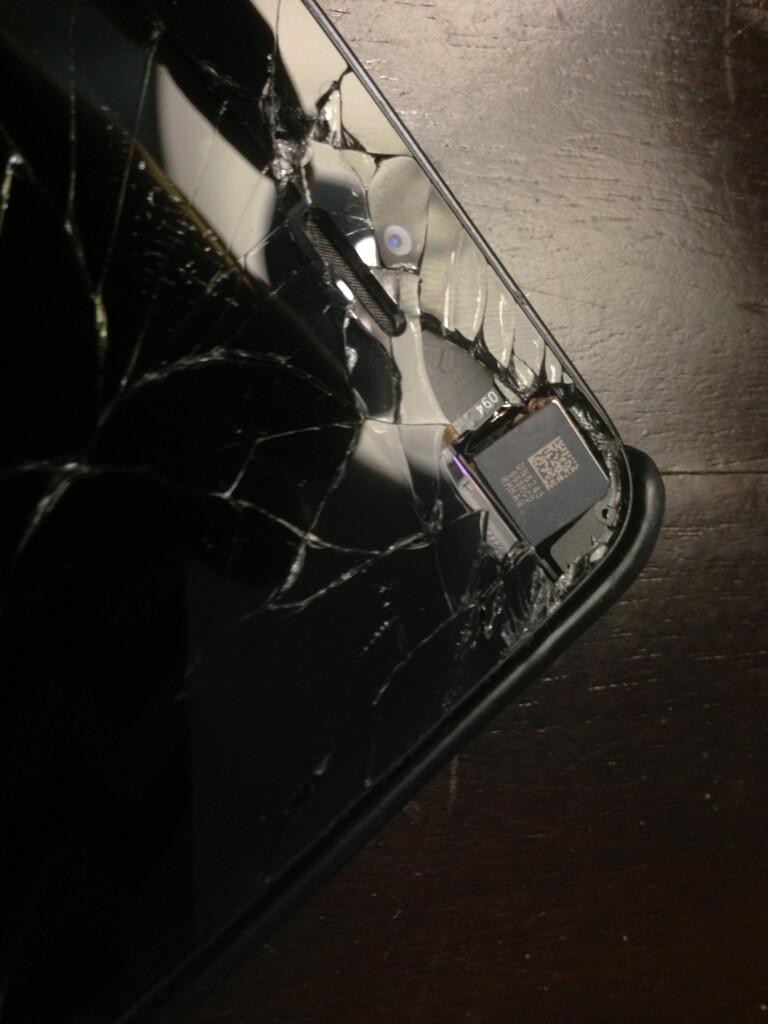
That’s the super-secret
NSA spying chip.
The biggest problem with Apple’s position is that it just plain isn’t true. If you use the iCloud backup service to back up your iDevice, there’s a very good chance that Apple can access the last few days of your iMessage history.
For those who aren’t in the Apple ecosystem: iCloud is an optional backup service that Apple provides for free. Backups are great, but if iMessages are backed up we need to ask how they’re protected. Taking Apple at their word — that they really can’t get your iMessages — leaves us with two possibilities:
  1. iMessage backups are encrypted under a key that ‘never leaves the device‘.
  2. iMessage backups are encrypted using your password as a key.

Unfortunately neither of these choices really works — and it’s easy to prove it. All you need to do is run the following simple experiment: First, lose your iPhone. Now change your password using Apple’s iForgot service (this requires you to answer some simple security questions or provide a recovery email). Now go to an Apple store and shell out a fortune buying a new phone.

If you can recover your recent iMessages onto a new iPhone — as I was able to do in an Apple store this afternoon — then Apple isn’t protecting your iMessages with your password or with a device key. Too bad. (Update 6/27: Ashkan Soltani also has some much nicer screenshots from a similar test.)

The sad thing is there’s really no crypto to understand here. The simple and obvious point is this: if I could do this experiment, then someone at Apple could have done it too. Possibly at the request of law enforcement. All they need are your iForgot security questions, something that Apple almost certainly does keep.* 

Apple distributes iMessage encryption keys

But maybe you don’t use backups. In this case the above won’t apply to you, and Apple clearly says that their messages are end-to-end encrypted. The question you should be asking now is: encrypted to whom?

The problem here is that encryption only works if I have your encryption key. And that means before I can talk to you I need to get hold of it. Apple has a simple solution to this: they operate a directory lookup service that iMessage can use to look up the public key associated with any email address or phone number. This is great, but represents yet another tradeoff: you’re now fundamentally dependent on Apple giving you the right key.

HTTPS request/response containing a
“message identity key” associated with an
iPhone phone number (modified). These keys are
sent over SSL.

The concern here is that Apple – or a hacker who compromises Apple’s directory server – might instead deliver their own key. Since you won’t know the difference, you’ll be encrypting to that person rather than to your friend.**

Moreover, iMessage lets you associate multiple public keys with the same account — for example, you can you add a device (such as a Mac) to receive copies of messages sent to your phone. From what I can tell, the iMessage app gives the sender no indication of how many keys have been associated with a given iMessage recipient, nor does it warn them if the recipient suddenly develops new keys.

The practical upshot is that the integrity of iMessage depends on Apple honestly handing out keys. If they cease to be honest (or if somebody compromises the iMessage servers) it may be possible to run a man-in-the-middle attack and silently intercept iMessage data.

Now to some people this is obvious, and to other’s it’s no big deal. All of which is fine. But people should at least understand the strengths and weaknesses of the particular design that Apple has chosen. Armed with that knowledge they can make up their minds how much they want to trust Apple.

Apple can retain metadata

While Apple may encrypt the contents of your communication, their statement doesn’t exactly rule out the possibility they store who you’re talking to. This is the famous meta-data the NSA already sweeps up and (as I’ve said before) it’s almost impossible not to at least collect this information, especially since Apple actually delivers your messages through their servers.

This metadata can be as valuable as the data itself. And while Apple doesn’t retain the content of your messages, their statement says nothing about all that metadata.

Apple doesn’t use Certificate Pinning

As a last – and fairly minor point – iMessage client applications (for iPhone and Mac) communicate with Apple’s directory service using the HTTPS protocol. (Note that this applies to directory lookup messages: the actual iMessages are encrypted separately and travel over XMPP Apple’s push network protocol.)

Using HTTPS is a good thing, and in general it provides strong protections against interception. But it doesn’t protect against all attacks. There’s still a very real possibility that a capable attacker could obtain a forged certificate (possibly by compromising a Certificate Authority) and thus intercept or modify communications with Apple.

This kind of thing isn’t as crazy as it sounds. It happened to hundreds of thousands of Iranian Gmail users, and it’s likely to happen again in the future. The standard solution to this problem is called ‘certificate pinning‘ — this essentially tells the application not to trust unknown certificates. Many apps such as Twitter do this. However based on the testing I did while writing this post, Apple doesn’t.

Conclusion

I don’t write any of this stuff because I dislike Apple. In fact I love their products and would bathe with them if it didn’t (unfortunately) violate the warranty.

But the flipside of my admiration is simple: I rely on these devices and want to know how secure they are. I see absolutely no downside to Apple presenting at least a high-level explanation to experts, even if they keep the low-level details to themselves. This would include the type and nature of the encryption algorithms used, the details of the directory service and the key agreement protocol.

Apple may Think Different, but security rules apply to them too. Sooner or later someone will compromise or just plain reverse-engineer the iMessage system. And then it’ll all come out anyway.

Notes:

* Of course it’s possible that Apple is using your security questions to derive an encryption key. However this seems unlikely. First because it’s likely that Apple has your question/answers on file. But even if they don’t, it’s unlikely that many security answers contain enough entropy to use for encryption. There are only so many makes/models of cars and so many birthdays. Apple’s 2-step authentication may improve things if you use it — but if so Apple isn’t saying.

** In practice it’s not clear if Apple devices encrypt to this key directly or if they engage in an OTR-like key exchange protocol. What is clear is that iMessage does not include a ‘key fingerprint’ or any means for users to verify key authenticity, which means fundamentally you have to trust Apple to guarantee the authenticity of your keys. Moreover iMessage allows you to send messages to offline users. It’s not clear how this would work with OTR.

How to ‘backdoor’ an encryption app

Over the past week or so there’s been a huge burst of interest in encryption software. Applications like Silent Circle and RedPhone have seen a major uptick in new installs. CryptoCat alone has seen a zillion new installs, prompting several infosec researchers to nearly die of irritation.

From my perspective this is a fantastic glass of lemonade, if one made from particular bitter lemons. It seems all we ever needed to get encryption into the mainstream was… ubiquitous NSA surveillance. Who knew?

Since I’ve written about encryption software before on this blog, I received several calls this week from reporters who want to know what these apps do. Sooner or later each interview runs into the same question: what happens when somebody plans a crime using one of these? Shouldn’t law enforcement have some way to listen in?

This is not a theoretical matter. The FBI has been floating a very real proposal that will either mandate wiretap backdoors in these systems, or alternatively will impose fines on providers that fail to cough up user data. This legislation goes by the name ‘CALEA II‘, after the CALEA act which governs traditional (POTS) phone wiretapping.

Personally I’m strongly against these measures, particularly the ones that target client software. Mandating wiretap capability jeopardizes users’ legitimate privacy needs and will seriously hinder technical progress in this area. Such ‘backdoors’ may be compromised by the very same criminals we’re trying to stop. Moreover, smart/serious criminals will easily bypass them.

To me, a more interesting question is how such ‘backdoors’ would even work. This isn’t something you can really discuss in an interview, which is why I decided to blog about them. The answers range from ‘dead stupid‘ to ‘diabolically technical‘, with the best answers sitting somewhere in the middle. Even if many of these are pretty obvious from a technical perspective, we can’t really have a debate until they’ve all been spelled out.

And so: in the rest of this post I’m going to discuss five of the most likely ways to add backdoors to end-to-end encryption systems.

1. Don’t use end-to-end encryption in the first place (just say you do)

There’s no need to kick down the door when you already have the keys. Similarly there’s no reason to add a ‘backdoor’ when you already have the plaintext. Unfortunately this is the case for a shocking number of popular chat systems — ranging from Google Talk (er, ‘Hangouts’) to your typical commercial Voice-over-IP system. The same statement also applies to at least some components of more robust systems: for example, Skype text messages.

Many of these systems use encryption at some level, but typically only to protect communications from the end user to the company’s servers. Once there, the data is available to capture or log to your heart’s content.

2. Own the directory service (or be the Certificate Authority)

Fortunately an increasing number of applications really do encrypt voice and text messages end-to-end — meaning that the data is encrypted all the way from sender directly to the recipient. This cuts the service out of the equation (mostly), which is nice. But unfortunately it’s only half the story.

The problem here is that encrypting things is generally the easy bit. The hard part is distributing the keys (key signing parties anyone?) Many ‘end-to-end’ systems — notably Skype*, Apple’s iMessage and Wickr — try to make your life easier by providing a convenient ‘key lookup service’, or else by acting as trusted certificate authorities to sign your keys. Some will even store your secret keys.**

This certainly does make life easier, both for you and the company, should it decide to eavesdrop on you. Since the service controls the key, it can just as easily send you its own public key — or a public key belonging to the FBI. This approach makes it ridiculously easy for providers to run a Man-in-the-Middle attack (MITM) and intercept any data they want.

This is always ‘best’ way to distinguish seirous encryption systems from their lesser cousins. When a company tells you they’re encrypting end-to-end, just ask them: how are you distributing keys? If they can’t answer — or worse, they blabber about ‘military grade encryption’ — you might want to find another service.

3. Metadata is the new data

The best encryption systems push key distribution offline, or even better, perform a true end-to-end key exchange that only involves the parties to the communication. The latter applies to several protocols — notably OTR and ZRTP — used by apps like Silent Circle, RedPhone and CryptoCat.

You still have to worry about the possibility that an attacker might substitute her own key material in the connection (an MITM attack). So the best of these systems add a verification phase in which the parties check a key fingerprint — preferably in person, but possibly by reading it over a voice connection (you know what your friends’ voice sounds like, don’t you?) Some programs will even convert the fingerprint into a short ‘authentication string‘ that you can read to your friend.

From a cryptographic perspective the design of these systems is quite good. But you don’t need to attack the software to get useful information out of them. That’s because while encryption may hide what you say, it doesn’t necessarily hide who you’re talking to.

The problem here is that someone needs to move your (encrypted) data from point A to point B. Typically this work is done by a server operated by the company that wrote the app. While the server may not be able to eavesdrop you, it can easily log the details (including IP addresses) of each call. This is essentially the same data the NSA collects from phone carriers.

Particularly when it comes to VoIP (where anonymity services like Tor just aren’t very effective), this is a big problem. Some companies are out ahead of it: Silent Circle (a company whose founders have threatened chew off their own limbs rather than comply with surveillance orders) don’t log any IP addresses. One hopes the other services are as careful.

But even this isn’t perfect: just because you choose not to collect doesn’t mean you can’t. If the government shows up with a National Security Letter compelling your compliance — or just hacks your servers — that information will obtained.

4. Escrow your keys

If you want to add real eavesdropping backdoors to a properly-designed encryption protocol you have to take things to a whole different level. Generally this requires that you modify the encryption software itself.

If you’re doing this above board you’d refer to it as ‘key escrow‘. A simple technique is just to an extra field to the wire protocol. Each time your clients agree on a session key, you have one of the parties encrypt that key under the public key of a third party (say, the encryption service, or a law enforcement agency). The encrypted key gets shipped along with the rest of the handshake data. PGP used to provide this as an optional feature, and the US government unsuccessfully tried to mandate an escrow-capable system called Clipper.***

In theory key escrow features don’t weaken the system. In practice this is debatable. The security of every connection now depends on the security of your master ‘escrow’ secret key. And experience tells us that wiretapping systems are surprisingly vulnerable. In 2009, for example, a group of Chinese hackers were able to breach the servers used to manage Google’s law enforcement surveillance infrastructure — giving them access to confidential data on every target the US government was surveilling.

One hopes that law enforcement escrow keys would be better secured. But they probably won’t be.

5. Compromise, Update, Exfiltrate

But what if your software doesn’t have escrow functionality? Then it’s time to change the software.

The simplest way to add an eavesdropping function is just to issue a software update. Ship a trustworthy client, ask your users to enable automatic updates, then deliver a new version when you need to. This gets even easier now that some operating systems are adding automatic background app updates.

If updates aren’t an option, there are always software vulnerabilities. If you’re the one developing the software you have some extra capabilities here. All you need to do is keep track of a few minor vulnerabilities in your server-client communication protocol — which may be secured by SSL and thus protected from third party exploits. These can be weaknesses as minor as an uninitialized memory structure or a ‘wild read’ that can be used to scan key material.

Or better yet, put your vulnerabilities in at the level of the crypto implementation itself. It’s terrifyingly easy to break crypto code — for example, the difference between a working random number generator and a badly broken one can be a single line of code, or even a couple of instructions. Re-use some counters in your AES implementation, or (better yet) implement ECDSA without a proper random nonce. You can even exflitrate your keys using a subliminal channel.

Or just write a simple exploit like the normal kids do.

Unfortunately there’s very little we can do about things like this. Probably the best defense is to use open source code, disable software updates until others have reviewed them, and then pray you’re never the target of a National Security Letter. Because if you are — none of this crap is going to save you.

Conclusion

I hope nobody comes away with the wrong idea about any of this. I wouldn’t seriously recommend that anyone add backdoors to a piece of encryption software. In fact, this is just about the worst idea in the world.

That said, encryption software is likely to be a victim of its own success. Either we’ll stay in the technical ghetto, with only a few boring nerds adopting the technology. Or the world will catch on. And then the pressure will come. At that point the authors of these applications are going to face some tough choices. I don’t envy them one bit.

Notes:

* See this wildly out of date security analysis (still available on Skype’s site) for a description of how this system worked circa 2005.

** A few systems (notably Hushmail back in the 90s) will store your secret keys encrypted under a password. This shouldn’t inspire a lot of confidence, since passwords are notoriously easy to crack. Moreover, if the system has a ‘password recovery’ service (such as Apple’s iForgot) you can more or less guarantee that even this kind of encryption isn’t happening.

*** The story of Clipper (and how it failed) is a wonderful one. Go read Matt Blaze’s paper.

Here come the encryption apps!

It seems like these days I can’t eat breakfast without reading about some new encryption app that will (supposedly) revolutionize our communications — while making tyrannical regimes fall like cheap confetti.

This is exciting stuff, and I want to believe. After all, I’ve spent a lot of my professional life working on crypto, and it’s nice to imagine that people are actually going to start using it. At the same time, I worry that too much hype can be a bad thing — and could even get people killed.

Given what’s at stake, it seems worthwhile to sit down and look carefully at some of these new tools. How solid are they? What makes them different/better than what came before? And most importantly: should you trust them with your life?

To take a crack at answering these questions, I’m going to look at four apps that seem to be getting a lot of press in this area. In no particular order, these are Cryptocat, Silent Circle, RedPhone and Wickr.

A couple of notes…

Before we get to the details, a few stipulations. First, the apps we’ll talk about here are hardly the only apps that use encryption. In fact, these days almost everyone advertises some form of ‘end-to-end encryption‘ for your data. This has even gotten Skype and Blackberry into a bit of hot water with foreign governments.

However — and this is a critical point — ‘end-to-end encryption’ is rapidly becoming the most useless term in the security lexicon. That’s because actually encrypting stuff is not the interesting part. The real challenge turns out to be distributing users’ encryption keys securely, i.e., without relying on a trusted, central service.

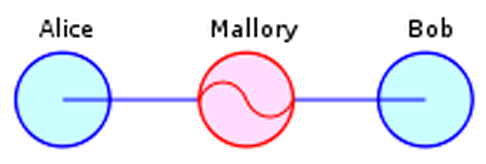
The problem here is simple: if I can compromise such a service, then I can convince you to use my encryption key instead of your intended recipient’s. In this scenario — known as a Man in the Middle (MITM) attack — all the encryption in the world won’t help you.

Man in the Middle attack (image credit: Privacy Canada via Wikipedia). Mallory convinces Alice and Bob to use her key, then transparently passes messages between the two.

And this is where most ‘end-to-end’ commercial services (like Skype and iMessage) seem to fall down. Clients depend fundamentally on a central directly server to obtain their encryption keys. This works fine if the server really is trustworthy, but it’s huge problem if the server is ever compromised — or forced to engage in MITM attacks by a nosy government.

(An even worse variant of this attack comes from services that actually store your secret keys for you. In this case you’re truly dependent on their good behavior.*)

One important feature of the ‘new’ encryption apps is that they recognize this concern. That is, they don’t require you to trust the service. A few even point this out in their marketing material, and have included their own dishonesty into the threat model.

Cryptocat

Cryptocat is an IM application developed by Nadim Kobeissi, who — when he’s not busy being harassed by government officials — manages to put out out a very useable app. What truly distinguishes Cryptocat is its platform: it’s designed to run as a plugin inside of a web browser (Safari, Chrome and Firefox).

Living in a browser is Cryptocat’s greatest strength and greatest weakness. It’s a strength because (1) just about everyone has a browser, (2) the user interface is pretty and intuitive, and (3) the installation process is trivial. Cryptocat’s impressive user base testifies to the demand for such an application.

The weakness is that it runs in a frigging web browser.

To put a finer point on it: web browsers are some of the most complex software packages you can run on a consumer device. They do eight million things, most of which require them to process arbitrary and untrusted data. Running security-critical code in a browser is like having surgery in a hospital that doubles as a sardine cannery and sewage-treatment plant — maybe it’s fine, but you should be aware of the risk you’re taking.

If that’s not good enough for you: go check out this year’s pwn2own results.

For non-group messaging, Cryptocat uses a protocol known as off-the-record (OTR) and ships the encrypted data over Jabber/XMPP — using either Cryptocat’s own server, or the XMPP server of your choice. OTR is a well-studied protocol that does a form of dynamic key agreement, which means that two parties who have never previously spoken can quickly agree on a cryptographic key. To ensure that your key is valid (i.e., you’re not being tricked by a MITM attacker), Cryptocat presents users with a key fingerprint they can manually verify through a separate (voice) connection.

So how does Cryptocat stack up?

Code quality: Nadim has taken an enormous amount of crap from people over the past year or two, and the result has been a consistent and notable improvement in Cryptocat’s code quality. While Cryptocat is written in Javascript (aaggh!), the application is distributed as a plugin and not dumped out to you like typical script. This negates some of the most serious complaints people level at Javascript crypto, but not all of them! Cryptocat has also been subject to a couple of commercial code audits.

Crypto: All of the protocols are well-studied and designed by experts. Update: Jake Appelbaum reminds me that while this is true for one-on-one communications, it’s not true for the multi-party (group chat) OTR protocol — which is basically hand-rolled. Don’t use that.

Ease of use: My five year old can use Cryptocat.

Other notes: If the silent auto-update functionality is activated (in Chrome) it is technically possible for someone to compromise Cryptocat’s update keys and quietly push out a malicious version of the app. This concern probably applies to most applications, but it is something you should be aware of.

Should I use it to fight an oppressive regime? Oh god no.

Silent Circle

Silent Circle is the brainchild of PGP inventor Phil Zimmerman and a cadre of smart/paranoid folks. It actually consists of multiple apps, supporting VoIP/IM/PGP-based Email and videoconferencing — with an optional Snapchat-like self-destructing messages feature. The apps can essentially replace the standard Phone and Messages apps in your iPhone or Android device.

Silent Circle is a paid subscription service, which means it’s marketed to folks who (in theory, anyway) really care about their security, but also don’t want to scrounge around with messy open-source software — for example, journalists working in dangerous locations or business executives running overseas operations. In exchange for $240/year you get the ability to securely call other SilentCircle subscribers and to dial ordinary telephone (POTS) numbers.

The termination to POTS is SilentCircle’s best feature, and also its biggest concern. When you directly call another SilentCircle user, your connection is encrypted from your phone to theirs. When you dial a normal phone line, your connection will only be encrypted until it reaches SilentCircle’s servers. From there it will travel on normal, tappable phone lines.

Now most users will probably understand this, and SilentCircle certainly does its best to make sure people do. Still, most users aren’t experts, and it’s easy to imagine a typical user getting confused — and possibly assuming they’re safer than they actually are.

SilentCircle uses ZRTP (and a variant called SCIMP) to generate the keys used in communications. It doesn’t require you to trust a central directory server, or to send your keys outside of the device. Your protection against MITM comes from two features: (1) the app presents a ‘short authentication string’ that users can verbally compare before they communicate, and (2) after you’ve successfully communicated the first time, it caches a ‘secret’ that can be used to protect future sessions.

Overall code quality: It took a while for SilentCircle to publish their code, but they’ve finally put most of it online. It’s much less fun to look at SilentCircle than it is to poke at Cryptocat — mostly because Nadim’s reactions are more entertaining — but the code for SilentCircle looks ok. (I’ve seen a couple of minor comments, but nobody’s found any security issues.) Moreover, the app has been independently audited and given a clean bill of health.

Crypto: SilentCircle uses ZRTP, which I dislike because it’s so complex — it’s like a choose-your-own-adventure by sadists. But ZRTP is old and well-studied so it’s unlikely that there are any serious issues lurking in it. The messaging app uses a simplified variant called SCIMP (Silent Circle Instant Messaging Protocol) which seems much better, since it ditches most of the crazy options I dislike about ZRTP. I’m pretty confident that both of these protocols work just fine.

Ease of use: To quote SilentCircle’s PR: so simple even an MBA can use it. (No, I’m kidding, they don’t say that. They just think it.)

Other thoughts: Rumor has it that the market price for an iOS vulnerability is currently near $500,000. That doesn’t mean iOS (or Silent Circle’s app) is bulletproof. But it should give you a little bit of confidence. If you’re being targeted with an iOS software vulnerability, then someone really wants you.

Should I use this to fight my oppressive regime? SilentCircle’s founders have made it clear that they’ll chew off their own legs before they allow themselves to be a party to eavesdropping on their clients. But even so — I would still have to think on this for a while.

RedPhone/TextSecure

RedPhone and TextSecure are developed by Moxie Marlinspike’s Open Whisper Systems. Note that OWS is actually Moxie’s second company — the original Whisper Systems was purchased by Twitter a couple of years back — not for the software, mind you; just to get hold of Moxie for a while.

RedPhone does a much of what SilentCircle does, though without the paid subscription and termination to POTS. In fact, I’m not quite sure if you can terminate it to POTS (I’ll update if I find out.)

Like Silent Circle, RedPhone uses ZRTP to establish keys, then encrypts voice data using AES. Consequently, most of what I said for SilentCircle also applies here, including the use of a short authentication string to prevent MITM attacks.

Overall code quality: After reading Moxie’s RedPhone code the first time, I literally discovered a line of drool running down my face. It’s really nice.

In fact, it was so nice that I decided to rough it up a little. I assigned it to the grad students in my Practical Crypto course — assuming that they’d find something, anything to take the shine off of it. Unfortunately they basically failed on this score (though see ‘Other thoughts’ below). In short: it’s very well written.

Crypto: Most of what I said about Silent Circle applies here, except that RedPhone uses only ZRTP, not SCIMP. However, RedPhone’s implementation of ZRTP is somewhat simplified and avoids most of the options that make ZRTP a pain to deal with.

Other thoughts: In fairness to my students, they did point out that Redphone does not retain a cache of secrets from connection to connection. Technically this is an optional feature of ZRTP, so it’s not wrong to omit it. However, it means that you have to verify the authentication string on every single call. Moxie is working on this, so it may change in the future.

Should I use this to fight my oppressive regime? Oh look, a pony!

Wickr

Wickr is an encrypted Snapchat-like app for the iPhone. Like the above applications it provides for instant messaging, but it also focuses heavily on the message destruction feature. Chats/messages can be set to self-destruct after a pre-specified period of time.

I’ve included Wickr on this list because I’ve seen it mentioned in a handful of respectable media outlets over the past few months. This means that people are either using Wickr, or that Wickr has very good PR folks. I also included it because it was at least partially designed by Dan Kaminsky, who generally knows his stuff.

Unfortunately I can’t say too much about Wickr because — to date — there’s virtually no technical information available on it. (Not even a white paper!) However, based on Tweets with Dan and this short post on the LiberationTech mailing list, I believe that Wickr uses a centralized directory server to share keys. In theory this could be ok if it provided a mechanism to compare key fingerprints between users, and/or detect invalid keys. But currently this does not seem to be the case.

As for the destruction of secrets, well, this does seem like a nice idea, particularly if the destruction is enforced cryptographically. Unfortunately this is a fundamentally hard problem to solve correctly: if I can get a copy of your phone’s memory while the message is there, I can keep the message forever.

Overall code quality: Who knows.

Crypto: Current versions use some kind of RSA-based key agreement. According to Dan, the next generation will use elliptic curve crypto with perfect forward secrecy. But the real horses head is the (apparent) reliance on a central directory server, which makes the service much more vulnerable to MITM.

Ease of use: Very easy. Just set your message expiration date, key in the destruct time, and send away.

Should I use this to fight my oppressive regime? Yes, as long your fight consists of sending naughty self-portraits to your comrades-at-arms. Otherwise, probably not.

In summary

If you’ve made it this far, I’m guessing you still have one burning question. Namely: What app should I use if I’m trying to overthrow my government?

The simple answer is that I just don’t know. It’s not an easy question.

Each of the above apps seem quite good, cryptographically speaking. But that’s not the problem. The real issue is that they each run on a vulnerable, networked platform. If I really had to trust my life to a piece of software, I would probably use something much less flashy — GnuPG, maybe, running on an isolated computer locked in a basement.

Then I would probably stay locked in the basement with it.

But not everyone is a coward like me. The widespread availability of smartphones has already changed the way people interact with their government. These encryption apps could well be the first wave in an entirely new revolution — one that makes truly private communication a reality.

Notes:

* Some services actually know and store your private keys, while others operate as a Certificate Authority, allowing you to ‘certify’ new public keys under your name. Either of these models makes eavesdropping relatively easy for someone with access to the server.

Dear Apple: Please set iMessage free

Normally I avoid complaining about Apple because (a) there are plenty of other people carrying that flag, and (b) I honestly like Apple and own numerous lovely iProducts. I’m even using one to write this post.

Moroever, from a security point of view, there isn’t that much to complain about. Sure, Apple has a few irritating habits — shipping old, broken versions of libraries in its software, for example. But on the continuum of security crimes this stuff is at best a misdemeanor, maybe a half-step above ‘improper baby naming‘. Everyone’s software sucks, news at 11.

There is, however, one thing that drives me absolutely nuts about Apple’s security posture. You see, starting about a year ago Apple began operating one of the most widely deployed encrypted text message services in the history of mankind. So far so good. The problem is that they still won’t properly explain how it works.

And nobody seems to care.

I am, of course, referring to iMessage, which was deployed last year in iOS Version 5. It allows — nay, encourages — users to avoid normal carrier SMS text messages and to route their texts through Apple instead.

Now, this is not a particularly new idea. But iMessage is special for two reasons. First it’s built into the normal iPhone texting application and turned on by default. When my Mom texts another Apple user, iMessage will automatically route her message over the Internet. She doesn’t have to approve this, and honestly, probably won’t even know the difference.

Secondly, iMessage claims to bring ‘secure end-to-end encryption‘ (and authentication) to text messaging. In principle this is huge! True end-to-end encryption should protect you from eavesdropping even by Apple, who carries your message. Authentication should protect you from spoofing attacks. This stands in contrast to normal SMS which is often not encrypted at all.

So why am I looking a gift horse in the mouth? iMessage will clearly save you a ton in texting charges and it will secure your messages for free. Some encryption is better than none, right?

Well maybe.

To me, the disconcerting thing about iMessage is how rapidly it’s gone from no deployment to securing billions of text messages for millions of users. And this despite the fact that the full protocol has never been published by Apple or (to my knowledge) vetted by security experts. (Note: if I’m wrong about this, let me know and I’ll eat my words.)

What’s worse is that Apple has been hyping iMessage as a secure protocol; they even propose it as a solution to some serious SMS spoofing bugs. For example:

Apple takes security very seriously. When using iMessage instead of SMS, addresses are verified which protects against these kinds of spoofing attacks. One of the limitations of SMS is that it allows messages to be sent with spoofed addresses to any phone, so we urge customers to be extremely careful if they’re directed to an unknown website or address over SMS.

And this makes me nervous. While iMessage may very well be as secure as Apple makes it out to be, there are plenty of reasons to give the protocol a second look.

For one thing, it’s surprisingly complicated.

iMessage is not just two phones talking to each other with TLS. If this partial reverse-engineering of the protocol (based on the MacOS Mountain Lion Messages client) is for real, then there are lots of moving parts. TLS. Client certificates. Certificate signing requests. New certificates delivered via XML. Oh my.

As a general rule, lots of moving parts means lots of places for things to go wrong. Things that could seriously reduce the security of the protocol. And as far as I know, nobody’s given this much of  a look. It’s surprising.

Moreover, there are some very real questions about what powers Apple has when it comes to iMessage. In principle ‘end-to-end’ encryption should mean that only the end devices can read the connection. In practice this is almost certainly not the case with iMessage. A quick glance at the protocol linked above is enough to tell me that Apple operates as a Certificate Authority for iMessage devices. And as a Certificate Authority, it may be able to substantially undercut the security of the protocol. When would Apple do this? How would it do this? Are we allowed to know?

Finally, there have been several reports of iMessages going astray and even being delivered to the wrong (or stolen) devices. This stuff may all have a reasonable explanation, but it’s yet another set of reasons why we it would be nice to understand iMessage better than we do now if we’re going to go around relying on it.

So what’s my point with all of this?

This is obviously not a technical post. I’m not here to present answers, which is disappointing. If I knew the protocol maybe I’d have some. Maybe I’d even be saying good things about it.

Rather, consider this post as a plea for help. iMessage is important. People use it. We ought to know how secure it is and what risks those people are taking by using it. The best solution would be for Apple to simply release a detailed specification for the protocol — even if they need to hold back a few key details. But if that’s not possible, maybe we in the community should be doing more to find out.

Remember, it’s not just our security at stake. People we know are using these products. It would be awfully nice to know what that means.