This is the second in a series of posts about anonymous credentials. You can find the first part here.
In the previous post, we introduced the notion of anonymous credentials as a technique that allows users to authenticate to a website without sacrificing their privacy.
As a quick reminder, an anonymous credential system consists of a few parties: an Issuer that hands out credentials, one or more Resources, such as websites (these can be the same person as the Issuer in some cases), and many Users. The User obtains its credential(s) from the Issuer, who will typically verify the user’s identity in a non-anonymous way. Once a user holds this credential, it can “show” the credential anytime it wants to access a Resource, such as a website. This “show” procedure is where the anonymity comes in: implemented correctly, it should not allow any party (either Resource or Issuer, or the two working together) to link this “show” back to the specific credential given to the User.
We also introduced a few features that are useful for an anonymous credential system to have:
- The most useful feature is some way to constrain the usefulness of a single credential: for example, by limiting the number of times it can be “shown”. This is needed in order to prevent credential cloning attacks, where a hacker (or malicious User) steals a credential and makes many copies that power e.g., “bot” accounts. These attacks are very dangerous in an anonymous credential system, since credentials aren’t natively traceable to a specific user — and hence a single stolen credential can be cloned many times without detection. In the previous post, we even proposed a handful of fixes for that problem.
- We also talked about how to make credentials more expressive. For example, your driver’s license is a (non-anonymous) credential that allows you to assert many claims, such as your age, the type of vehicle you’re certified to drive, which state you live in. An expressive anonymous credential allows you, the User, to prove a variety of statements over this data — without leaking useful information beyond the facts that you wish to assert.
The previous post was intended as a high-level overview, so we mainly kept our discussion at a theoretical level. However, this is a blog about cryptography engineering. That means today we’re going to move past theory and discuss practice.
Concretely, that means describing two real-world credential systems that are actually used in our world. The first is Privacy Pass, which is widely used by Cloudflare and Apple and other companies. Then we’ll discuss a new proposal for anonymous age verification that Google is in the process of standardizing.
Privacy Pass
Privacy Pass is the most widely-deployed anonymous credential standard in the world.
Under one name or another, Privacy Pass is used all over the Internet, primarily by large tech firms. The most famous of these is Cloudflare, whose researchers helped to write the standard as a way to bypass CAPTCHAs and other anti-abuse annoyances. But an identical protocol is also deployed by Apple (which names it “Private Access Tokens“), Google (“Private State Tokens“), the Brave browser, and a handful of other projects. Privacy Pass is so ubiquitous that even Microsoft uses it in their Edge browser, and they don’t even like privacy.
Privacy Pass is exactly what you’d expect from the first large-scale deployment of credentials. It’s incredibly simple, just about as simple as you can imagine. The protocol offers classic single-use “wristband” credentials, the kind where credentials carry one bit of information — namely, “I own a credential”. The techniques used are so simple that you can more or less extract Privacy Pass from reading academic papers written in the 1980s and tossing in a few clever performance optimizations. The real novelty is that people are actually using it.
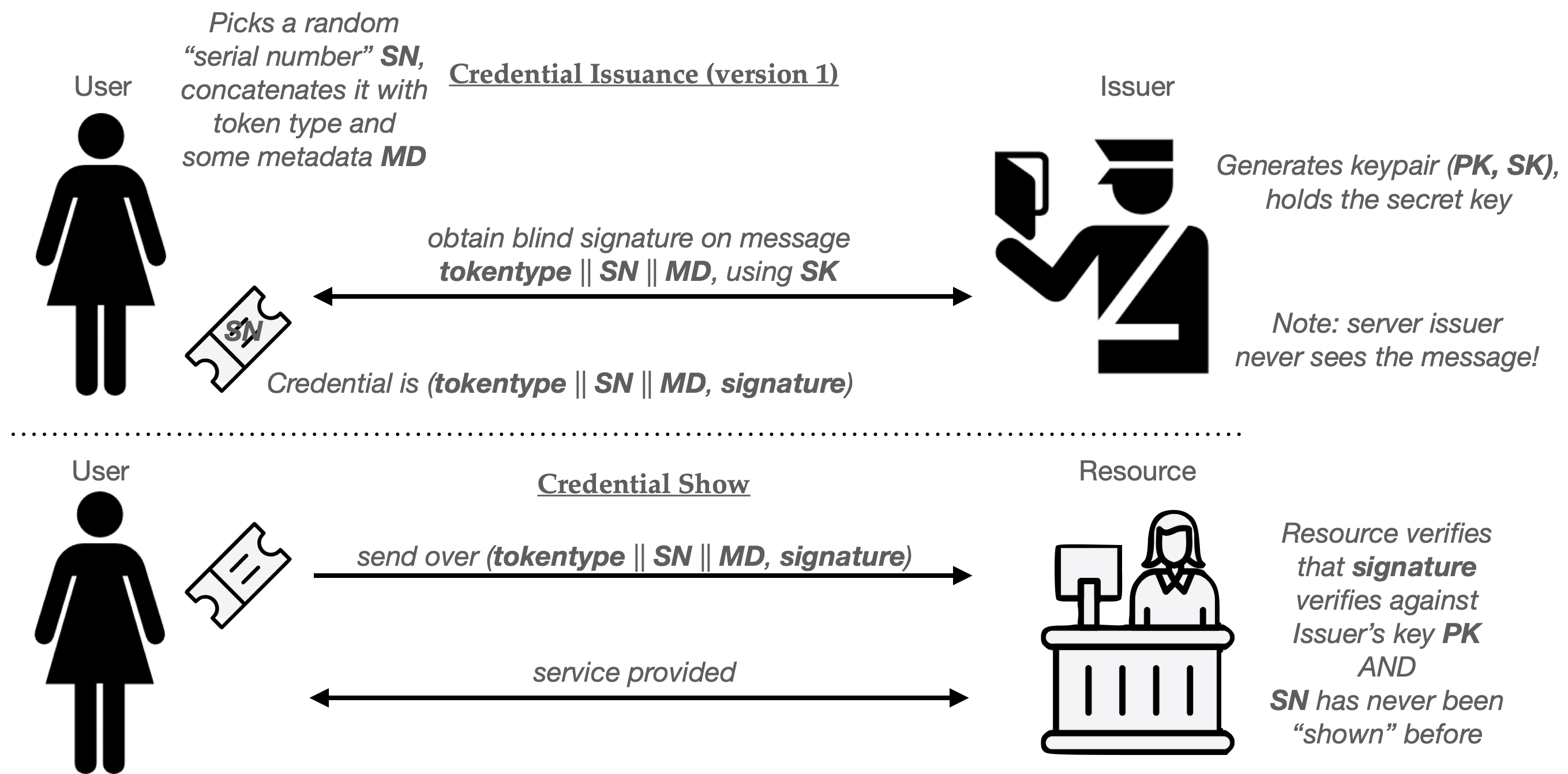
Privacy Pass is standardized in IETF RFCs 9576, 9577 and 9578. There are many deployment options in those standards, but the core protocol is essentially a perfect realization of Chaum’s original “blind signature” credentials, which we discussed in the previous post. Allow me to quickly revisit how these credentials work:
- When a User wishes to obtain a single-use credential, they first choose a token type (tokentype) and some metadata MD, which is an optional string the user can include in the token.
- The User now generates a long random serial number SN that’s (hopefully) globally unique.
- The User and Issuer next run a blind signature protocol to produce a signature on a message that comprises (tokentype, SN, MD). The User learns the signature sig, while the Issuer does not learn the signature or anything about the message being signed.
The four-tuple (tokentype, MD, SN, sig) are the resulting credential. To “show” this credential to a Resource:
- The Users sends (tokentype, MD, SN, sig) to the Resource.
- The Resource verifies that tokentype is a valid type of Privacy Pass token, and decides if it will accept a token with metadata MD (more on this in a moment.)
- Next, the Resource verifies the signature sig using the Issuer’s verification key (the tokentype field tells it how to), and checks a database to ensure that SN has not been used before. If these checks all succeed, it adds SN to the database.
Done up as a pictogram, the basic Privacy Pass flow looks like something this:
An obvious question you might ask here is: what the heck is with the metadata MD?
This metadata string is an additional blob of data that can be used to “bind” a credential to a specific application, such as a website. For example, if I plan to access the New York Times on Tuesday, March 31, I could request a credential that contains the metadata string MD = “nyt.com || 2026-03-31“. When I “show” the credential, that website can verify the string and decide if it will grant me service.
Critically, the Issuer does not see this metadata string. It is entirely up to the User to select it, but once selected, it cannot be changed. This approach allows websites to require tokens that are of restricted usefulness — for example, bound only to the one specific website, or limited to a specific time period.
The primary application of metadata in Privacy Pass is to implement what I’ll call session-specific credentials. This is a different issuance flow in which the User does not obtain their credential prior to visiting the website, but rather, obtains the credential only after it has begun to access a site (such as a Cloudflare-protected website.) This flow works as follows:
- When a user begins to access a Resource, the Resource sends them a session-specific “challenge” (a random string, for example).
- The User then requests a credential from the Issuer in real time, setting MD equal to the “challenge”.
- When the User “shows” the credential to the Resource, the Resource verifies that the challenge matches the one it chose in step (1).
Put together as a cute pictogram, the protocol flow looks like this:
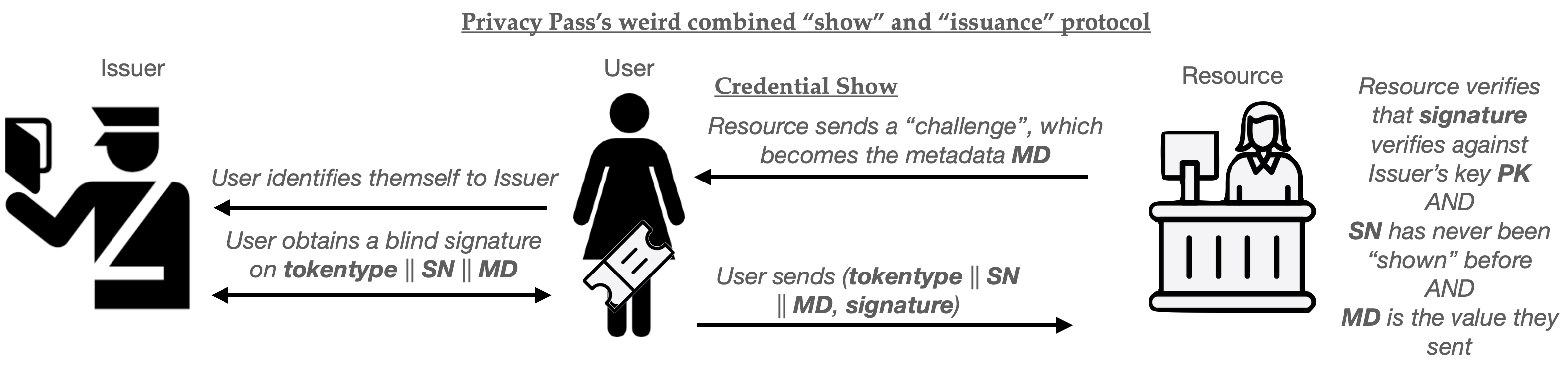
The advantage of this combined protocol is that each credential can only be used for the specific session that the User has already initiated. It cannot be used to do anything else: for example, the User can’t sit on the credential and use it next week. This plausibly has some advantages for sites like Cloudflare, where you want some ability to control how many users are accessing a site in real time.
There are some downsides to this approach as well.
One of the downsides is that for real-time credential issuance, the Issuer must be continuously available: if the Issuer goes down, then essentially all access to the Resource becomes impossible, since a User won’t be able to obtain fresh credentials. (In the earlier issuance flow, a User could obtain a bunch of credentials first, then use them later on, even if the Issuer is down.) A second downside is that the real-time issuance protocol could, in principle, lead to a timing correlation attack. That is, if the Resource and Issuer compare the timestamps at which they receive their individual messages, they might be able to link a user’s session to the credential issuance request.
This last point is particularly concerning for applications where the Issuer and Resource are both run by the same company: something that happens to be true for Cloudflare’s deployment. Fortunately, Cloudflare handles literally hundreds of thousands of transactions per second, which is so huge that this kind of correlation attack is probably not very easy to pull off. (As a sanity check, I even did a quick and dirty analysis using Claude Code to check this, and the results are mixed: see here.)
What’s the signature scheme, and what are the “token types”?
With this basic protocol flow written up, the main remaining question when describing Privacy Pass is a pretty basic one: how do we implement the blind signatures?
Privacy Pass defines two standardized “issuance protocols” that each use slightly different cryptography. The first of these describes a variant of Privacy Pass for publicly verifiable tokens. These are essentially the same Chaumian credentials we discussed in the last post: here, the Issuer uses blind RSA signatures to sign the token, in a manner that’s almost exactly identical to Chaum’s original 1980s protocol. The benefit of these tokens is that the Resource can verify the token using the Issuer’s public key — meaning that the Issuer and Resource don’t have to share any secret key material.
The main problem with RSA blind signatures is that they’re big and somewhat expensive to construct. This is because RSA requires large public keys, typically at least 2,048 bits to achieve about 112-bit levels of symmetric-equivalent security. This makes the signatures relatively large, and also makes the signing procedure somewhat costly.
The obvious alternative approach would use elliptic-curve (EC) primitives, such as Schnorr signatures or even (ugh!) ECDSA. (I’ll discuss post-quantum alternatives later.) The boring problem with this approach is that we don’t have a great toolbox of EC-based blind signatures. To summarize:
- Several older “blind Schnorr” protocols turn out to be horribly insecure when you allow concurrent issuance — i.e., when attackers are allowed to run many blind signature request protocols at the same time. These attacks are bad enough that they can actually forge Schnorr signatures on reasonable computing hardware.
- Making these protocols run securely would require that we only conduct one signing session at a time, i.e., no parallel (concurrent) issuance.
- Some recent papers have tried to fix this problem, but the resulting protocols are slower than blind RSA.
Hence, Privacy Pass does not support elliptic-curve based blind signatures at all.
Instead, for deployments that need to be extremely fast, Privacy Pass defines a second issuance for privately-verifiable tokens. These tokens use an oblivious Message Authentication Code (MAC) based on an oblivious pseudorandom function. The advantage of these privately-verifiable tokens is that they use EC-based primitives and are extremely fast to create and verify. The disadvantage is that the verifier (in this case, the Resource) must possess the Issuer’s secret key in order to verify a credential.
In conclusion
Privacy Pass is the least surprising anonymous credential protocol you can build. It provides users with a simple, single-use “wristband” credential that’s optimized to be very fast. Although the basic ideas behind the protocol were all finalized in the 80s, they’ve now been standardized into something that is very fast and usable. What makes the protocol interesting is not so much the technology behind it, but the broad scale of deployment: between Apple, Google, Cloudflare, literally billions of people are likely using Privacy Pass every day — even if they don’t really know it.
At the same time, Privacy Pass is very boring: it does not provide many useful features beyond “get token, use token” model of a wristband credential. It certainly does not offer us much of a solution to the problems of age verification, unless we are willing to constantly communicate with an Issuer to obtain credentials, each time we use the web.
In the next post, we’re going to discuss a more powerful proposal that does purport to solve some of those problems: a new proposal by Google’s to support zero-knowledge credentials.


Interesting. I did not know that PrivacyPass was a thing and so widely deployed. I designed a similar system using blind RSA signatures back in 2015 for a privacy focused start up – but we ran out of money before finding a market.
Really enjoyed this. The flow of the article really helps the message land. Sharing across my network.
Top-notch content. Mind if I share this with my team? It’s spot-on analysis.
Great article! The flow of the article really helps the message land. More of this please.
Just wanted to drop a quick thanks — Rare to see such a balanced take. Kudos to the author.
You write like you respect the reader’s time. Great article!
Honestly, could read this on loop. Excellent write-up. Eager to read your next piece.
Well put together. Honestly refreshing to see a piece this very insightful. Stay awesome.
Just saved this to Notes. Well put together. Keep it up!